Enhance learning with AI-driven flashcards, tests, and games.
72M visits/mo+70.8%#1 Lifestyle & Education

An AI story generator for parents and teachers that creates age-appropriate children’s stories with custom illustrations, audio narration, and exports for sharing.
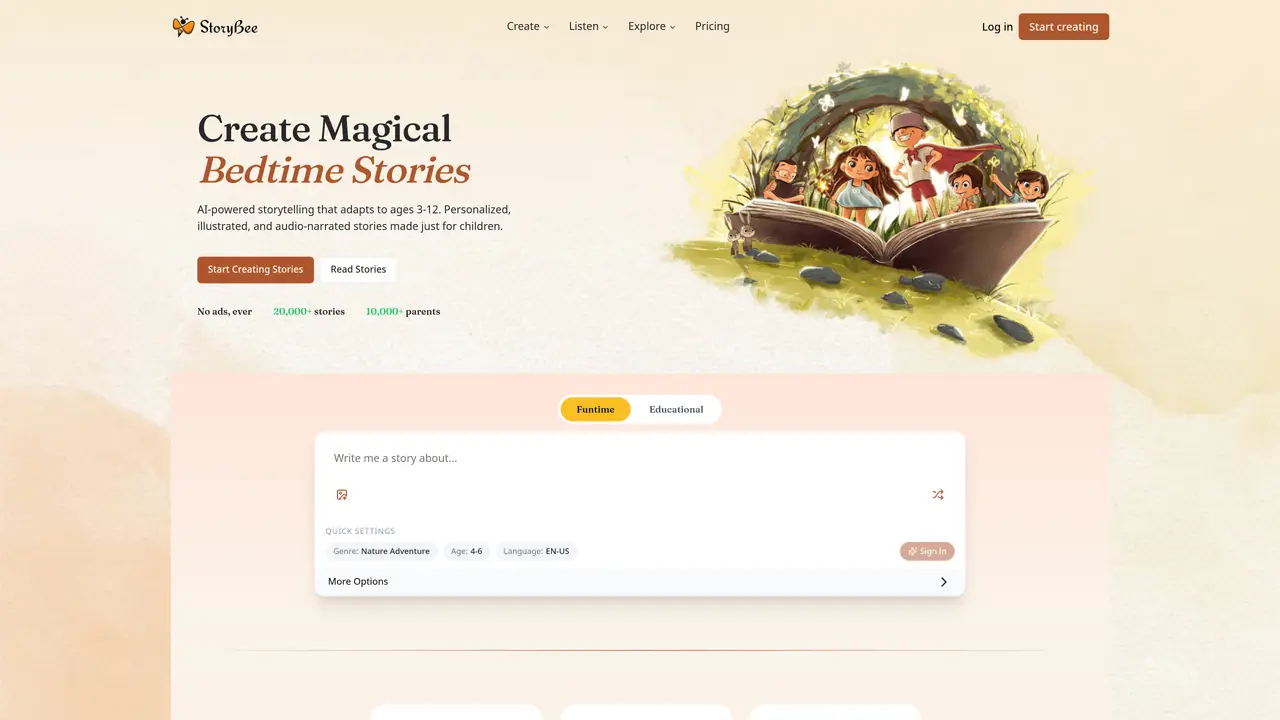
StoryBee is a web-based AI storytelling platform designed for parents, teachers, and caregivers who need personalized, age-appropriate stories for children aged 3 to 12. The tool generates stories from a theme, hint, or character, with adjustable controls for genre, length, writing style, and reading complexity to match the child’s needs. It includes custom illustrations with selectable art aesthetics, ensuring visuals align with the narrative and audience. Audio narration is available, including voice cloning to narrate stories in a chosen voice, such as a parent’s or child’s. The platform supports library and classroom workflows with features like saved story archives, playlists, PDF export, group story creation, and reading progress tracking. Beyond creation, StoryBee enables podcast publishing with distribution to platforms like Spotify, YouTube, and Apple Podcasts, and offers options to turn digital stories into printed books. It combines story writing, illustration, and audio in one interface, making it a versatile tool for educational and creative storytelling.
StoryBee generates stories based on user-provided ideas, themes, or characters, adapting the content for ages 3 to 12 with age-appropriate language and themes. The AI crafts narratives that can be further customized with specific characters, art styles, and reading complexity.
The tool is designed for parents, teachers, and caregivers seeking personalized, age-appropriate stories for children aged 3 to 12. It also serves educators looking to integrate storytelling into classroom activities.
Yes, StoryBee offers a voice cloning feature that allows users to record their voice in just 5 minutes and use it to narrate stories, providing a familiar and comforting experience for children.
Yes, users can turn their digital stories into printed books, which are delivered to their door as a keepsake. The platform also supports PDF exports and group story creation for classroom use.
Yes, StoryBee enables podcast publishing with distribution options to platforms like Spotify, YouTube, and Apple Podcasts, allowing users to share their stories beyond the app.
Users can start by visiting the StoryBee website, selecting the 'Create' option, and entering their story idea or theme. The platform guides users through personalization, generation, and customization steps to produce a finished story.
storybee.app · third-party estimates from Similarweb
Last 4 months · grows by one month every month
Share of visits · estimated visits
Lifestyle & Education · Sep 2026
Traffic figures are third-party estimates, good for scale and trends; they can differ from a company's own numbers. Updated monthly.
We use essential cookies to run aitoolnavio™, and optional cookies to analyze traffic and measure our marketing. You choose what we use — optional cookies stay off unless you turn them on. See our Privacy Policy.
One short email a week: fresh tools worth trying, honest takes and the updates that actually matter. No spam, unsubscribe any time.
Enhance learning with AI-driven flashcards, tests, and games.
Automatically check student papers for plagiarism, generate originality reports, and offer powerful grading tools.
Create interactive lessons, track student progress, deliver assessments for personalized learning.
Practice coding challenges, improve technical skills, get detailed explanations, compare performance with peers.
AI-powered homework help with step-by-step textbook solutions, expert Q&A, writing tools, and exam prep.
Easily create and track training courses, design learning environments, and access from any device with an intuitive interface.
AI-generated text detector with 99.98% verified accuracy, supporting 20+ languages and integrations with LMS platforms.
Solve math problems, learn topics from basic to advanced, and get hints and insights for difficult problems.
Revolutionize education with AI: lesson planning, IEPs, assessments, enhanced communication.
Online language-learning platform offering interactive courses, progress tracking, rewards, and personalized feedback for all skill levels.
IB and MYP exam prep platform with 35k+ practice questions, AI grading, flashcards, and study tools for students and schools.
AI-powered learning app that helps students and pupils organize study materials, stay motivated, and improve grades with smart tools and features.
Matched on what this tool does — grouped by the job you would be replacing.
matches Personalized story generation from theme, hint, or character · Adjustable controls for genre, length, writing style, and reading complexity · Custom illustrations with selectable art aesthetics
Turn any idea, image, or drawing into fully illustrated children's books ready to print.
AI storyteller creating personalized, illustrated, and narrated children's books to help kids in hospital understand medical journeys.
Creates AI-generated personalized children's storybooks with custom art and narration
Creates fully illustrated, personalized children's storybooks in multiple languages
matches Personalized story generation from interests and nickname · Theme and mood selection for customization · Parent editing and review before sharing
Customize bedtime stories tailored to a child's age and interests.
Generates personalized English bedtime stories for children based on interests and themes
Creates personalized audio bedtime stories for children with natural narration