
Enhance learning with AI-driven flashcards, tests, and games.
72M visits/mo+70.8%#1 Lifestyle & Education
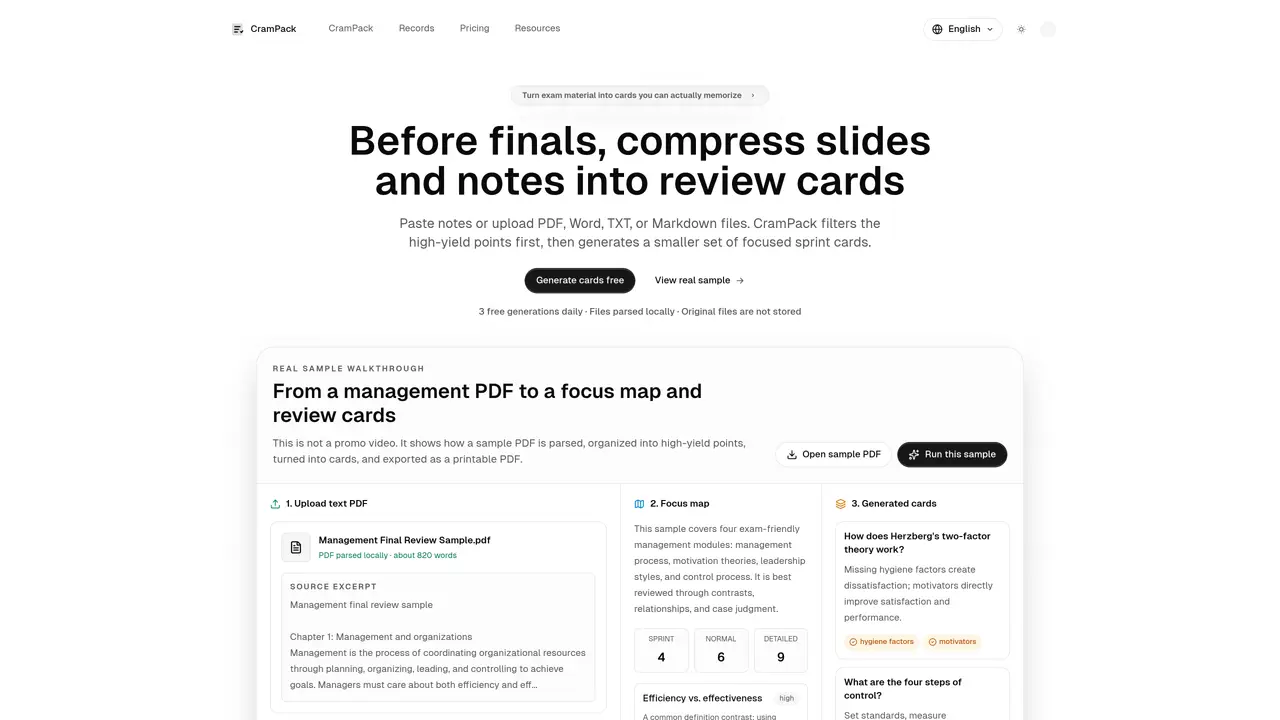
CramPack transforms class notes, slides, and PDFs into concise review cards for exam preparation. Users paste text or upload files in PDF, Word, TXT, or Markdown formats. The tool first filters high-yield content and generates a smaller set of focused cards called sprint cards. A first-pass AI analysis creates a review map showing core concepts, likely comparison questions, and low-yield details, allowing users to verify direction before card generation. Students can adjust card quantity, ordering, answer density, and candidate points. Each card focuses on a single knowledge point with concise wording, highlighted terms, and hidden source snippets. The final pack is intentionally smaller to facilitate review before exams. Cards can be edited, exported as Anki CSV or PDF, and reviewed in flip mode with autosave functionality.
CramPack transforms class notes, slides, and PDFs into concise review cards called sprint cards for exam preparation. It filters high-yield content and generates focused cards to help students memorize key concepts efficiently.
CramPack is designed for students who need to review large amounts of material before exams. It works best with text from slides, class notes, chapter summaries, and similar exam-focused content.
CramPack first performs an AI analysis to create a review map of core concepts, likely comparison questions, and low-yield details. Users can then generate focused cards based on this map, adjusting quantity, ordering, and answer density.
CramPack supports PDF, Word, TXT, and Markdown files. Users can paste text directly or upload files for processing.
Yes, each card is editable. Users can modify the title, answer, and highlighted terms before exporting the final pack.
Review cards can be exported as Anki CSV or PDF. The tool also supports flip mode for reviewing cards with autosave functionality.
We use essential cookies to run aitoolnavio™, and optional cookies to analyze traffic and measure our marketing. You choose what we use — optional cookies stay off unless you turn them on. See our Privacy Policy.
One short email a week: fresh tools worth trying, honest takes and the updates that actually matter. No spam, unsubscribe any time.
Enhance learning with AI-driven flashcards, tests, and games.
IB and MYP exam prep platform with 35k+ practice questions, AI grading, flashcards, and study tools for students and schools.
AI-powered learning app that helps students and pupils organize study materials, stay motivated, and improve grades with smart tools and features.
Solvely is an AI homework-help app that solves math, science, and liberal arts problems with photos.
Learn AI fundamentals, develop new skills and join a knowledgeable mentor community.
An AI tutoring platform that converts PDFs, YouTube videos, slides, and lectures into notes, quizzes, flashcards, and chat-based study help.
Web-based AI flashcard generator that converts PDFs, text, images, and YouTube links into Anki-compatible decks for faster study creation.
AI study tool that turns class materials into personalized quizzes, flashcards, and summaries to make studying faster and less stressful.
Learn Anything Joyfully - From the Best Sources, Faster
Revolutionizes studying with tailored, AI-driven academic assistance.
Revolutionize learning with AI chatbots, 200M+ papers, writing aid, cross-platform.
Revolutionizing reading with AI-driven, personalized tutoring.
Matched on what this tool does — grouped by the job you would be replacing.
matches Local file parsing for PDF, Word, TXT, and Markdown · First-pass AI analysis producing review maps · Adjustable card quantity and ordering
Web-based AI flashcard generator that converts PDFs, text, images, and YouTube links into Anki-compatible decks for faster study creation.
AI-powered flashcard generation from PDFs with Anki export
Converts notes, PDFs or prompts into flashcard decks for spaced-repetition study
AI-powered flashcard app that identifies knowledge gaps and drills recall for exams