
Create marketing videos quickly, customize with templates, music, and photos, optimize for different platforms with AI.
4.4M visits/mo-5%#12 Video & Animation
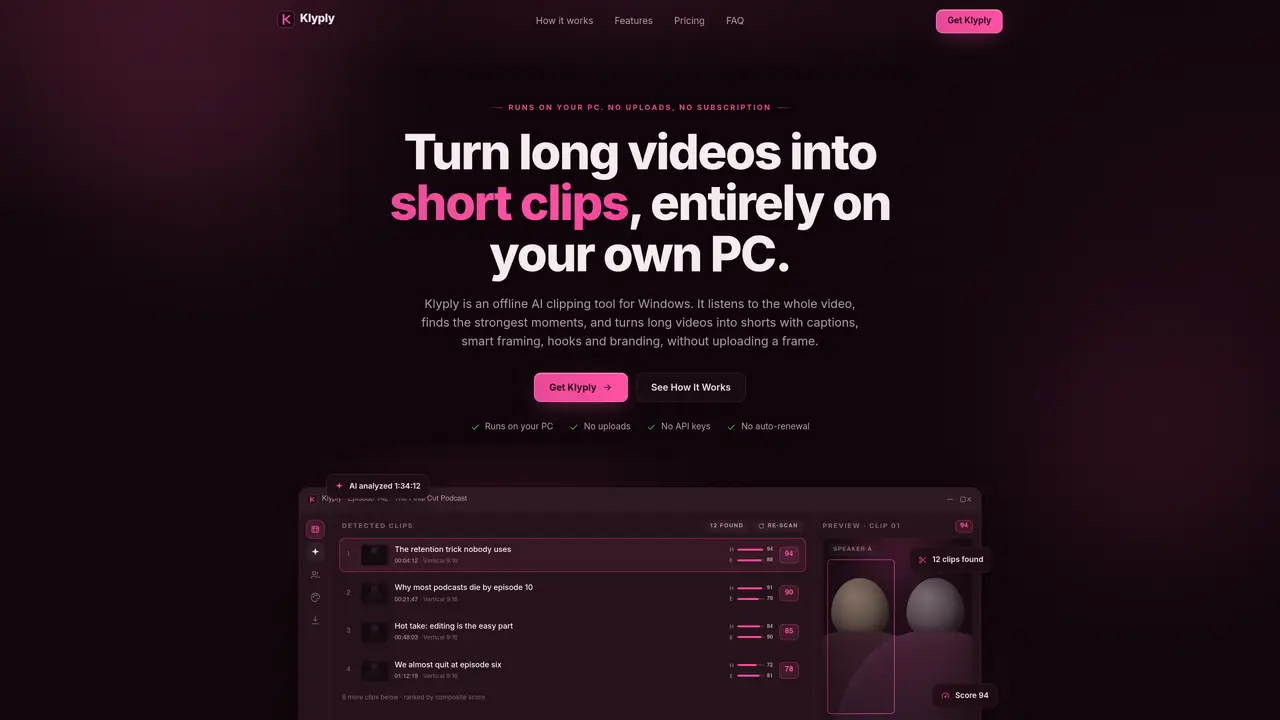
Klyply is a Windows desktop application that converts long videos into short, shareable clips using local AI processing. It transcribes the entire video on the user’s machine, scores candidate moments based on hook strength, energy, pacing and conversation structure, then renders finished clips with captions, smart framing and branding. The tool is designed for podcasters, interviewers and content creators who need to repurpose lengthy recordings into platform-optimized vertical videos without uploading footage to external servers. All processing—transcription, analysis and rendering—occurs locally, keeping source material and finished clips on the user’s computer. Users can customize captions, hooks and branding before exporting clips in 9:16 aspect ratio for social platforms.
Klyply is an offline AI tool for Windows that converts long videos into short, shareable clips entirely on the user’s local machine. It transcribes the video, scores candidate moments based on hook strength, energy, pacing and conversation structure, then renders finished clips with captions, smart framing and branding.
The tool is designed for podcasters, interviewers, content creators and anyone who needs to repurpose lengthy recordings into platform-optimized vertical videos without uploading footage to external servers.
No, Klyply runs entirely offline on the user’s PC. Videos, transcripts and finished clips never leave the local machine, and no uploads or API keys are required.
Klyply scores candidate moments using transcript-aware metrics such as hook strength, energy, pacing and conversation structure, then ranks them to produce a prioritized shortlist of the strongest sections.
Yes, Klyply detects speakers and reframes the vertical crop to follow the active speaker in real time. For two-shot podcasts, it can split the frame to keep both speakers visible.
Users can set their logo, colors and caption style once, and every clip carries the same branding. Captions include word-by-word highlighting with kinetic animations and emphasis styles, burned into the video for compatibility with social platforms.
We use essential cookies to run aitoolnavio™, and optional cookies to analyze traffic and measure our marketing. You choose what we use — optional cookies stay off unless you turn them on. See our Privacy Policy.
One short email a week: fresh tools worth trying, honest takes and the updates that actually matter. No spam, unsubscribe any time.
Create marketing videos quickly, customize with templates, music, and photos, optimize for different platforms with AI.
AI video clipping and editing tool that turns long videos into short clips with captions, reframing, and one-click social publishing.
Boost social media engagement, produce AI music videos, and remix videos with any style effortlessly.
Create promotional videos effortlessly with WeVideo's intuitive drag-and-drop interface.
An AI creation platform for turning images into videos, adding twist endings, and building interactive roleplay stories.
Drag-and-drop video maker for creating professional product demos, explainer videos, and ads without coding skills.
AI-powered video clipping and editing tool that extracts viral moments, adds captions, and schedules shorts for TikTok, YouTube, and Instagram.
Submagic is an AI tool that helps content creators create viral reels and shorts 10 times faster than any other video editing tool.
Turn text or links into short, viral-ready videos for TikTok, Instagram, and YouTube without editing skills.
Turns long videos into ready-to-post short clips for TikTok, Reels, and YouTube Shorts in minutes.
AIReel lets creators make AI-generated videos from text or image in minutes.
AI-powered tool for accurate captions, video clipping, and impactful face centering.
Matched on what this tool does — grouped by the job you would be replacing.
matches Local transcription with timestamps · Hook, energy and pacing scoring · Automatic speaker tracking and reframing
AI tool that converts long videos into captioned, vertical clips automatically
AI-powered video clipping tool that extracts and reframes key moments from long recordings
Turns long videos into short vertical clips with AI-generated captions
Local AI video editor for Windows that turns long footage into publish-ready shorts