Cloud-based unified communications platform for secure call, video, messaging, file sharing, and automated call routing.
12M visits/mo+2.9%#14 Productivity & Office

Generate multilingual training videos with customizable avatars.
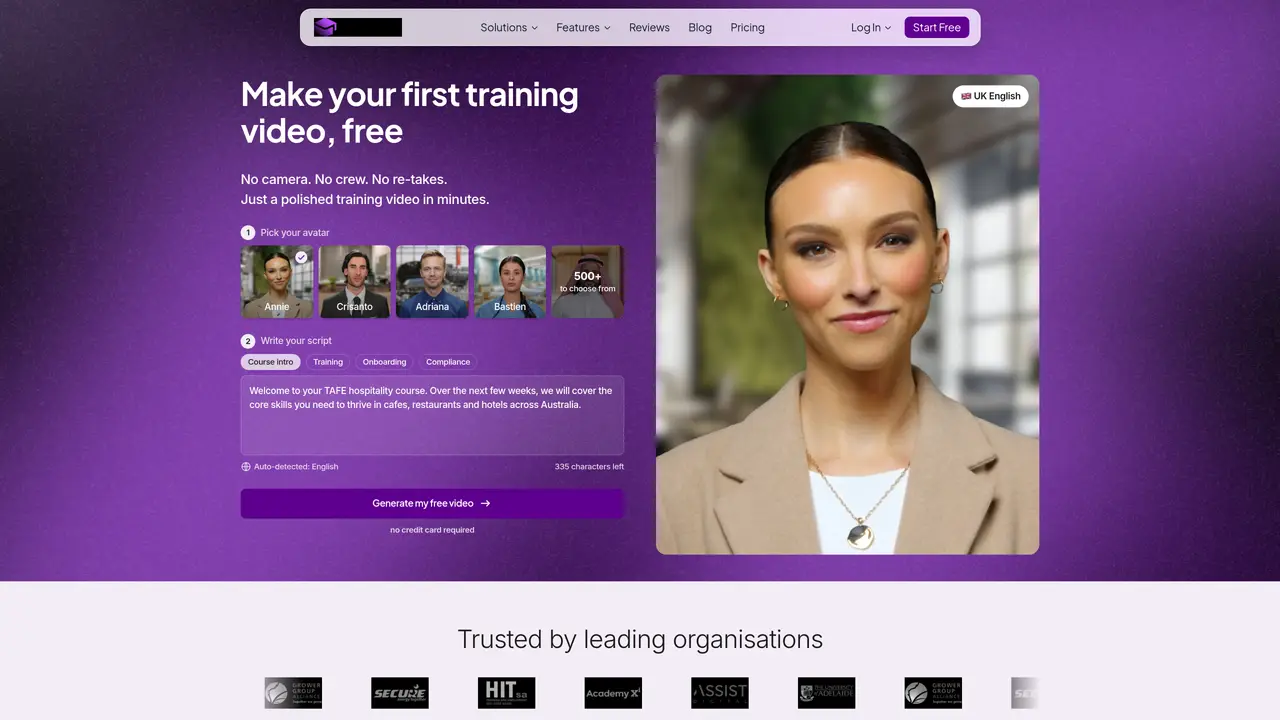
AI Video Course Generator is a powerful tool designed to simplify the creation of professional training videos. Tailored for educators, corporate trainers, and instructional designers, it transforms traditional course content into engaging video presentations. With features like automatic script generation, multilingual support, and customizable avatars, the tool aims to streamline the video production process for diverse training needs. Key Features: AI-Powered Script Generation: Automatically creates scripts from documents, websites, or prompts, reducing manual effort. Multilingual Capabilities: Supports over 100 languages and 300+ accents, enabling the creation of videos for a global audience. Avatar Library: Offers over 500 avatars with various ethnicities and outfits, allowing users to personalize their video content. Customization Options: Users can add logos, change backgrounds, and adjust colors to align with their branding.
The AI Video Course Generator by Coursebox is a tool that creates professional training videos from documents, prompts, or slide decks using AI-generated scripts and customizable avatars. It eliminates the need for cameras, crews, or re-takes, producing polished videos in minutes.
The tool is designed for educators, corporate trainers, instructional designers, training providers, and businesses needing scalable training content. It supports industries like healthcare, hospitality, IT, and compliance training.
Yes, Coursebox allows users to create a custom avatar by uploading a single photo. Alternatively, users can choose from over 500 pre-built avatars with natural voice and facial expressions.
Coursebox supports training videos in over 100 languages, enabling global teams to receive localized content without separate production workflows.
Videos can be updated by editing the source content and regenerating. Users can also swap avatars, change backgrounds, adjust colors, and insert brand logos without starting from scratch.
Coursebox videos can be embedded or exported to most major LMS platforms and SCORM packages. Alternatively, they can be hosted directly inside Coursebox for a white-label LMS with native AI course authoring.
We use essential cookies to run aitoolnavio™, and optional cookies to analyze traffic and measure our marketing. You choose what we use — optional cookies stay off unless you turn them on. See our Privacy Policy.
One short email a week: fresh tools worth trying, honest takes and the updates that actually matter. No spam, unsubscribe any time.
Cloud-based unified communications platform for secure call, video, messaging, file sharing, and automated call routing.
Create engaging videos with voiceovers, music, and customizations using a library of royalty-free assets.
Create, edit, subtitle, and translate pro-grade videos instantly.
Create realistic talking avatar videos from a photo with AI-powered lip sync and text-to-speech in multiple languages.
Ultra-fast video generation with pre-designed templates and a user-friendly interface design.
Topview AI is an AI-powered video creation platform that turns your product into engaging, attention-grabbing and viral-worthy video; no editing skills or cameras needed.
Generate engaging video content with AI-powered system, professional presenters, ease, scalability, and budget-friendly.
Generate videos featuring expressive AI characters from a single photo and text prompts with creative control.
Create lifelike videos from text and images.
VTuber software suite to create and animate custom VTuber avatars with VTuber Maker.
Transform images into engaging, AI-generated videos.
AI video generator that turns scripts or stories into long-form videos up to 50 minutes with consistent characters and 1080p export.
Matched on what this tool does — grouped by the job you would be replacing.
matches AI-Powered Script Generation · Multilingual Capabilities · Avatar Library with over 500 avatars
Effortlessly create captivating videos with lifelike AI avatars.
Converts documents, slides and scripts into multilingual interactive videos with AI-generated avatars and speech.
Instantly generate AI videos, UGC ads, animations, and social media clips from text prompts or images with automated editing workflows.
AI video creation platform for fast UGC and social videos with 500+ avatars, script generation, subtitles, and automated editing.
matches Multilingual Capabilities · Avatar Library with over 500 avatars · Rapid Video Production in minutes
Create realistic talking avatar videos from a photo with AI-powered lip sync and text-to-speech in multiple languages.
Ultra-fast video generation with pre-designed templates and a user-friendly interface design.
Transform your ideas into stunning videos online in minutes.
Generate professional videos instantly with AI avatars, multilingual voices, and text-to-video tools in one platform.