
Get quick copywriting help, generate marketing copy, and easily translate, explain, and rephrase web page text.
5.1M visits/mo-7.2%#11 Writing & Content

Generate custom tweets, threads, and direct messages effortlessly, add media, and monitor performance with real-time analytics.
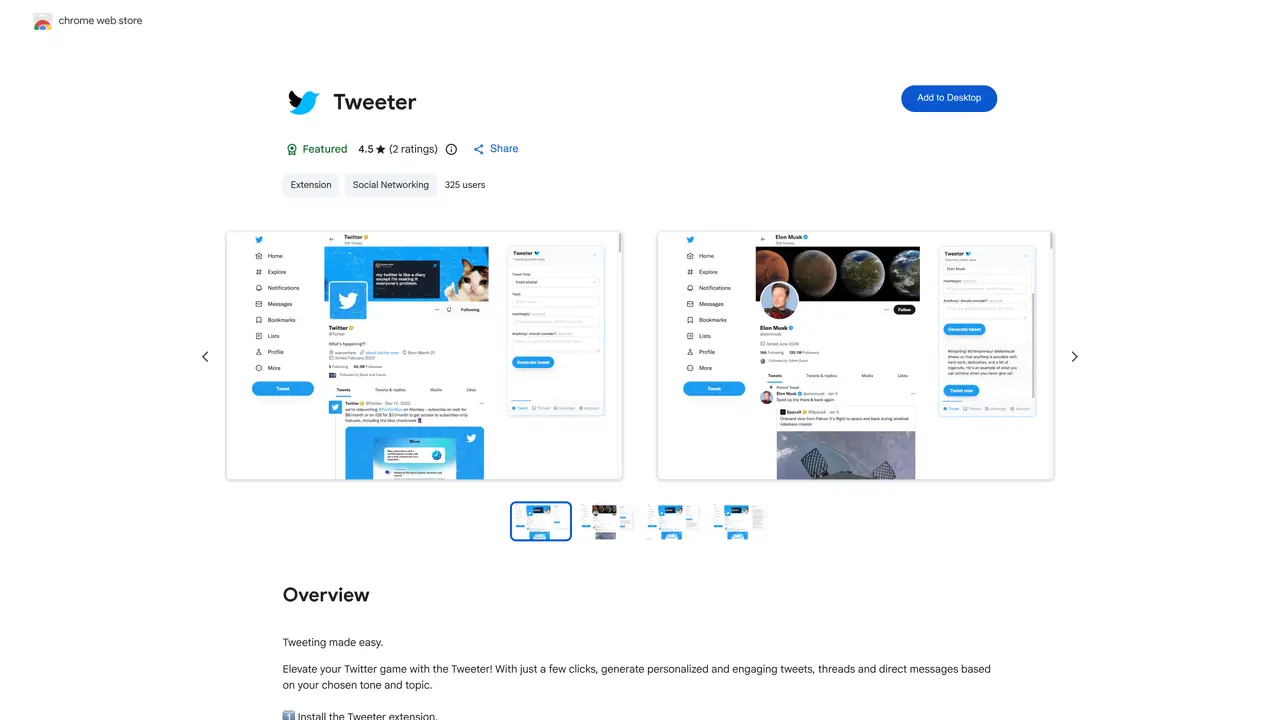
Tweeter is a Chrome extension designed to simplify and enhance the process of creating content on Twitter. It enables users to generate personalized tweets, threads, and direct messages with minimal effort by providing customizable templates and suggestions tailored to specific tones and topics. The tool allows users to refine their posts by adding media, links, and other elements to improve professionalism and engagement. Tweeter also offers real-time analytics to track the performance of posts, helping users understand what resonates with their audience and adjust their strategy accordingly. By streamlining content creation and providing insights, the extension aims to help users maintain a consistent and impactful presence on Twitter. It is particularly useful for social media managers, marketers, and individuals looking to optimize their Twitter interactions without spending excessive time on drafting or editing.
Tweeter is a Chrome extension designed to simplify Twitter content creation by generating personalized tweets, threads, and direct messages with minimal effort. It allows users to customize posts based on tone and topic, enhancing professionalism and engagement.
Tweeter is suitable for social media users, marketers, content creators, and professionals who want to streamline their Twitter presence and create engaging content without spending excessive time on drafting posts.
To get started, install the Tweeter extension from the Chrome Web Store, open Twitter or TweetDeck, and click the Tweeter extension icon to generate content. Follow the three-step process outlined in the extension to create tweets, threads, or direct messages.
The extension offers real-time analytics to help users monitor the effectiveness of their tweets, threads, and direct messages, enabling them to refine their content strategy based on performance data.
Tweeter allows users to customize their posts by selecting a tone and topic, and adding media or additional content to enhance professionalism. This ensures the generated content aligns with the user's desired style and audience.
Tweeter handles personally identifiable information and declares that user data is not sold to third parties or used for unrelated purposes. Users can review the extension's privacy policy for more details on data handling.
We use essential cookies to run aitoolnavio™, and optional cookies to analyze traffic and measure our marketing. You choose what we use — optional cookies stay off unless you turn them on. See our Privacy Policy.
Get quick copywriting help, generate marketing copy, and easily translate, explain, and rephrase web page text.
Tailor web copy, generate high-quality content, bypass AI detectors.
Generate unique avatars and craft effective, engaging copy effortlessly.
Teams design on-brand, gamified emails without coding.
Generate professional copy in seconds, customize with an intuitive platform, and access pre-written content for inspiration.
Create blog posts, generate tailored product descriptions, and automate content creation for websites and social media.
AI-powered YouTube growth tool for creators that identifies viral video patterns, generates thumbnails and titles, and tracks channels using data from millions of videos.
Generate engaging articles quickly and cost-effectively that resonate with readers.
Create engaging tweets, tailor to target audience, monitor performance for optimal presence.
Create branded content, mimic any Twitter account's tone and topics, and generate professional-quality tweets.
Generate SEO-friendly YouTube video scripts and descriptions for blog posts.
Create SEO-friendly webpage copy, generate tailored content, and save time and money with its subscription-based model.
Matched on what this tool does — grouped by the job you would be replacing.
matches Generate custom tweets, threads, and direct messages · Add media and content to posts · Customize tone and topic of posts
Generate tweets, threads and ideas.
Create engaging custom tweets in different moods, accessible on the go via Google Play/App Store.
Generate personalized post captions to unlock creative potential effortlessly.
Generate AI-created Tweets, explore insights, and create engaging social media posts with an easy-to-use interface.
matches Monitor performance with real-time analytics · Track engagement and performance metrics
matches Generate custom tweets, threads, and direct messages
Schedule, track performance, collaborate across social media channels.
Schedule posts, respond to comments, track metrics in real-time for effective social media management.
Automate content posting, track performance, schedule content in advance, and automate responses with powerful analytics tools.
Automate content scheduling, identify trends/influencers, monitor/respond to comments for efficient social media management.
An AI chat platform for roleplaying, storytelling, and learning by chatting with millions of user-created AI characters.
Create engaging conversations, generate tailored content, and track performance effortlessly.
Create interactive chatbots, integrate content into conversations, track user engagement with analytics and reporting.
One short email a week: fresh tools worth trying, honest takes and the updates that actually matter. No spam, unsubscribe any time.