Automate research, make corrections, and integrate easily into text editors for convenient content generation and error detection.
36M visits/mo+12%#4 Writing & Content

Inspects and rewrites text to reveal hidden Unicode characters and watermarks
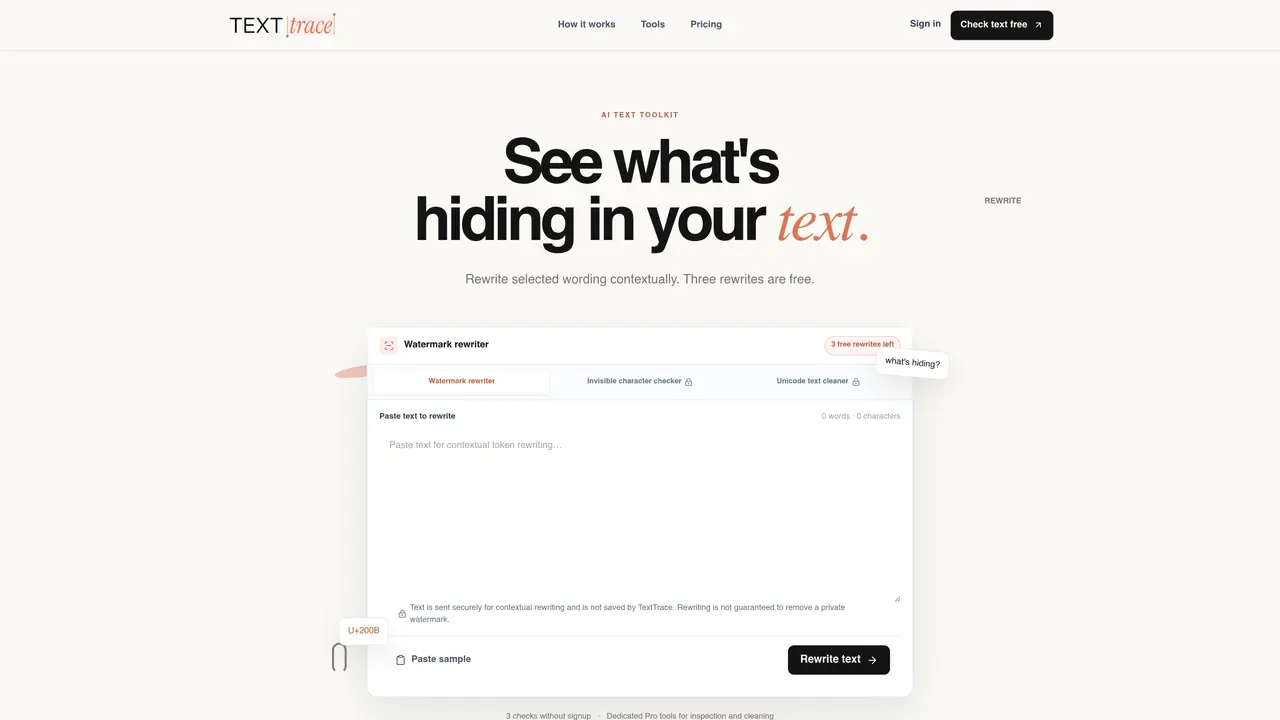
TextTrace provides tools for inspecting and cleaning text by revealing hidden Unicode characters, watermarks, and formatting artifacts. The platform offers contextual rewriting to refresh wording while preserving meaning, along with dedicated tools for locating non-rendering characters and normalizing Unicode artifacts. Users can paste text directly into the interface to inspect for invisible elements such as zero-width spaces or line breaks. The watermark rewriter performs contextual edits to refresh wording, while the invisible-character checker and Unicode cleaner focus on normalization without altering visible text. File processing is supported for documents with an active Pro plan. The service emphasizes privacy by processing text securely and not storing submissions beyond the session. Guides explain the technical layer of text inspection, including watermark detection, hidden characters, and cleaning methods.
TextTrace provides tools for inspecting and cleaning text by revealing hidden Unicode characters, watermarks, and formatting artifacts. It offers contextual rewriting to refresh wording while preserving meaning.
TextTrace is suitable for users who need to inspect, clean, or rewrite text while preserving its original meaning. This includes professionals handling documents, researchers, and anyone concerned with text integrity.
TextTrace offers a Free plan with limited watermark rewrites and a Pro plan for complete text rewriting, inspection, and cleanup. The Pro plan includes unlimited watermark rewrites, invisible-character checking, Unicode cleaning, and file uploads.
Yes, TextTrace supports file uploads for documents in formats such as TXT, MD, DOCX, and PDF, but this feature is available only with the Pro plan.
TextTrace processes text securely and does not store submissions beyond the session. It emphasizes privacy by ensuring that user data is not retained after the inspection or cleaning process.
Users can start for free by visiting the TextTrace website and using the watermark rewriter tool without requiring a credit card. For advanced features, they can upgrade to the Pro plan.
texttrace.in · third-party estimates from Similarweb
Share of visits by channel
Share of visits · estimated visits
Writing & Content · Sep 2026
Traffic figures are third-party estimates, good for scale and trends; they can differ from a company's own numbers. Updated monthly.
We use essential cookies to run aitoolnavio™, and optional cookies to analyze traffic and measure our marketing. You choose what we use — optional cookies stay off unless you turn them on. See our Privacy Policy.
One short email a week: fresh tools worth trying, honest takes and the updates that actually matter. No spam, unsubscribe any time.
Automate research, make corrections, and integrate easily into text editors for convenient content generation and error detection.
AI-powered writing tool for paraphrasing, summarizing, and enhancing writing effortlessly.
All-in-one SEO suite for website performance analysis, keyword tracking, plagiarism checks, sitemap generation, and article rewriting.
Detect errors, suggest real-time corrections, and provide a variety of writing tools.
AI-powered grammar and writing assistant that corrects English text, rephrases sentences, suggests synonyms, and translates content.
Generate alternative phrasing, replace words with synonyms, and alter sentence structure for creative content.
Instantly reword, rewrite, and rephrase texts for improved readability, accuracy, and engaging, plagiarism-free content.
Detects AI-generated text and rewrites it to bypass detection while preserving readability and SEO-friendliness.
Rewrite text, check for plagiarism, generate citations, translate languages, and enhance writing with powerful applications.
Free AI tool that converts robotic AI text into natural, human-like writing, bypassing detection while supporting multiple languages and ensuring privacy.
Fix errors, paraphrase text automatically, and generate new content for clearer ideas.
Detect, bypass, and generate undetectable AI content in seconds.
Matched on what this tool does — grouped by the job you would be replacing.
matches Watermark rewriter with contextual editing · Invisible character checker for non-rendering code points · Unicode text cleaner for normalization
Removes invisible AI watermarks and stock phrases from copied text
Removes invisible Unicode and statistical watermarks from AI-generated text
Removes AI watermarks from text while preserving meaning
Detects and removes Claude AI's invisible text watermark