
AI-powered writing assistant for grammar, style, and tone improvements across documents and emails.
60M visits/mo+21.3%#2 Writing & Content
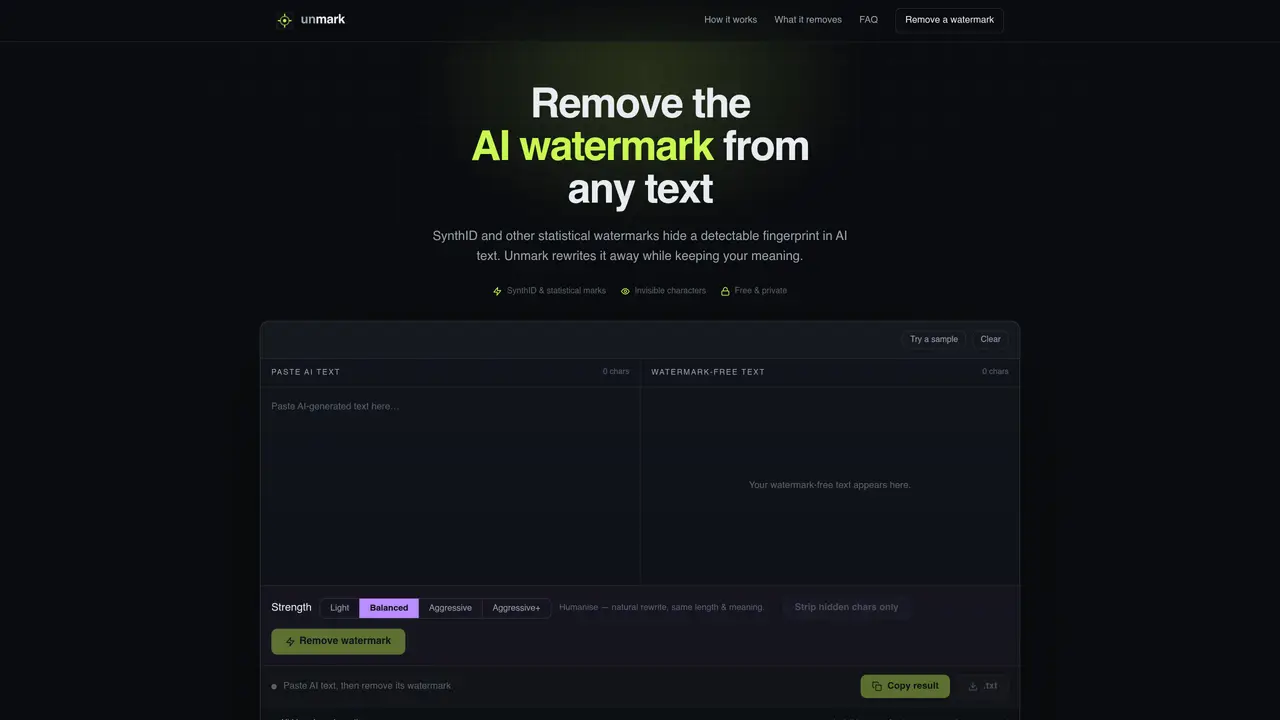
Unmark is a browser-based tool that removes two types of AI watermarks from text: statistical watermarks like Google’s SynthID and hidden-character watermarks such as zero-width spaces and invisible Unicode. It rewrites text to disrupt statistical patterns while keeping the original meaning intact, and simultaneously strips invisible characters that may fingerprint the text. The tool works with output from any AI system, including ChatGPT, Claude, Gemini, and Copilot, and requires no account or setup. Users paste text, select a rewrite strength, and receive watermark-free text in three steps. Unmark operates entirely in the browser, ensuring privacy and speed, and offers options to normalize spaces, handle bidirectional text, and preserve emoji sequences. It is designed for users who need to remove AI watermarks for compliance, reuse, or privacy reasons.
An AI text watermark is a hidden signal embedded in AI-generated text to flag it as machine-generated. There are two types: statistical watermarks like Google’s SynthID, which bias word choices into a detectable pattern, and hidden-character watermarks, which use invisible Unicode characters such as zero-width spaces to fingerprint the text.
SynthID-Text is Google’s statistical watermark that nudges an AI model’s token choices into a measurable pattern. Unmark removes it by rewriting the text to scramble the pattern while preserving the original meaning, which is the only reliable way to strip a statistical watermark.
Anthropic has announced that future Claude models will watermark their text with a SynthID-style statistical method by default. Unmark can remove this watermark by performing a full rewrite of the text, ensuring the meaning remains intact.
Paste the AI-generated text into Unmark, select a rewrite strength, and click 'Remove watermark.' The tool rewrites the text to disrupt statistical watermarks and strips invisible characters simultaneously, then provides a clean output for copying.
Rewriting text with Unmark substantially degrades statistical watermarks and AI-detector signals, especially with stronger settings. However, no tool can guarantee permanent undetectability against all future detectors, so the result should be reviewed carefully.
Unmark works with any AI tool that generates plain text, including ChatGPT, Claude, Gemini, Copilot, and Llama. Since it operates on plain text, it can remove watermarks from output generated by any AI system.
We use essential cookies to run aitoolnavio™, and optional cookies to analyze traffic and measure our marketing. You choose what we use — optional cookies stay off unless you turn them on. See our Privacy Policy.
One short email a week: fresh tools worth trying, honest takes and the updates that actually matter. No spam, unsubscribe any time.
AI-powered writing assistant for grammar, style, and tone improvements across documents and emails.
Plagiarism detector for AI generated text.
Instantly detect AI-generated text, identify plagiarism, and customize the detection process.
Automatically check student papers for plagiarism, generate originality reports, and offer powerful grading tools.
AI-generated text detector with 99.98% verified accuracy, supporting 20+ languages and integrations with LMS platforms.
Detect plagiarism, verify authenticity, and save time with an intuitive interface across multiple languages.
Tailor web copy, generate high-quality content, bypass AI detectors.
All-in-one SEO suite for website performance analysis, keyword tracking, plagiarism checks, sitemap generation, and article rewriting.
Create undetectable, original and engaging content with customizable output.
Ensure content originality, detect plagiarism, and identify AI usage in content with advanced AI technology.
JustDone transforms AI-generated content into clear, natural, and human-like text with its style adaptation technology.
Secure, scalable AI-driven identity verification solutions.
Matched on what this tool does — grouped by the job you would be replacing.
matches Rewrites text to break statistical watermarks · Strips invisible Unicode characters · Preserves emoji sequences
Removes hidden AI markers from text to reduce detection risk
Removes invisible AI watermarks and stock phrases from copied text
Removes invisible Unicode and statistical watermarks from AI-generated text
Inspects and rewrites text to reveal hidden Unicode characters and watermarks