Generate full songs with vocals, lyrics, and instrumentals from text prompts in minutes.
75M visits/mo+3.8%#1 Audio & Voice

AI-powered profanity editor for YouTubers and podcasters that detects swear words, customizes censor effects, and exports clean files or editor-ready projects.
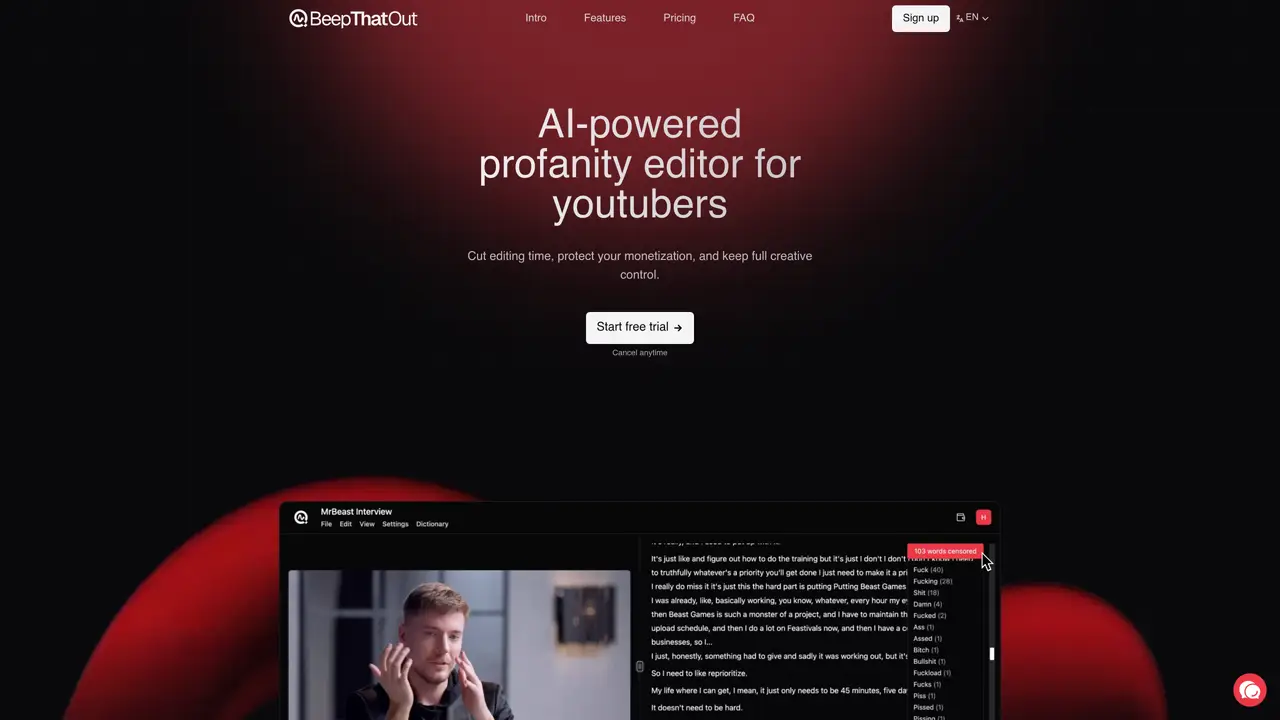
BeepThatOut is an AI-powered, web-based profanity editor designed for content creators who need to efficiently detect and censor swear words in audio or video content. The tool automatically identifies profanity in uploaded media and aligns detected words with a transcript on a timeline for precise editing. Users can customize filtering and censor effects, including category-based intensity filters, a personal word blacklist, and options like beeps, silence, preset sounds, or custom audio uploads. The browser-based interface allows for detailed review and fine-tuning, with features such as inline transcript edits, profanity tag adjustments, and timing modifications like moving, trimming, or stretching words. BeepThatOut supports exports for publishing or post-production, including rendered video or audio outputs, XML project exports compatible with Adobe Premiere Pro, Final Cut Pro, and DaVinci Resolve, as well as .srt subtitle downloads. The tool also offers multilingual support for over 50 languages and can process long-form content, such as podcasts or interviews, with a maximum duration of up to 10 hours.
BeepThatOut is an AI-powered profanity editor that automatically detects and censors swear words in audio or video content. It aligns detected profanity with a transcript on a timeline for precise editing and allows users to customize filtering and censor effects.
The tool is designed for content creators who need to efficiently clean their media for platforms with strict content policies, such as YouTube, podcasts, or social media. It suits creators of all sizes, from hobbyists to professional producers.
BeepThatOut offers a simple pricing structure with monthly and annual plans. The annual plan includes a discount compared to the monthly option. Users can start with a free trial and cancel anytime.
The tool allows exporting projects as XML files compatible with Adobe Premiere Pro, Final Cut Pro, and DaVinci Resolve. Users can also download rendered video, audio, or subtitle files (.srt) for publishing or post-production.
Yes, users can select filtering categories and intensity levels, build a personal word blacklist, and choose from various censor effects like beeps, silence, preset sounds, or custom audio uploads.
To get started, upload your audio or video file to the browser-based interface. The AI will automatically scan for profanities, which you can then customize, review, and export for publishing or further editing.
beepthatout.com · third-party estimates from Similarweb
Last 4 months · grows by one month every month
Share of visits · estimated visits
Audio & Voice · Sep 2026
Traffic figures are third-party estimates, good for scale and trends; they can differ from a company's own numbers. Updated monthly.
We use essential cookies to run aitoolnavio™, and optional cookies to analyze traffic and measure our marketing. You choose what we use — optional cookies stay off unless you turn them on. See our Privacy Policy.
One short email a week: fresh tools worth trying, honest takes and the updates that actually matter. No spam, unsubscribe any time.
Generate full songs with vocals, lyrics, and instrumentals from text prompts in minutes.
Create instrumental versions, enhance clarity, and boost music quality effortlessly.
Generate original songs, lyrics, and studio-quality soundtracks from text prompts in minutes using AI.
Create funny videos with unique voices, modify pitch and speed for custom sound, and apply sound effects.
Remove vocals, extract audio stems, and refine audio for optimal sound quality.
Convert audio and video into text, sync transcripts with media, and edit easily.
Generates AI videos, images and audio from text prompts, photos or audio
Create podcasts, audiobooks, and voiceovers, customize voice style, and generate natural speech from text.
Create studio-ready vocals, choirs, and instruments from MIDI.
An AI music platform that generates royalty-free songs, instrumentals, and lyrics from text prompts, with stem splitting, vocal removal, and mastering tools.
Use this online audio cleaner to remove background noise from recordings and enhance sound quality.
Enhance audio quality, remove background noises, create professional recordings with any format.
Matched on what this tool does — grouped by the job you would be replacing.
matches Automatic profanity detection with word-level transcript alignment · Customizable censor effects (beep, silence, preset sounds, custom uploads) · Category and intensity-based filtering options
AI plugin for Adobe Premiere Pro that automates repetitive video editing tasks like silence removal, captioning, and chapter detection.
Offline AI subtitle generator for Mac with SRT and Final Cut Pro export
AI-powered panel for Adobe Premiere Pro that automates rough-cut editing, removes silences, and generates captions in a single pass.
matches Automatic profanity detection with word-level transcript alignment · Exports for publishing or post-production (video, audio, XML, .srt) · Multilingual support (50+ languages)
AI video localization platform for creators and teams to generate subtitles, translate into 200+ languages, and produce AI dubbing with voice cloning and lip-sync.
AI-powered video captioning tool supporting 11 languages with frame-accurate timing
AI captioning and transcription web app that generates, edits, and exports subtitles and 4K videos with viral templates for creators and marketers.