

Generate full songs with vocals, lyrics, and instrumentals from text prompts in minutes.
75M visits/mo+3.8%#1 Audio & Voice
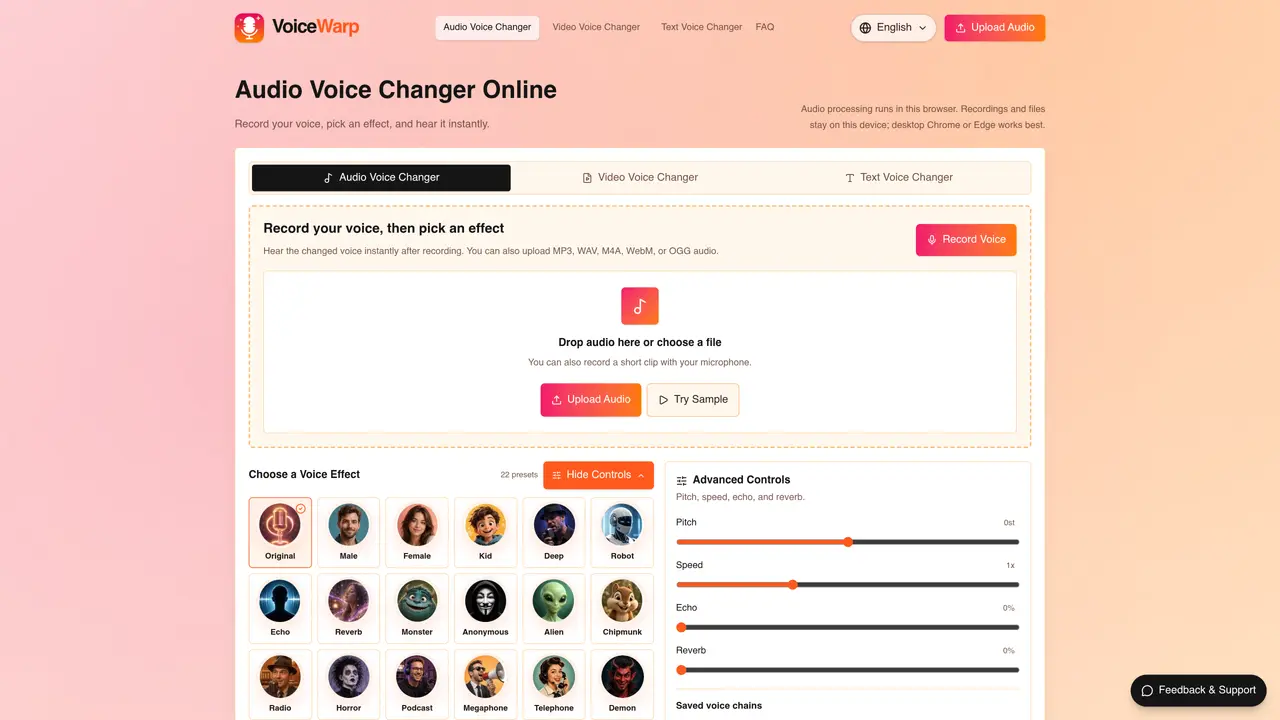
VoiceWarp is an online application that modifies voices in audio recordings, uploaded files, and videos directly in the browser. It allows users to record audio via microphone, upload supported formats such as MP3, WAV, M4A, WebM, or OGG, and apply voice effects like pitch adjustment, speed changes, echo, and reverb. The tool also includes a text-to-speech feature that generates natural-sounding speech from typed scripts, which can then be downloaded as MP3 files. Video files in formats like MP4, WebM, MOV, and M4V can be processed with voice effects, though large files may render slowly due to local processing. VoiceWarp offers 22 preset voice effects, including male, female, robot, echo, and monster, as well as the ability to save custom effect chains for reuse. All audio and video processing occurs locally in the user’s browser, ensuring privacy for media files.
VoiceWarp supports audio formats including MP3, WAV, M4A, WebM, and OGG. For video, it supports MP4, WebM, MOV, and M4V, though video processing is currently in beta.
No, VoiceWarp is a free online tool that does not require signup or a subscription to use its features.
All audio and video processing occurs locally in the user’s browser, meaning files stay on the device and are not uploaded to external servers.
Yes, VoiceWarp includes a text-to-speech feature that converts typed scripts into natural-sounding speech, which can then be downloaded as an MP3 file.
Desktop versions of Chrome or Edge are recommended for the smoothest processing experience.
Large audio or video files may render slowly because processing happens locally on the user’s device rather than on external servers.
voicewarp.ai · third-party estimates from Similarweb
Last 3 months · grows by one month every month
Share of visits by channel
Share of visits · estimated visits
Audio & Voice · Sep 2026
Traffic figures are third-party estimates, good for scale and trends; they can differ from a company's own numbers. Updated monthly.
We use essential cookies to run aitoolnavio™, and optional cookies to analyze traffic and measure our marketing. You choose what we use — optional cookies stay off unless you turn them on. See our Privacy Policy.
One short email a week: fresh tools worth trying, honest takes and the updates that actually matter. No spam, unsubscribe any time.
Generate full songs with vocals, lyrics, and instrumentals from text prompts in minutes.
Create instrumental versions, enhance clarity, and boost music quality effortlessly.
Generate original songs, lyrics, and studio-quality soundtracks from text prompts in minutes using AI.
Create funny videos with unique voices, modify pitch and speed for custom sound, and apply sound effects.
Remove vocals, extract audio stems, and refine audio for optimal sound quality.
Convert audio and video into text, sync transcripts with media, and edit easily.
Generates AI videos, images and audio from text prompts, photos or audio
Create podcasts, audiobooks, and voiceovers, customize voice style, and generate natural speech from text.
Create studio-ready vocals, choirs, and instruments from MIDI.
An AI music platform that generates royalty-free songs, instrumentals, and lyrics from text prompts, with stem splitting, vocal removal, and mastering tools.
Use this online audio cleaner to remove background noise from recordings and enhance sound quality.
Enhance audio quality, remove background noises, create professional recordings with any format.
Matched on what this tool does — grouped by the job you would be replacing.
matches Record audio via microphone · Upload audio files in MP3, WAV, M4A, WebM, or OGG · Apply 22 preset voice effects
Free online AI voice cloning tool that turns a voice sample into custom speech
Converts short audio or text into a synthetic Verity-style voice for editing
Online audio creation platform for quickly producing and sharing professional podcasts, soundtracks, and recordings privately or publicly.
matches Upload audio files in MP3, WAV, M4A, WebM, or OGG · Process video files in MP4, WebM, MOV, or M4V · Download processed audio or video
matches Generate speech from typed text · Download processed audio or video
Desktop app for recording and transcribing audio on Mac with multiple transcription options
Browser-based transcription of audio and video files with local processing
Browser-based tool for local audio and video transcription and subtitle editing
AI-powered transcription service for audio and video files with summaries
Create natural-sounding audio books, generate vocal audio for podcasts and radio shows, and use AI voices for e-learning courses.
Generate professional voiceovers, enhance language learning, and add synthesized speech to applications effortlessly.
Free Online Text to Speech with Natural-Sounding AI Voices.