
Generate captions, optimize content, and enhance with custom images for maximum engagement.
46M visits/mo-10%#3 Image & Design
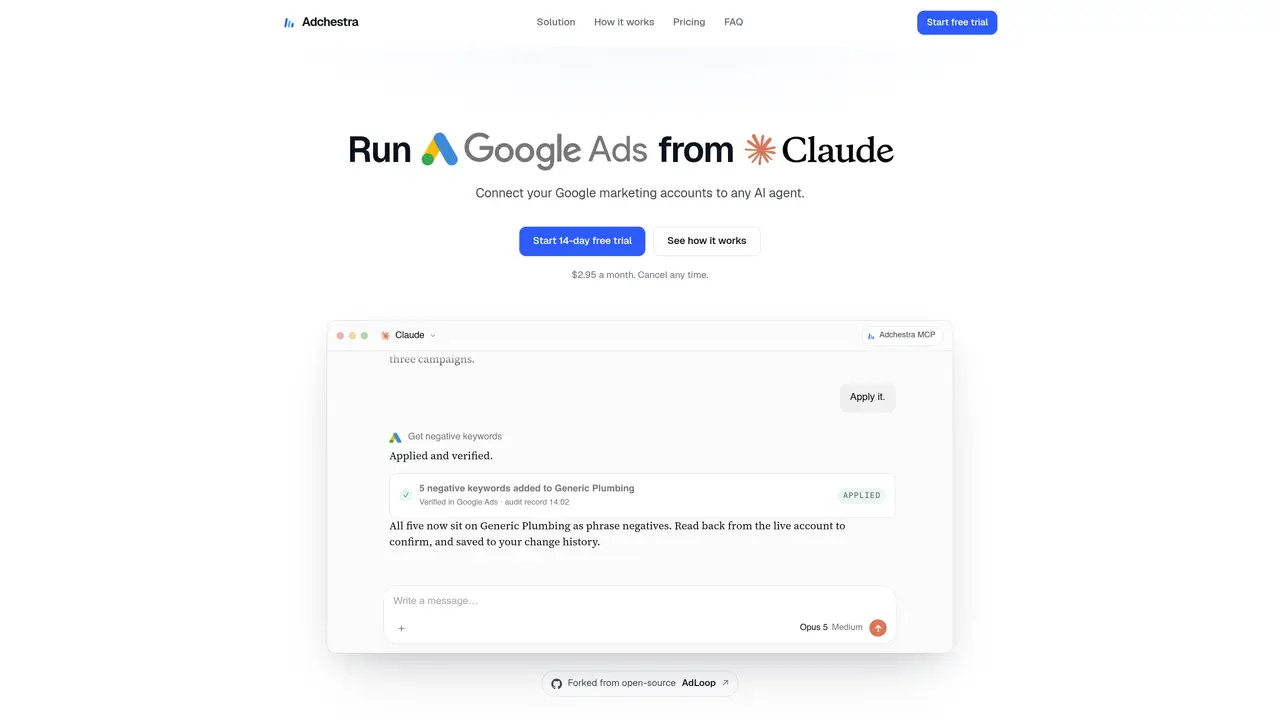
Adchestra connects Google Ads, Analytics 4 and Tag Manager to any AI agent through a hosted MCP server. Users authorize the tool once and can then ask their AI to analyze live ad performance, generate optimization plans, and apply approved changes directly to campaigns. The system supports multi-product queries spanning Ads, Analytics and Tag Manager, returning consolidated insights and actionable recommendations. Changes are previewed and executed only after explicit user approval, maintaining control over account modifications. Setup requires no coding or Google Cloud configuration, relying instead on a four-step connector process and existing Google account permissions. The service handles Google’s authentication, developer tokens and server infrastructure, removing technical barriers for non-technical users. Reports are fetched on demand and sent to the connected AI agent, with data access limited to what the user approves.
Adchestra connects to Google Ads, Google Analytics 4, Tag Manager, and read-only tools for Search Console. It works with any AI agent through a hosted MCP server.
No coding is required. Setup takes four steps and most users complete it in under five minutes. There is no need to write code, create a Google Cloud project, or host a server.
Open the connection guide, choose your AI tool, and follow the short setup instructions. Adchestra handles sign-in and account access through the MCP connection.
No. Adchestra handles Google Cloud credentials, developer tokens, and server infrastructure, removing the need for users to manage these themselves.
Adchestra does not sell user data, use it for advertising, or train AI models. It stores only what is necessary to secure connections and record approved changes. Access can be revoked at any time.
Adchestra can access the same accounts and resources as the connected Google account, limited by the permissions approved by the user during setup.
We use essential cookies to run aitoolnavio™, and optional cookies to analyze traffic and measure our marketing. You choose what we use — optional cookies stay off unless you turn them on. See our Privacy Policy.
One short email a week: fresh tools worth trying, honest takes and the updates that actually matter. No spam, unsubscribe any time.
Generate captions, optimize content, and enhance with custom images for maximum engagement.
Build conversational forms, capture rich responses, and automate follow-ups with AI-powered surveys and workflows.
Automate code, research, and documents using agents.
AI-powered IDE for autonomous coding tasks and agentic development workflows
Source, match, and manage talent with predictive analytics for effortless recruiting.
Automate workflow, optimize operations, and detect potential issues with this efficient AI-driven solution.
Transforms thoughts into actions, enhancing productivity and efficiency.
AI Recruitment engine to hire top global talent
All-in-one team productivity platform combining chat, docs, video meetings, workflows, and AI tools in one place.
Personal assistant that coordinates tasks across apps and devices via text or call
AI automation and agent-building platform with 3,000+ app integrations
AI job search copilot that matches roles to skills, optimizes resumes for ATS, generates cover letters, and autofills applications with real-time insights.
Matched on what this tool does — grouped by the job you would be replacing.
matches Multi-product data analysis across Google Ads, Analytics 4 and Tag Manager · Natural language queries spanning multiple Google products · Campaign optimization recommendations with performance metrics
AI-powered platform to manage, optimize, and scale ad campaigns across Google, Meta, TikTok, and LinkedIn with natural-language chat and automation.
AI marketing agent automating paid ads, SEO, social media, and competitive analysis across platforms like Meta and Google Ads.
Hosted MCP layer for cross-channel ad operations on Meta, Google Ads and TikTok
AI-powered platform for automated ad campaign creation and management across nine networks
matches Multi-product data analysis across Google Ads, Analytics 4 and Tag Manager · Read-only access to Search Console data
AI-powered tool that audits and fixes Google Analytics 4 and Google Tag Manager issues with prioritized recommendations and reports.
AI-powered SEO analysis via Google Search Console integration