

Generate captions, optimize content, and enhance with custom images for maximum engagement.
46M visits/mo-10%#3 Image & Design
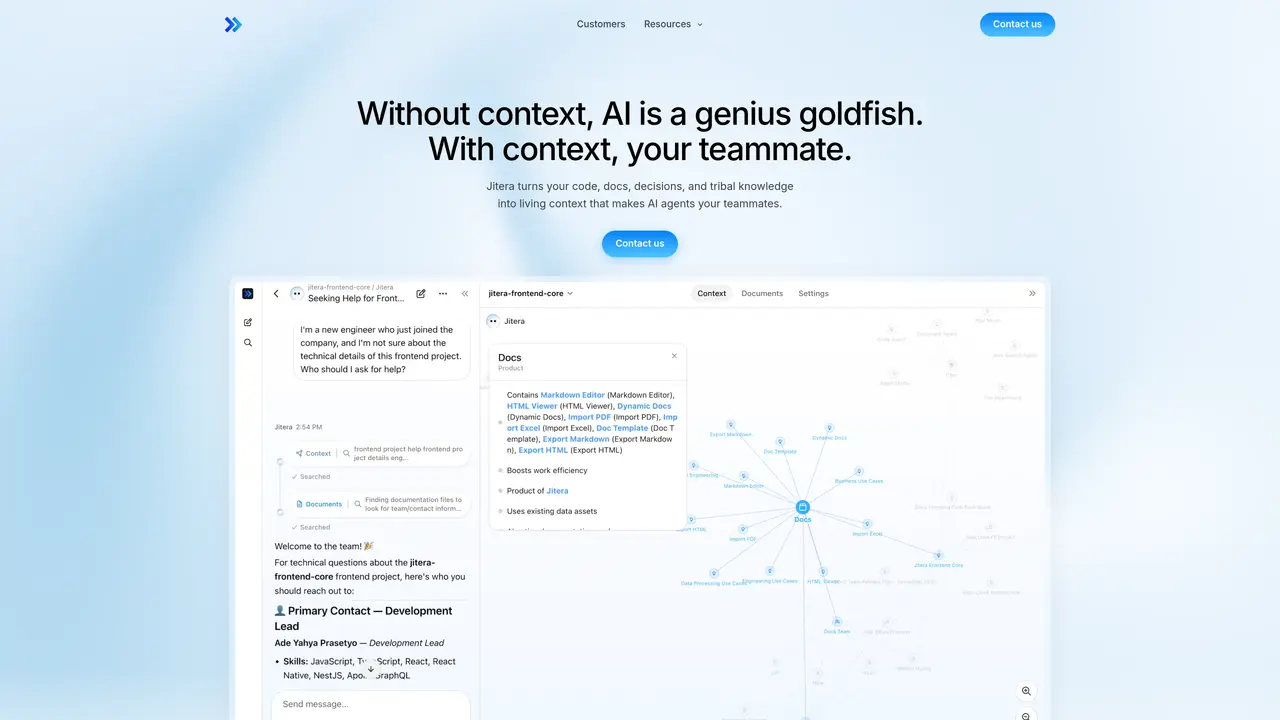
Jitera is an AI workspace where teams collaborate with AI agents that actually know how the organization works. It turns code, documents, decisions, and tribal knowledge into shared context, so agents and humans work from the same source of truth. Instead of every person running isolated chats, Jitera keeps conversations, automations, and documents together, so AI behaves more like a knowledgeable teammate than a one-off tool. Key Features: Shared context map: Visual graph of teams, projects, decisions, and resources that agents use to stay aligned with organizational structure. Team-in-the-loop agents: Agents follow chat threads, co-edit docs, and ask humans for confirmation before acting, reducing bad guesses and surprises. Multi-LLM custom agents: Support for leading models such as GPT, Claude, and Gemini, with per-agent instructions, tools, and skills. Automations and integrations: Recurring workflows, multi-step pipelines, and connections to tools like GitHub, Notion, Linear, Jira, and Slack.
Jitera is an AI workspace designed for teams to collaborate with AI agents that understand organizational context. It consolidates code, documents, decisions, and tribal knowledge into a shared context map, enabling agents and humans to work from the same source of truth in real time.
Jitera is suited for teams that rely on AI tools but struggle with fragmented workflows, version control issues, or misaligned outputs. It benefits organizations looking to centralize AI collaboration, automate workflows, and maintain consistency across projects.
Agents in Jitera follow team conversations, co-edit documents, and request human confirmation before taking action. They use a visual context map of teams, projects, and decisions to stay informed and avoid missteps.
Yes, Jitera supports integrations with tools such as GitHub, Notion, Linear, Jira, and Slack. Agents can interact directly within these platforms, ensuring seamless collaboration without switching contexts.
Jitera allows teams to choose from leading models like GPT, Claude, and Gemini. Each agent can be assigned a specific model and customized with instructions, tools, and skills tailored to the team's workflow.
Teams can begin by importing existing documents and resources into Jitera's workspace. From there, they can create custom agents, set up automations, and invite team members to collaborate in a shared AI environment.
jitera.com · third-party estimates from Similarweb
Last 4 months · grows by one month every month
Share of visits · estimated visits
Automation & Agents · Sep 2026
Traffic figures are third-party estimates, good for scale and trends; they can differ from a company's own numbers. Updated monthly.
We use essential cookies to run aitoolnavio™, and optional cookies to analyze traffic and measure our marketing. You choose what we use — optional cookies stay off unless you turn them on. See our Privacy Policy.
One short email a week: fresh tools worth trying, honest takes and the updates that actually matter. No spam, unsubscribe any time.
Generate captions, optimize content, and enhance with custom images for maximum engagement.
Build conversational forms, capture rich responses, and automate follow-ups with AI-powered surveys and workflows.
Automate code, research, and documents using agents.
AI-powered IDE for autonomous coding tasks and agentic development workflows
Source, match, and manage talent with predictive analytics for effortless recruiting.
Automate workflow, optimize operations, and detect potential issues with this efficient AI-driven solution.
Transforms thoughts into actions, enhancing productivity and efficiency.
AI Recruitment engine to hire top global talent
All-in-one team productivity platform combining chat, docs, video meetings, workflows, and AI tools in one place.
Personal assistant that coordinates tasks across apps and devices via text or call
AI automation and agent-building platform with 3,000+ app integrations
AI job search copilot that matches roles to skills, optimizes resumes for ATS, generates cover letters, and autofills applications with real-time insights.
Matched on what this tool does — grouped by the job you would be replacing.
matches Shared context map · Team-in-the-loop agents · Multi-LLM custom agents
Build teams of AI agents that collaborate, automate workflows, and complete complex tasks together.
A shared workspace where humans and AI agents collaborate in real time to plan, code, and manage projects without switching tools.
No-code AI workflow automation platform that builds, deploys, and manages AI agents to automate repetitive knowledge work across apps like Gmail, Calendar, Slack, and Notion.
Turns AI prompts into no-code workflows and 24/7 agents across 1,000+ integrations with 350+ models.
matches Shared context map · Team-in-the-loop agents · Multi-LLM custom agents
matches Team-in-the-loop agents · Multi-LLM custom agents · Automations and integrations
Give agents product truth so shipped code aligns.
Turn product ideas into prioritized, implementation-ready tickets.
An ontology engine that maps developer tools into a live knowledge graph to ground LLMs and enable unified search across engineering stacks.
An AI agent that connects to company tools and data to automate workflows, answer business questions, and build internal apps directly in Slack.
Agentic workplace messaging platform where teams collaborate with custom AI agents, shared sessions, and org-wide search in a Slack-like interface.
Centralized budgeting and execution layer for AI agents across 40+ services