
Unify customer data, automate workflows, and scale experiences with Einstein AI, Copilot, and Data Cloud in one CRM platform.
110M visits/mo+1.1%#1 Business & Marketing
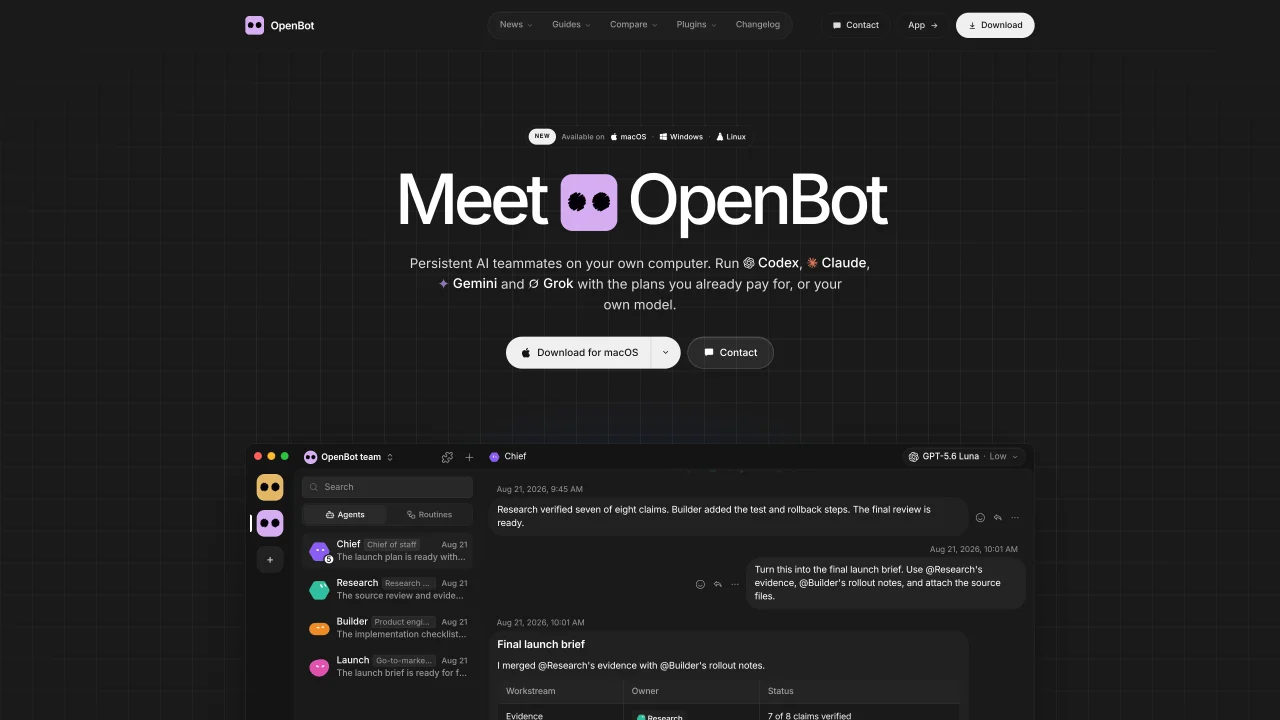
OpenBot is a desktop application that enables users to run a team of AI agents directly on their own computer. It supports multiple AI providers such as Codex, Claude Code, Gemini, Grok, OpenCode, Cursor, and Cline, as well as local models via Ollama or LM Studio. Each agent operates with its own name, instructions, and workspace, allowing them to communicate, share files, and hand off tasks. The application includes a built-in browser for agents to open, read, and control web pages. Workspaces, conversations, files, and browser data remain stored locally on the user’s computer rather than on external servers. Agents can continue their work across sessions or when switching providers without losing context. Users can manage tasks through a message queue that can be paused, resumed, or canceled.
OpenBot is a desktop application that allows users to run a team of AI agents directly on their own computer. It supports multiple AI providers and enables agents to communicate, share files, and hand off tasks while keeping all data stored locally.
OpenBot is designed for individuals or teams who want to collaborate with AI agents on their local machine, leveraging existing AI plans or local models without relying on external servers for data storage.
OpenBot itself is free to use with no hidden fees or locked features. Users only pay for the AI provider plans they already have, such as ChatGPT, Claude, or Google AI Pro.
OpenBot supports Codex, Claude Code, Gemini, Grok, OpenCode, Cursor, and Cline. It also allows connections to any OpenAI-compatible endpoint and local models via Ollama or LM Studio.
Download OpenBot for macOS, Windows, or Linux, then connect an AI provider. Describe the agent you want in one prompt, review its instructions, and save it. You can immediately send it tasks, which are queued until the agent is available.
All workspaces, conversations, files, and browser data remain stored locally on the user’s computer and are not sent to external servers. The AI provider only receives the necessary inputs for processing.
openbot.run · third-party estimates from Similarweb
Share of visits by channel
No measurable traffic from Social, Paid Referrals or Search.
Automation & Agents · Sep 2026
Traffic figures are third-party estimates, good for scale and trends; they can differ from a company's own numbers. Updated monthly.
We use essential cookies to run Aitoolnavio, and optional cookies to analyze traffic and measure our marketing. You choose what we use — optional cookies stay off unless you turn them on. See our Privacy Policy.
One short email a week: fresh tools worth trying, honest takes and the updates that actually matter. No spam, unsubscribe any time.
Unify customer data, automate workflows, and scale experiences with Einstein AI, Copilot, and Data Cloud in one CRM platform.
Build conversational forms, capture rich responses, and automate follow-ups with AI-powered surveys and workflows.
Transforms thoughts into actions, enhancing productivity and efficiency.
Automate code, research, and documents using agents.
All-in-one team productivity platform combining chat, docs, video meetings, workflows, and AI tools in one place.
Automate workflow, optimize operations, and detect potential issues with this efficient AI-driven solution.
AI-powered IDE for autonomous coding tasks and agentic development workflows
AI Recruitment engine to hire top global talent
Automate tailored conversations, analyze customer behavior, and automate lead gen, customer service, and sales.
AI job search copilot that matches roles to skills, optimizes resumes for ATS, generates cover letters, and autofills applications with real-time insights.
Source, match, and manage talent with predictive analytics for effortless recruiting.
Personal assistant that coordinates tasks across apps and devices via text or call
Matched on what this tool does — grouped by the job you would be replacing.
matches Multi-agent team collaboration · Agent instructions and workspaces persist across sessions · Marketplace for agents, skills, and plugins
Coordinate always-on AI agents to automate workflows.
Open-source platform for teams to collaborate with local AI agents in shared Discord-style rooms while keeping data on their own machines.
Orchestrates multi-agent AI teams for complex tasks across models
Hosted AI workspaces for teams with agents, approvals, and usage tracking
matches Support for multiple AI providers and local models · Local storage of workspaces and data · Task queue with pause, resume, and cancel options
matches Agent instructions and workspaces persist across sessions · Local storage of workspaces and data
A free desktop AI agent for students and learners that runs local open-source LLMs to control computers, use voice, and automate web tasks with offline privacy.
Unified local workspace for running AI models, automations and custom tools on a computer
Local workspace for running and supervising AI agents with private control
Android app that turns a device into an AI command center for running agent-based tasks
Private cloud computer for AI agents to collaborate on coding and research tasks
A shared workspace for storing and organizing AI-generated content as durable pages
Local memory manager for AI agents that retains context across tools
Desktop library to search and resume coding agent sessions locally