Generate captions, optimize content, and enhance with custom images for maximum engagement.
46M visits/mo-10%#3 Image & Design

Records changes made by AI agents and provides an undo layer for reverting them
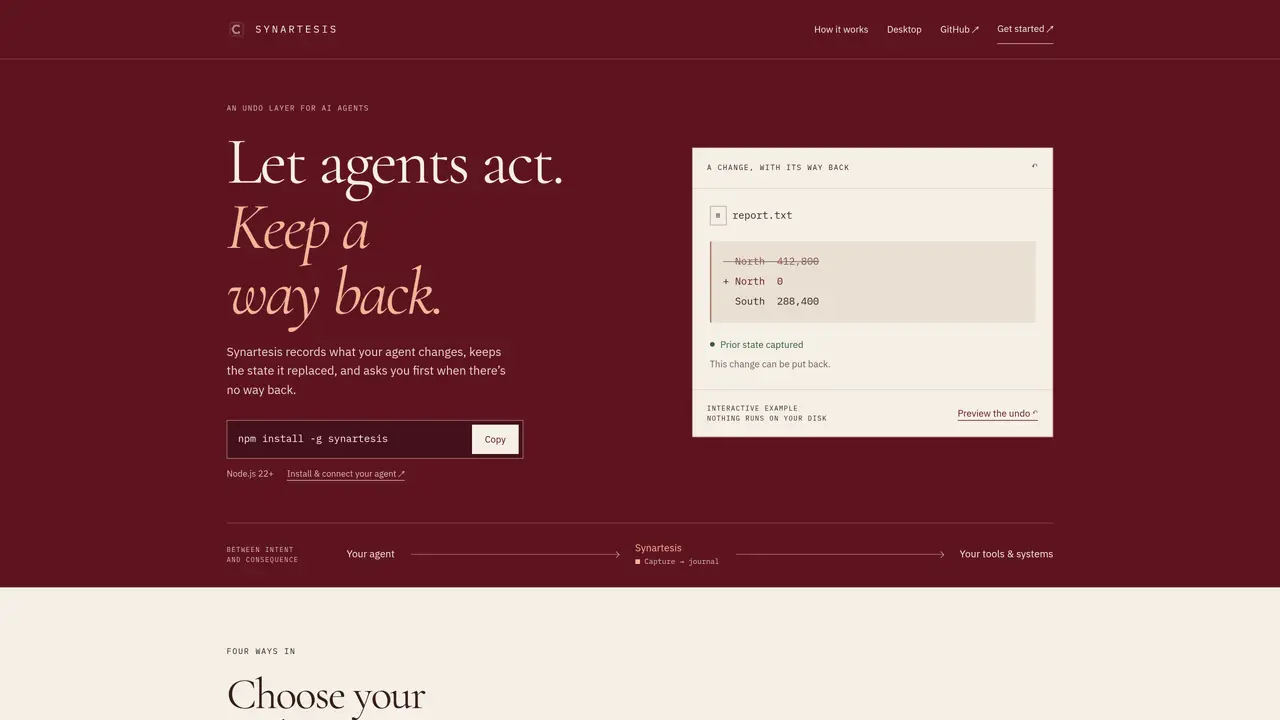
Synartesis functions as an undo layer for AI agents, capturing the state of files or systems before changes are made and storing that prior state for potential reversal. It integrates with existing agent workflows by acting as a proxy that intercepts tool calls, records the original values, and forwards the changes only after confirmation. The tool supports multiple entry points, including a command-line interface, a desktop window, and direct installation on local machines where agents like Claude Code or Cursor operate. Users can review captured changes, approve or reject them, and restore previous states when needed. Synartesis enforces policies to classify tool calls as reversible, compensable, or irreversible, ensuring that only actions with a defined undo path proceed automatically. For actions without a clear reversal, the system halts and requests human intervention before proceeding. The journal records each change and its corresponding undo step, allowing users to replay sequences or resolve conflicts that arise from later modifications to the same resources.
Synartesis acts as an undo layer for AI agents, recording changes made by agents and preserving the prior state of files or systems to allow reversal when needed. It intercepts tool calls, captures original values before changes occur, and forwards modifications only after confirmation or policy checks.
Synartesis is designed for users who work with AI agents that modify files or systems, such as developers using agents like Claude Code or Cursor. It suits those who need safety nets for irreversible actions or want to review and approve changes before they are finalized.
Synartesis integrates by acting as a proxy that intercepts tool calls from agents, records the original state, and enforces policies to classify actions as reversible, compensable, or irreversible. It supports multiple entry points, including command-line, desktop window, and local machine installation.
If an action is classified as irreversible or lacks a defined undo path, Synartesis halts the process and requests human intervention before proceeding. This ensures that potentially harmful or irreversible changes are not executed without explicit approval.
Yes, Synartesis supports local AI models, including those run via Ollama or LM Studio, allowing users to avoid paid API calls or sending prompts to external model providers. The desktop app and CLI can interact with these local models seamlessly.
To get started, install Synartesis using the command-line interface with a package manager like npm. Then, connect your AI agent to Synartesis by running a simple command such as 'synartesis install' to configure the proxy and begin capturing changes.
We use essential cookies to run aitoolnavio™, and optional cookies to analyze traffic and measure our marketing. You choose what we use — optional cookies stay off unless you turn them on. See our Privacy Policy.
One short email a week: fresh tools worth trying, honest takes and the updates that actually matter. No spam, unsubscribe any time.
Generate captions, optimize content, and enhance with custom images for maximum engagement.
Build conversational forms, capture rich responses, and automate follow-ups with AI-powered surveys and workflows.
Automate code, research, and documents using agents.
AI-powered IDE for autonomous coding tasks and agentic development workflows
Source, match, and manage talent with predictive analytics for effortless recruiting.
Automate workflow, optimize operations, and detect potential issues with this efficient AI-driven solution.
Transforms thoughts into actions, enhancing productivity and efficiency.
AI Recruitment engine to hire top global talent
All-in-one team productivity platform combining chat, docs, video meetings, workflows, and AI tools in one place.
Personal assistant that coordinates tasks across apps and devices via text or call
AI automation and agent-building platform with 3,000+ app integrations
AI job search copilot that matches roles to skills, optimizes resumes for ATS, generates cover letters, and autofills applications with real-time insights.
Matched on what this tool does — grouped by the job you would be replacing.
matches Prior state capture before writes · Conflict detection before undo operations · Journaling of all changes and undo steps
Runtime governance layer that intercepts and approves AI agent actions before execution
Middleware for durable AI agent execution with crash recovery and policy enforcement
Governance layer that validates AI agent actions before they update business systems
A security layer that enforces policies and audits actions for AI agents accessing real-world tools.
matches Policy enforcement for tool call classification · Proxy-based interception of tool calls
Screen-aware local AI hardware that reads your desktop, proposes multi-step tasks, and executes only after hardware approval via HDMI capture and USB-HID control.
Runtime security and governance tool for LLM applications and agents
Runtime control and observability for production AI agents
Local coding agent coordination workspace for macOS