



Generate captions, optimize content, and enhance with custom images for maximum engagement.
46M visits/mo-10%#3 Image & Design

AI-powered WhatsApp automation for sales teams that qualifies leads, runs follow-ups, and books appointments automatically with calendar integrations and analytics.
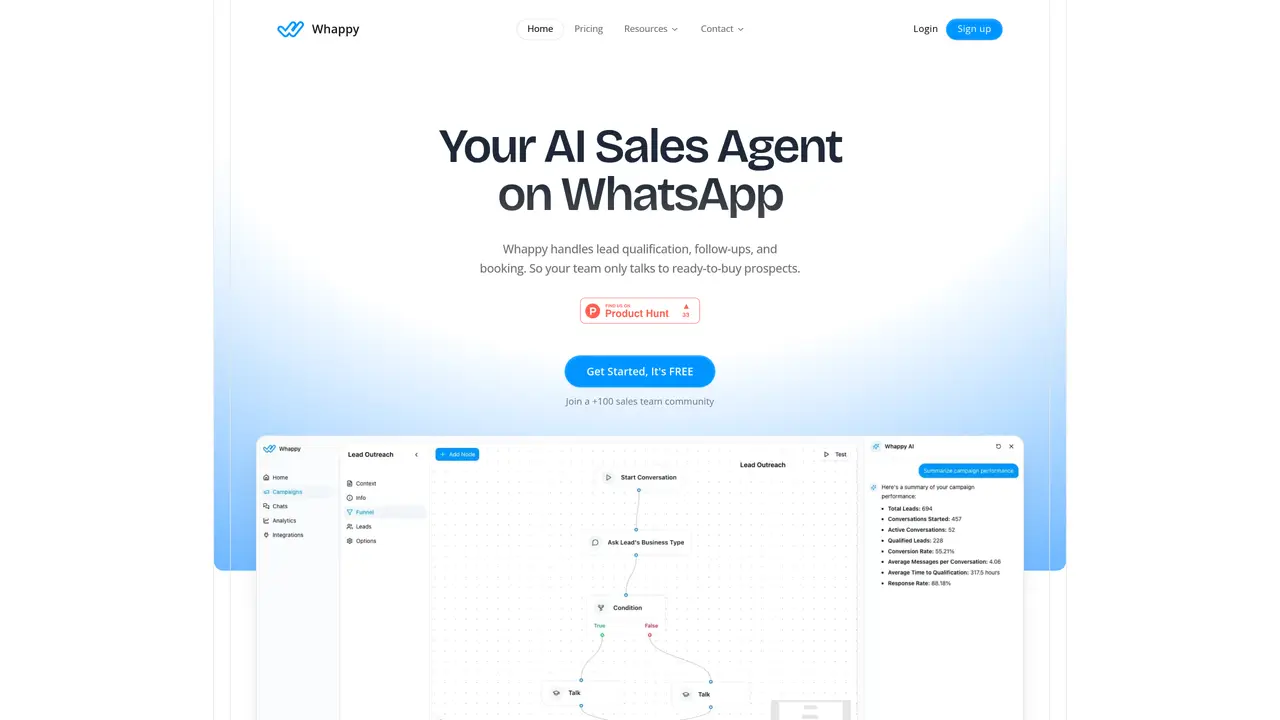
Whappy is a web-based, chat-based WhatsApp automation platform designed for B2B sales teams and service organizations that need to convert inbound ad leads into qualified, booked appointments. The platform uses AI-driven WhatsApp conversations that understand context, reply in a human-like way, handle voice notes, and support multi-language messaging. Users can create lead-qualification funnels, FAQs, and routing logic with a no-code drag-and-drop flow builder. Automated scheduling with calendar syncing (including Calendly) and appointment reminders reduces no-shows. Bulk messaging with WhatsApp-approved templates, lead tagging, and analytics dashboards track conversion rates and conversation performance. Whappy integrates with tools like Zapier and WhatsApp Business to fit into existing sales and operations stacks. It emphasizes end-to-end WhatsApp lead conversion from first response to qualification and booking, with enterprise-grade security and bank-level encryption for data protection.
Whappy automates WhatsApp conversations to qualify inbound ad leads, handle follow-ups, and book appointments without manual intervention. It uses AI to engage prospects, understand context, and respond in a human-like manner across multiple languages.
The platform is built for B2B sales teams and service organizations that rely on WhatsApp to convert leads into booked meetings. It suits businesses needing scalable, automated lead qualification and appointment scheduling.
Whappy connects with WhatsApp Business, calendar systems like Calendly, and workflow tools such as Zapier. It is designed to fit into existing sales and operations stacks with minimal setup.
Yes, Whappy can interpret voice messages and respond naturally, while automatically detecting and replying in the lead’s language to remove communication barriers.
Whappy offers detailed analytics on conversation performance, conversion rates, and customer satisfaction. Users can track funnel effectiveness and optimize outreach strategies in real time.
Users can start by linking their WhatsApp Business account, designing conversation flows with a drag-and-drop builder, and syncing with their calendar. The setup process is designed to be completed in minutes.
We use essential cookies to run aitoolnavio™, and optional cookies to analyze traffic and measure our marketing. You choose what we use — optional cookies stay off unless you turn them on. See our Privacy Policy.
One short email a week: fresh tools worth trying, honest takes and the updates that actually matter. No spam, unsubscribe any time.
Generate captions, optimize content, and enhance with custom images for maximum engagement.
Build conversational forms, capture rich responses, and automate follow-ups with AI-powered surveys and workflows.
Automate code, research, and documents using agents.
AI-powered IDE for autonomous coding tasks and agentic development workflows
Source, match, and manage talent with predictive analytics for effortless recruiting.
Automate workflow, optimize operations, and detect potential issues with this efficient AI-driven solution.
Transforms thoughts into actions, enhancing productivity and efficiency.
AI Recruitment engine to hire top global talent
All-in-one team productivity platform combining chat, docs, video meetings, workflows, and AI tools in one place.
Personal assistant that coordinates tasks across apps and devices via text or call
AI automation and agent-building platform with 3,000+ app integrations
AI job search copilot that matches roles to skills, optimizes resumes for ATS, generates cover letters, and autofills applications with real-time insights.
Web-based CRM that unifies WhatsApp, Instagram, email, and calls into one inbox for sales teams to manage leads and automate conversations.
Build and deploy AI agents for sales and support without coding, automating interactions across multiple channels.
Build LLM-powered voice, chat and WhatsApp agents to automate customer support, lead qualification and call management.
AI-powered tool for automating sales, bookings and support on WhatsApp and Instagram
matches AI-driven WhatsApp conversations with human-like replies · No-code drag-and-drop flow builder for lead qualification · Automated scheduling with calendar syncing
A voice AI platform that automates inbound and outbound calling for sales, marketing, support, and e-commerce teams with no-code workflows and CRM integrations.
AI-powered platform that qualifies leads, books appointments, and handles customer support via human-like conversational agents and synthetic voices.
AI voice sales platform that automates inbound/outbound calls, qualifies leads, books appointments, and handles 24/7 omnichannel follow-ups for B2B teams.
AI voice agent platform automating inbound/outbound calls, scheduling, lead qualification, and customer support with CRM and calendar integrations.