
Generate captions, optimize content, and enhance with custom images for maximum engagement.
46M visits/mo-10%#3 Image & Design
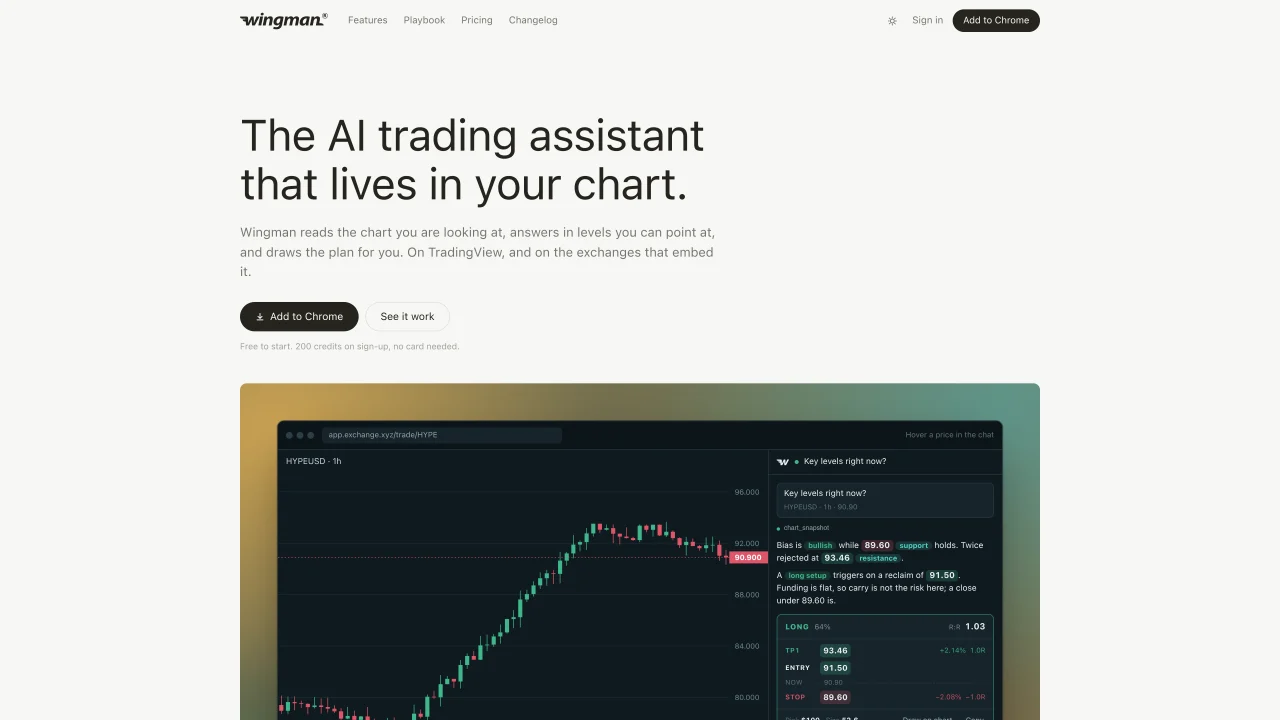
Wingman is a Chrome extension that integrates with TradingView and exchanges using TradingView charts to provide AI-driven trading analysis. It reads the chart in real time, identifies key levels such as support, resistance, and rejections, and generates structured trade plans including entry, stop, targets, reward-to-risk ratios, and position sizing based on the user’s account size and risk tolerance. The tool supports follow-up questions about market context, funding rates, open interest, and technical indicators, with answers grounded in the visible chart data. It can also write and compile Pine Script indicators directly into the TradingView editor, fixing errors automatically. Every response includes three suggested follow-up questions, and all interactions are saved in a journal for later review. The interface adapts to the site’s theme and dark mode settings, and users can pin levels or draw plans directly on the chart with one click.
Wingman is a Chrome extension that acts as an AI trading assistant integrated with TradingView and exchanges using TradingView charts. It reads charts in real time, identifies key levels such as support, resistance, and rejections, and generates structured trade plans including entry, stop, targets, reward-to-risk ratios, and position sizing based on the user’s account size and risk tolerance.
Wingman is designed for traders who use TradingView or exchanges that embed TradingView charts. It suits both beginners and experienced traders who want AI-driven analysis, real-time market insights, and structured trade planning without leaving their charting environment.
Wingman works directly within TradingView and on exchanges that use TradingView charts, such as perp exchanges and broker dashboards. It reads the chart data in real time and provides AI-driven analysis and trade plans without requiring users to switch platforms.
Yes, Wingman can write Pine Script indicators directly into the TradingView editor, compile them, and automatically fix errors until the script runs successfully. This feature is available on TradingView where the Pine editor is located.
Wingman uses a credit-based system where each AI answer consumes credits. Users receive an initial allocation of credits upon sign-up, and additional credits can be purchased as needed. Credits do not expire, and plan credits reset monthly and are used first.
No, Wingman cannot place trades, access wallets, or interact with user funds. It operates as a second opinion tool that provides analysis and trade plans but requires users to execute trades manually and manage their own funds.
We use essential cookies to run aitoolnavio™, and optional cookies to analyze traffic and measure our marketing. You choose what we use — optional cookies stay off unless you turn them on. See our Privacy Policy.
One short email a week: fresh tools worth trying, honest takes and the updates that actually matter. No spam, unsubscribe any time.
Generate captions, optimize content, and enhance with custom images for maximum engagement.
Build conversational forms, capture rich responses, and automate follow-ups with AI-powered surveys and workflows.
Automate code, research, and documents using agents.
AI-powered IDE for autonomous coding tasks and agentic development workflows
Source, match, and manage talent with predictive analytics for effortless recruiting.
Automate workflow, optimize operations, and detect potential issues with this efficient AI-driven solution.
Transforms thoughts into actions, enhancing productivity and efficiency.
AI Recruitment engine to hire top global talent
All-in-one team productivity platform combining chat, docs, video meetings, workflows, and AI tools in one place.
Personal assistant that coordinates tasks across apps and devices via text or call
AI automation and agent-building platform with 3,000+ app integrations
AI job search copilot that matches roles to skills, optimizes resumes for ATS, generates cover letters, and autofills applications with real-time insights.
Matched on what this tool does — grouped by the job you would be replacing.
matches AI-powered chart analysis with real-time data · Trade plan generation with risk metrics · Pine Script indicator writing and compilation
AI tool that analyzes trading charts and provides structured trade verdicts
AI-powered chart analysis tool that generates trade plans with entry, stop and target levels
AI platform that analyzes market charts and data to provide structured trading insights
AI-assisted chart analysis tool that generates structured trading decisions with entry conditions and risk
matches Journal that records past trades and plans
Trading journal that evaluates trade decisions rather than outcomes for MetaTrader 5 users
Crypto trading journal that syncs with exchanges and provides AI-powered analysis
AI-powered trading journal and analytics platform for institutional traders
All-in-one AI trading journal and backtester for manual and automated strategies