An AI chat platform for roleplaying, storytelling, and learning by chatting with millions of user-created AI characters.
151M visits/mo-5.5%#2 Chatbots & Assistants

Converts YouTube or Vimeo videos into interactive courses with built-in quizzes and adaptive learning
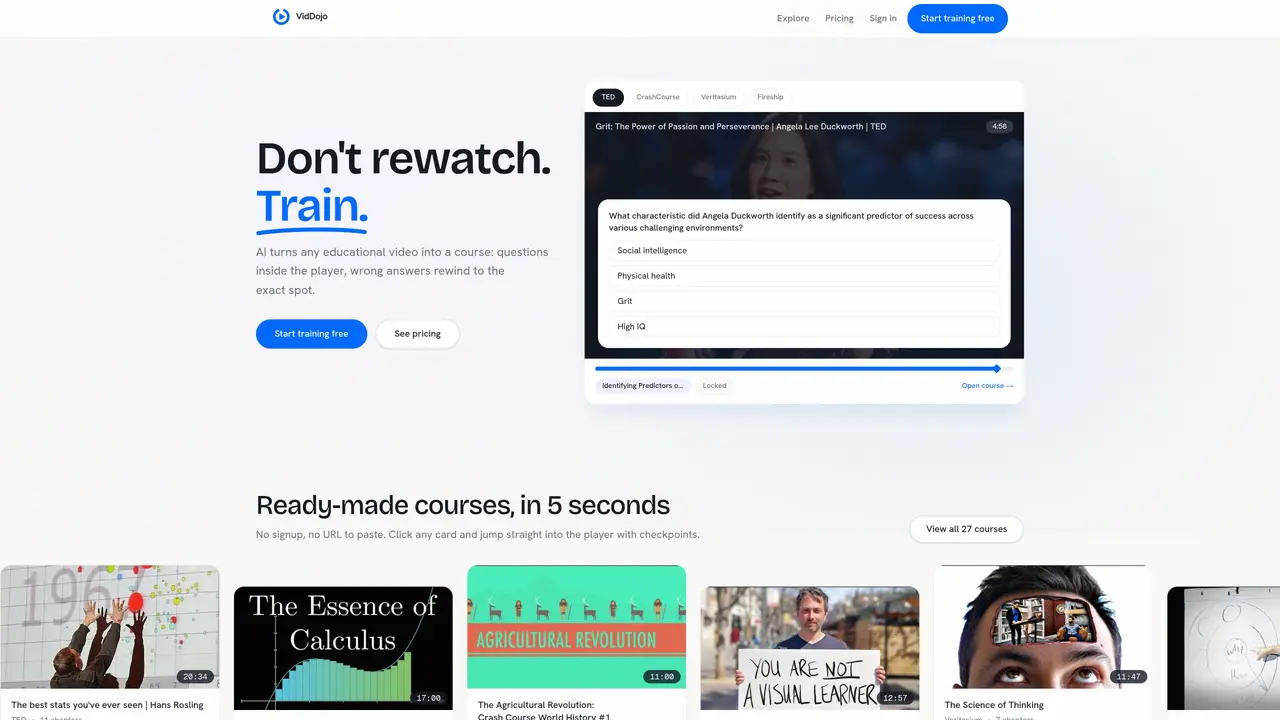
VidDojo transforms educational videos into interactive courses by embedding questions directly into the player. The tool automatically splits videos into chapters and inserts checkpoints where learners must answer questions before proceeding. Wrong answers trigger an automatic rewind to the exact moment of confusion, reinforcing learning through immediate feedback. Six question types are supported, including flashcards, diagrams, and predicting the next part of the video. Progress is tracked per concept rather than as a single percentage, allowing users to identify specific areas of weakness. The platform also features a final boss-fight challenge, particularly for coding videos where learners must pass a Jest test in a browser editor to complete the course. Ready-made courses are available for instant use without signup, while the tool supports videos up to 140 minutes with Whisper captions.
VidDojo transforms educational videos into interactive courses by embedding questions directly into the player. It automatically splits videos into chapters and inserts checkpoints where learners must answer questions before proceeding.
VidDojo is designed for learners and educators who want to turn passive video watching into active training. It suits students, professionals, and anyone seeking to reinforce learning through immediate feedback and progress tracking.
When a learner answers incorrectly, VidDojo automatically rewinds to the exact moment of confusion, allowing them to revisit the material. This feature reinforces learning by providing immediate feedback and targeted review.
VidDojo supports six question types, including flashcards, diagrams, retell, quiz, predict the next part, and a final boss-fight challenge for coding videos. These varied formats cater to different learning styles and subject matter.
Yes, VidDojo supports videos from YouTube, Vimeo, and direct .mp4 files. It can also generate captions using Whisper for videos up to 140 minutes long, ensuring accessibility and comprehension.
To get started, paste a video link into VidDojo, and the platform will automatically build a course in about 60 seconds. You can then begin training immediately, with progress tracked per concept to identify areas of weakness.
viddojo.com · third-party estimates from Similarweb
Last 3 months · grows by one month every month
Share of visits by channel
Share of visits · estimated visits
Chatbots & Assistants · Sep 2026
Traffic figures are third-party estimates, good for scale and trends; they can differ from a company's own numbers. Updated monthly.
We use essential cookies to run aitoolnavio™, and optional cookies to analyze traffic and measure our marketing. You choose what we use — optional cookies stay off unless you turn them on. See our Privacy Policy.
One short email a week: fresh tools worth trying, honest takes and the updates that actually matter. No spam, unsubscribe any time.
An AI chat platform for roleplaying, storytelling, and learning by chatting with millions of user-created AI characters.
Create and interact with AI companions and virtual characters using GPT-4o on Chub AI's platform.
Create stunning visuals, access image recognition and processing, and express creatively with natural language processing.
Create fully customizable AI companions with persistent memory, selfies, and live voice calls.
Practice conversing with AI, improve pronunciation, and learn a new language in an immersive, safe environment.
Train, customize, optimize, and deploy models easily for powerful AI projects.
AI-powered tarot readings and personalized interpretations for self-reflection and guidance.
Quickly narrow searches by category, control results by country or language, and find relevant, accurate results with ease.
Chat with AI friends, mentors, and characters on the world's largest conversational AI platform for entertainment.
Generate presentations, create interactive slideshows, and customize with themes, fonts, and colors.
Trendspider is a sophisticated all-in-one market research and trading software designed to enhance the trading strategies of investors and traders.
An AI chat platform for immersive, personalized interactions with virtual companions, including image generation.
Matched on what this tool does — grouped by the job you would be replacing.
Paid placement · similar tools from listings that support aitoolnavio™
Instant lead response for home-service pros: your phone rings on every new lead, plus 14 days of follow-up
matches AI splits videos into chapters · Questions embedded in video player · Automatic rewind on wrong answers
matches AI-Generated Flashcards · Multiple Choice Questions · Case Questions
Turns existing content like videos or documents into interactive courses with auto-generated lessons, quizzes, and flashcards.
Turns YouTube videos, PDFs, and articles into interactive, gamified lessons with quizzes and flashcards for personalized learning.
Converts YouTube playlists into structured study plans with quizzes and flashcards
Transforms documents into interactive video lessons with automatically generated quizzes and gamification.
Generate instant flashcards and questions from any study material.
An AI-powered flashcard maker for students, language learners, and self-directed learners.
Turns articles, videos, and PDFs into interactive flashcards to boost learning and retention.