

AI-powered video messaging tool that records, shares, and manages video messages with AI-generated titles, summaries, and tasks.
16M visits/mo-3.4%#5 Chatbots & Assistants
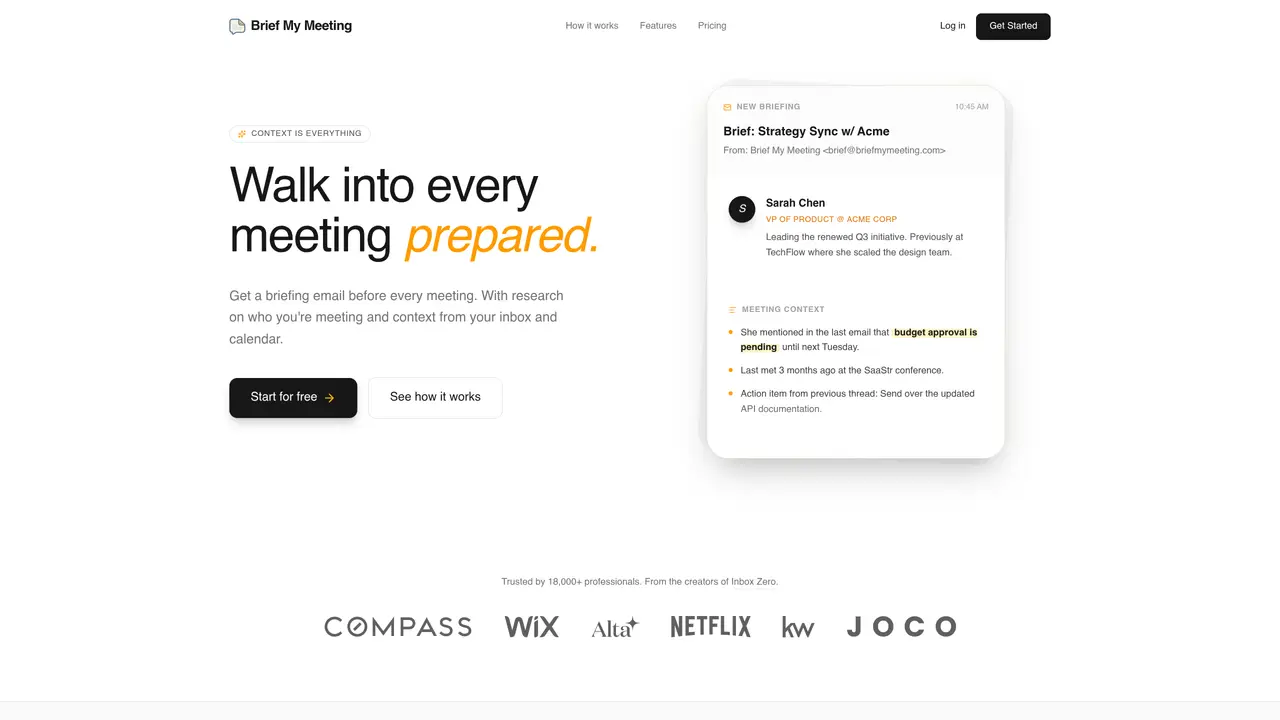
Brief My Meeting focuses on AI-driven meeting preparation, turning scattered email and calendar data into clear, timely briefings. By connecting to Google or Outlook email and calendars, it automatically compiles who attendees are, what has been discussed previously, open action items, and relevant documents, then sends a structured briefing email about four hours before each external meeting. It targets busy professionals who juggle many conversations and want to walk into every meeting informed rather than scrambling. Key Features: AI-generated pre-meeting briefs: Uses text analysis to scan past email threads, calendar events, and attachments related to attendees, then distills them into a concise, human-readable briefing sent ahead of the meeting. Attendee and company research: Pulls in LinkedIn profiles, company details, and role context for each participant so users understand who is in the room and what matters to them. Contextual history view: Surfaces prior meetings, emails, and key quotes, including reminders about what was decided last time and which follow-ups are still pending. Relevant document surfacing: Identifies and links important attachments such as proposals, budgets, slide decks, or shared PDFs that might be referenced in the upcoming call. Calendar and inbox integration: Connects directly to Google and Outlook environments, automatically detecting external meetings and preparing briefs without manual setup for each event. Security and compliance focus: Operates with SOC 2 Type 2 compliance and a clearly stated “only what is necessary” access approach, aiming to reassure security-conscious teams.
Brief My Meeting automatically generates concise pre-meeting briefings by analyzing past email threads, calendar events, attachments, and attendee details. It sends a structured briefing email approximately four hours before each external meeting to help users walk in prepared.
The tool is designed for busy professionals who manage multiple meetings and need to quickly recall context, attendee backgrounds, and prior discussions without manually searching through emails or documents.
Brief My Meeting connects securely to Google or Outlook calendars and email accounts, automatically detecting external meetings and compiling relevant information without requiring manual setup for each event.
Yes, Brief My Meeting operates with SOC 2 Type 2 compliance and follows a 'only what is necessary' access approach to ensure data security and privacy for users.
Yes, Brief My Meeting offers a 7-day free trial with no long-term commitments required, allowing users to test the service before subscribing.
Users can start by signing up for a free trial on the Brief My Meeting website, securely linking their Google or Outlook accounts, and enabling automated briefings for external meetings.
briefmymeeting.com · third-party estimates from Similarweb
Last 4 months · grows by one month every month
Share of visits · estimated visits
Chatbots & Assistants · Sep 2026
Traffic figures are third-party estimates, good for scale and trends; they can differ from a company's own numbers. Updated monthly.
We use essential cookies to run aitoolnavio™, and optional cookies to analyze traffic and measure our marketing. You choose what we use — optional cookies stay off unless you turn them on. See our Privacy Policy.
One short email a week: fresh tools worth trying, honest takes and the updates that actually matter. No spam, unsubscribe any time.
AI-powered video messaging tool that records, shares, and manages video messages with AI-generated titles, summaries, and tasks.
Hardware device that records conversations and converts them into searchable transcripts, summaries, and notes.
Automate transcription, generate summaries, identify speakers, and timestamps for video-conferencing conversations.
AI-powered meeting recorder and summarizer that captures, transcribes, and generates actionable insights from conversations.
Automatically record, transcribe, take notes, and create summaries with key insights during meetings.
Transforms audio/video to summarized text, instantly, across platforms.
Automatically transcribe meetings, create summaries, and securely store audio files in a searchable format.
Automatically turn meetings into searchable notes and tasks.
Wearable AI device that captures conversations and meetings, then auto-generates transcripts, summaries, action items, mind maps, and searchable notes.
Record, transcribe, and share key insights from virtual trainings, online meetings, and content creation.
Record, transcribe, and summarize online meetings from Google Meet and Zoom with AI, then share insights across collaboration tools.
Transform audio/video to text with precision, supporting 1500+ platforms, enriched by AI features.
Matched on what this tool does — grouped by the job you would be replacing.
matches AI-generated pre-meeting briefs · Attendee and company research · Contextual history view
An open-source AI email assistant that labels messages, drafts replies in your voice, blocks cold email, and provides inbox analytics.
Turns email threads and calendar invites into concise meeting briefs in 60 seconds
AI-powered inbox manager that drafts context-aware email replies and surfaces action items across Gmail, Outlook, and calendars.