
Turn spreadsheets into custom business apps without writing code using this no-code platform.
21M visits/mo+0.1%#15 Coding & Development
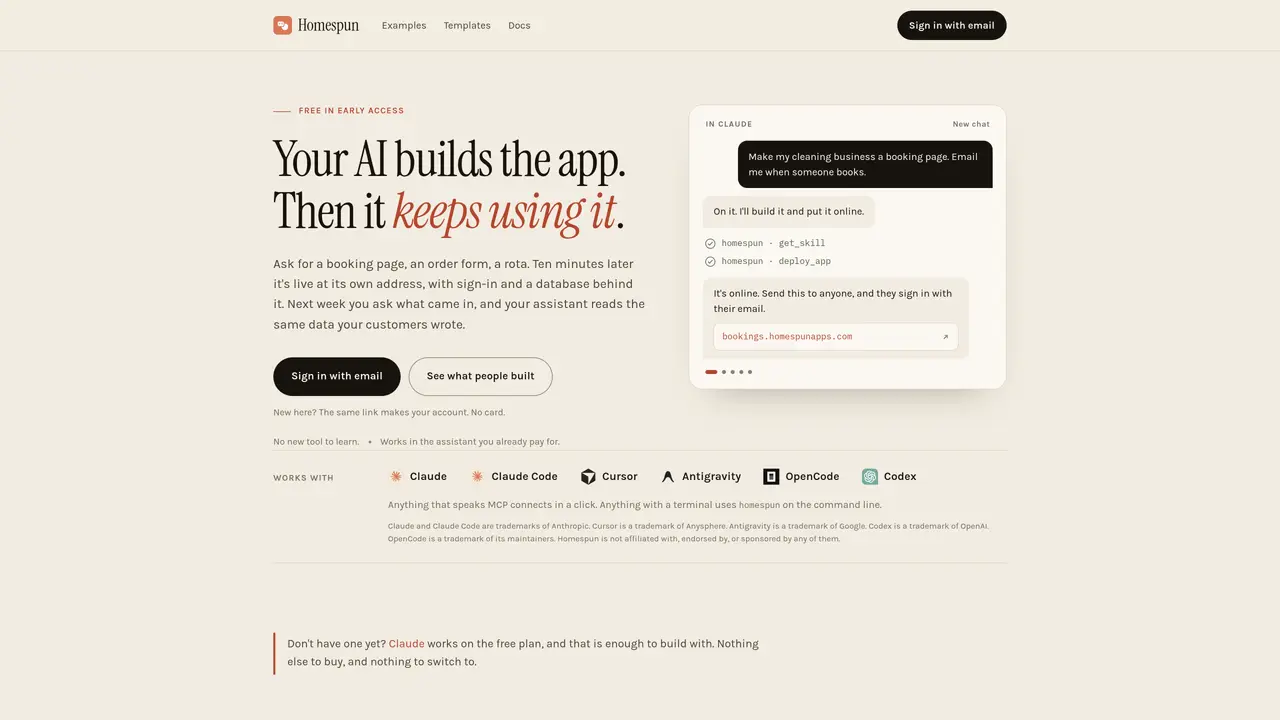
Homespun converts natural-language requests into fully functional web applications that are immediately accessible online. Each app receives a dedicated web address, a security certificate, a built-in sign-in system, and a persistent database without requiring manual setup. The resulting site can be shared with others who sign in via email, and the original AI assistant retains access to the same data for follow-up tasks such as reading new entries or updating fields. The tool integrates directly with existing AI assistants like Claude, Claude Code, Cursor, Antigravity, OpenCode, and Codex through a connector or command-line interface, allowing users to issue prompts from any device with a browser or terminal. Applications remain live and editable indefinitely, enabling ongoing changes such as adding fields, adjusting prices, or sending reminders without redeploying. The platform emphasizes privacy by default, with each app isolated from the user’s main account and sharing only the creator’s name, not their email address. Early-access users can build and deploy without payment or installation, relying solely on an email sign-in.
Homespun converts natural-language requests into fully functional web applications that are immediately accessible online. Users can issue prompts from any device with a browser or terminal, and the resulting site includes a dedicated web address, security certificate, built-in sign-in system, and a persistent database without manual setup.
Homespun is designed for individuals or small teams who need to quickly create and deploy web applications without managing infrastructure. It is particularly useful for those already using AI assistants like Claude, Claude Code, or Cursor to streamline the development process.
Homespun integrates directly with AI assistants that support the MCP protocol, such as Claude, Claude Code, Cursor, Antigravity, OpenCode, and Codex. Users can connect Homespun via a connector link or command-line interface, and sign in with their email to start building applications.
Yes, applications created with Homespun remain live and editable indefinitely. Users can make ongoing changes such as adding fields, adjusting prices, or sending reminders without redeploying the application.
Homespun is currently available for free during its early-access phase. Users can build and deploy applications without payment or installation, relying solely on an email sign-in. Future pricing details will be communicated before any changes are made.
Homespun emphasizes privacy by default, with each application isolated from the user’s main account. Only invited users can access an app, and they see only the creator’s name, not their email address. Applications run on their own web addresses, treated as separate sites by the browser.
homespun.dev · third-party estimates from Similarweb
Share of visits by channel
Share of visits · estimated visits
Coding & Development · Sep 2026
Traffic figures are third-party estimates, good for scale and trends; they can differ from a company's own numbers. Updated monthly.
We use essential cookies to run aitoolnavio™, and optional cookies to analyze traffic and measure our marketing. You choose what we use — optional cookies stay off unless you turn them on. See our Privacy Policy.
One short email a week: fresh tools worth trying, honest takes and the updates that actually matter. No spam, unsubscribe any time.
Turn spreadsheets into custom business apps without writing code using this no-code platform.
Transform ideas into fully functional applications with Lovable, a groundbreaking AI tool.
Explore and test Google’s experimental AI tools and prototypes before they become products.
Build full applications swiftly without coding expertise.
Build scalable apps with AI-driven tools.
AI-native builder that turns prompts into full-stack web apps, syncs to GitHub, and deploys to Vercel in seconds with visual editing.
Create AI-powered applications, customize features, build & test rapidly with intuitive UI.
AI-powered visual platform that turns prompts or images into mobile and web apps with drag-and-drop simplicity.
Turn natural language into full-stack apps, SaaS products, and websites without coding using an AI-powered no-code builder.
AI-powered app builder that turns data into functional web apps without coding.
Low-code platform accelerates enterprise app development with AI.
Rork turns app ideas into fully functional mobile apps for iOS, Android, and web in minutes using AI, no coding required.
Matched on what this tool does — grouped by the job you would be replacing.
matches Natural-language app generation · Dedicated web address and HTTPS · Email-based sign-in system
AI-powered platform to generate, edit, and deploy full-stack web apps with minimal setup.
AI-powered platform to build, host and operate web apps from natural language prompts
AI-powered no-code platform that converts plain-English prompts into full-stack web apps
AI-powered web app builder that generates working apps from plain-language descriptions
matches Email-based sign-in system · Persistent database integration · Real-time data access for AI assistants
Open-source backend platform providing Postgres, authentication, APIs, and real-time features to build scalable apps quickly.
AI-powered no-code platform to build business apps, workflows, and databases from plain-language descriptions with built-in hosting and security.