Generate captions, optimize content, and enhance with custom images for maximum engagement.
46M visits/mo-10%#3 Image & Design
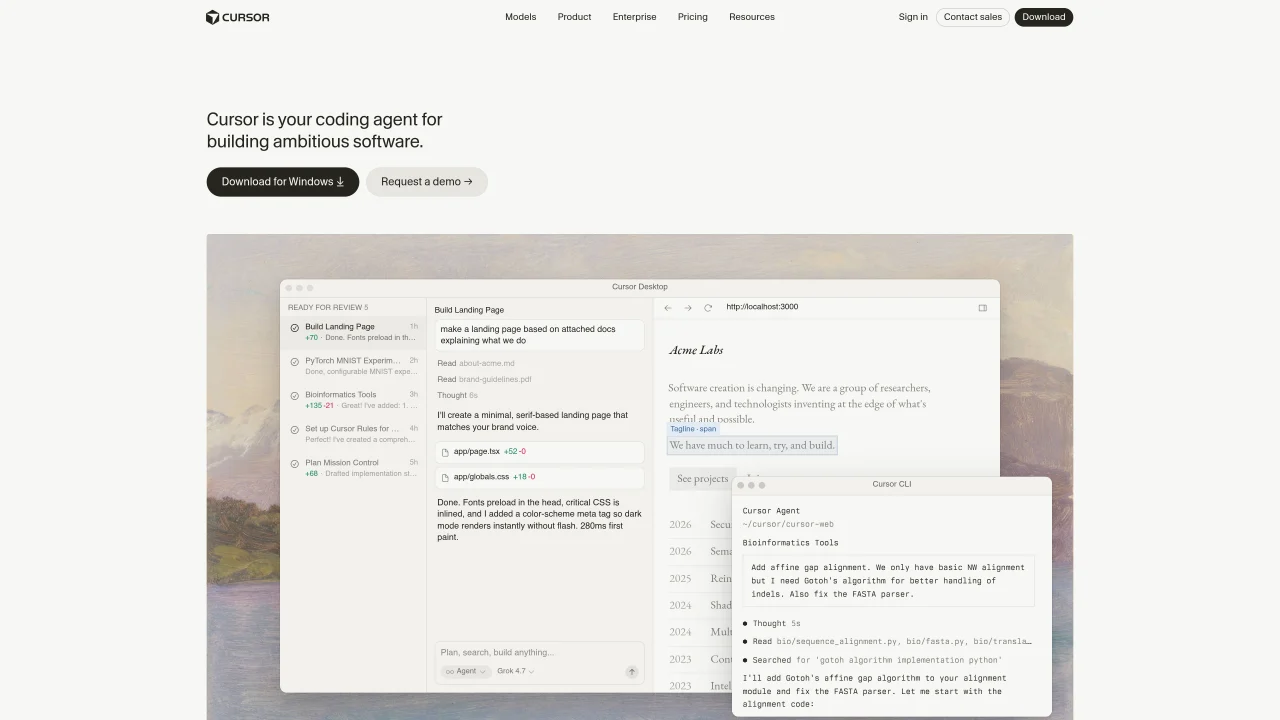
Cursor is an integrated development environment that combines AI coding assistance with agentic workflows. It supports autonomous task execution, allowing agents to build, test, and demo features end-to-end while developers review and guide the process. The tool integrates with existing workflows through desktop and terminal interfaces, Slack for team communication, and GitHub for pull request reviews. Cursor provides context-aware code completions, intelligent navigation, and semantic search across codebases. It supports multi-agent collaboration, reinforcement learning-based optimizations, and secure codebase indexing. Users can automate repetitive tasks, set up scheduled agents, and leverage frontier models for coding assistance. The interface includes features like Mission Control for window management and plan generation for breaking down development tasks.
Anysphere, Inc.
San Francisco, California, US · Founded 2022
Cursor is an AI-powered integrated development environment designed to assist developers in building software by providing context-aware code completions, intelligent navigation, and autonomous agentic workflows. It enables agents to handle tasks such as building, testing, and demoing features end-to-end, while developers review and guide the process.
Cursor is suitable for developers, engineering teams, and organizations looking to accelerate software development through AI assistance. It is particularly useful for those who want to automate repetitive tasks, collaborate with AI agents, and integrate AI workflows into existing development processes.
Cursor integrates with existing workflows through desktop and terminal interfaces, Slack for team communication, and GitHub for pull request reviews. It also supports secure codebase indexing, semantic search, and multi-agent collaboration to streamline development processes.
Yes, Cursor can run autonomously, allowing agents to build, test, and demo features end-to-end without constant developer input. Developers can review the results and provide guidance as needed, making it useful for both individual and team workflows.
Key features include context-aware code completions, intelligent code navigation, semantic search across codebases, multi-agent collaboration, reinforcement learning-based optimizations, and secure codebase indexing. It also offers Mission Control for window management and plan generation for breaking down development tasks.
To get started with Cursor, you can download the desktop application for macOS or use the Cursor CLI for terminal-based workflows. The tool provides interactive demos and documentation to help users set up agents, automations, and integrations with platforms like Slack and GitHub.
cursor.com · third-party estimates from Similarweb
Last 4 months · grows by one month every month
Share of visits by channel
No measurable traffic from Paid Referrals.
Share of visits · estimated visits
Other countries: 47.4%
How people reach this site from other AI tools
234K a month · 1.1% of all visits
Automation & Agents · Sep 2026
Traffic figures are third-party estimates, good for scale and trends; they can differ from a company's own numbers. Updated monthly.
We use essential cookies to run aitoolnavio™, and optional cookies to analyze traffic and measure our marketing. You choose what we use — optional cookies stay off unless you turn them on. See our Privacy Policy.
Generate captions, optimize content, and enhance with custom images for maximum engagement.
Build conversational forms, capture rich responses, and automate follow-ups with AI-powered surveys and workflows.
Automate code, research, and documents using agents.
Source, match, and manage talent with predictive analytics for effortless recruiting.
Automate workflow, optimize operations, and detect potential issues with this efficient AI-driven solution.
Transforms thoughts into actions, enhancing productivity and efficiency.
AI Recruitment engine to hire top global talent
All-in-one team productivity platform combining chat, docs, video meetings, workflows, and AI tools in one place.
Personal assistant that coordinates tasks across apps and devices via text or call
AI automation and agent-building platform with 3,000+ app integrations
AI job search copilot that matches roles to skills, optimizes resumes for ATS, generates cover letters, and autofills applications with real-time insights.
Automate tailored conversations, analyze customer behavior, and automate lead gen, customer service, and sales.
One short email a week: fresh tools worth trying, honest takes and the updates that actually matter. No spam, unsubscribe any time.
Matched on what this tool does — grouped by the job you would be replacing.
Streamline coding with predictive AI, deployment, and integration.
Create tasks, set deadlines, track progress, review code efficiently, automate notifications for team members.
AI-powered coding platform that uses agents to plan, write, and test software with real-time feedback and verifiable artifacts.
Automate coding, understand code better, and streamline coding with AI-powered auto-complete.
See all Cursor alternatives, compared →
Compare: Cursor vs Claude
AI coding assistant that writes, debugs, refactors, and automates code tasks using natural language in terminals, IDEs, or web interfaces.
An open-source AI coding agent that autonomously analyzes, modifies, and manages local codebases while keeping all data private and secure.
Automates software development tasks like coding, debugging, and project management to boost productivity and accelerate development cycles.
Write & run code in 50+ languages, auto-complete with AI, and code faster with an intuitive interface.
AI-powered platform to generate, edit, and deploy full-stack web apps with minimal setup.
Transform ideas into fully functional applications with Lovable, a groundbreaking AI tool.