AI-powered website builder that generates a professional site in under a minute and includes tools for content, SEO, and analytics.
52M visits/mo+0.7%#4 Coding & Development

Generates code from natural language, explains macros, optimizes performance, detects errors, and provides reusable code snippets within Excel.
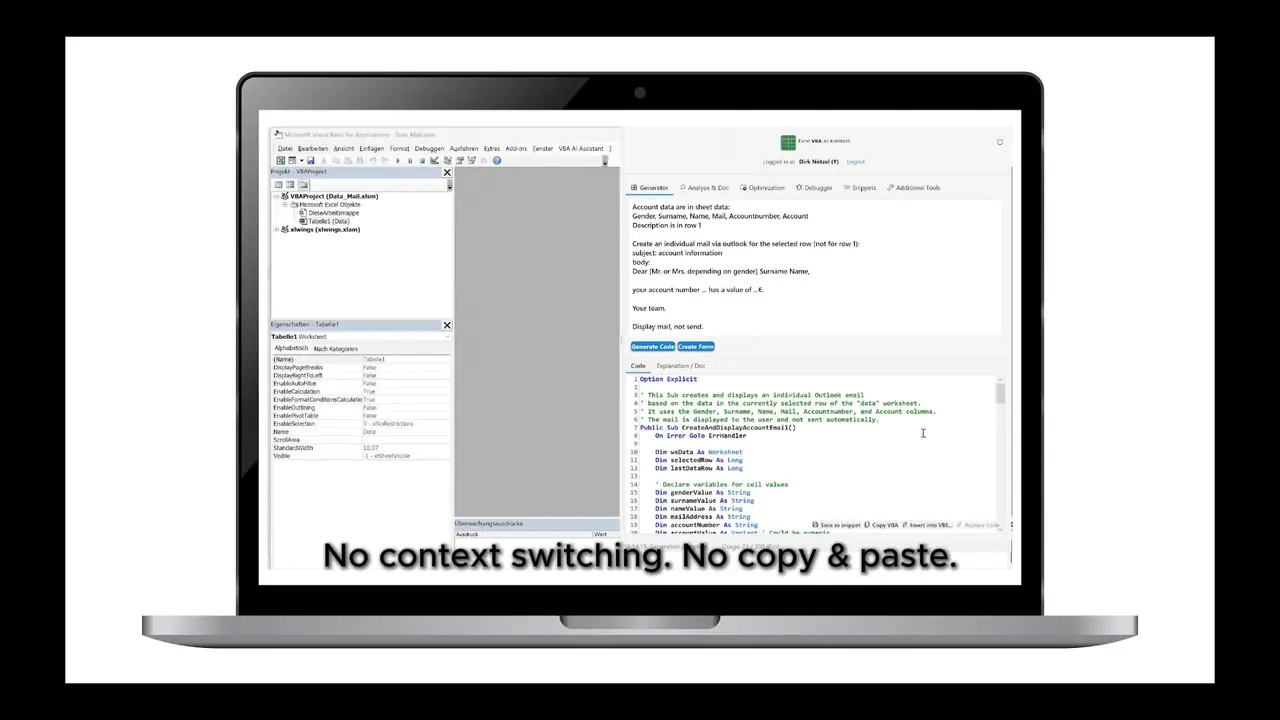
The Excel VBA AI Assistant integrates artificial intelligence directly into the Visual Basic Editor of Microsoft Excel. It supports users who create, maintain, or analyze VBA macros by enabling code-related tasks entirely within Excel instead of switching to external tools. Key functions include generating code from natural language descriptions, explaining complex macros, and creating documentation. Existing code can be optimized by identifying inefficient constructs such as cell-by-cell loops or the use of Select and Activate, with alternatives like array processing suggested. The assistant also detects compile-time and runtime errors, proposes corrected versions, and provides standardized error-handling templates with optional logging. A snippet manager with more than one hundred reusable routines allows frequently used solutions to be stored, searched, and reused directly in the editor. The Excel VBA AI Assistant is available as an Excel add-in.
The Excel VBA AI Assistant integrates AI directly into the Excel VBA editor to generate, explain, optimize, and debug VBA macros without leaving Excel.
It is designed for Excel users who write, maintain, or analyze VBA macros, including developers, analysts, and power users who need to automate tasks in Excel.
Install the Excel add-in, open the VBA editor, and use natural language prompts or the built-in tools to generate, explain, or optimize your VBA code.
Yes, it detects compile-time and runtime errors, suggests fixes, and provides standardized error-handling templates with optional logging.
Yes, it identifies inefficient constructs like cell-by-cell loops or excessive use of Select and Activate, and suggests alternatives such as array processing.
Yes, it includes a snippet manager with over one hundred reusable routines that can be stored, searched, and reused directly in the VBA editor.
vbassistant.ai · third-party estimates from Similarweb
Last 2 months · grows by one month every month
Traffic figures are third-party estimates, good for scale and trends; they can differ from a company's own numbers. Updated monthly.
We use essential cookies to run aitoolnavio™, and optional cookies to analyze traffic and measure our marketing. You choose what we use — optional cookies stay off unless you turn them on. See our Privacy Policy.
One short email a week: fresh tools worth trying, honest takes and the updates that actually matter. No spam, unsubscribe any time.
AI-powered website builder that generates a professional site in under a minute and includes tools for content, SEO, and analytics.
AI-powered coding platform that uses agents to plan, write, and test software with real-time feedback and verifiable artifacts.
Automate code, research, and documents using agents.
AI-powered code assistant that generates, reviews, optimizes, and debugs code with natural language prompts and editor integrations.
AI assistant for safe, reliable productivity with code, collaboration, and integrations.
AI-powered IDE for autonomous coding tasks and agentic development workflows
Privacy-focused AI chatbot that generates uncensored text, code, images, and translations without storing conversations or requiring an account.
A free web-based AI chatbot and agent for writing, coding, research, and content creation with multilingual support.
Write & run code in 50+ languages, auto-complete with AI, and code faster with an intuitive interface.
An IDE that automates legacy-to-modern code migration using autonomous coding agents.
AI models that return typed decisions with calibrated confidence for software automation
Practice coding challenges, improve technical skills, get detailed explanations, compare performance with peers.
Matched on what this tool does — grouped by the job you would be replacing.
matches Generates code from natural language descriptions · Explains complex macros · Creates documentation
Guidy, your on-screen AI assistant, shows you how to do it in real time - on your computer.
AI Excel VBA code generator that creates, debugs, and improves Excel macros from simple commands in seconds.
Create complex formulas, automate tasks with code snippets, and save time with an intuitive interface.
matches Generates code from natural language descriptions · Explains complex macros
AI-powered code assistant that generates, reviews, optimizes, and debugs code with natural language prompts and editor integrations.
Revolutionize coding with real-time assistance, error detection, and code optimization.
AI coding assistant that generates and explains code from natural language descriptions to speed up development and reduce errors.
Generate code from language, translate code between languages, and use ML algorithms for precise coding.