
AI-powered website builder that generates a professional site in under a minute and includes tools for content, SEO, and analytics.
52M visits/mo+0.7%#4 Coding & Development
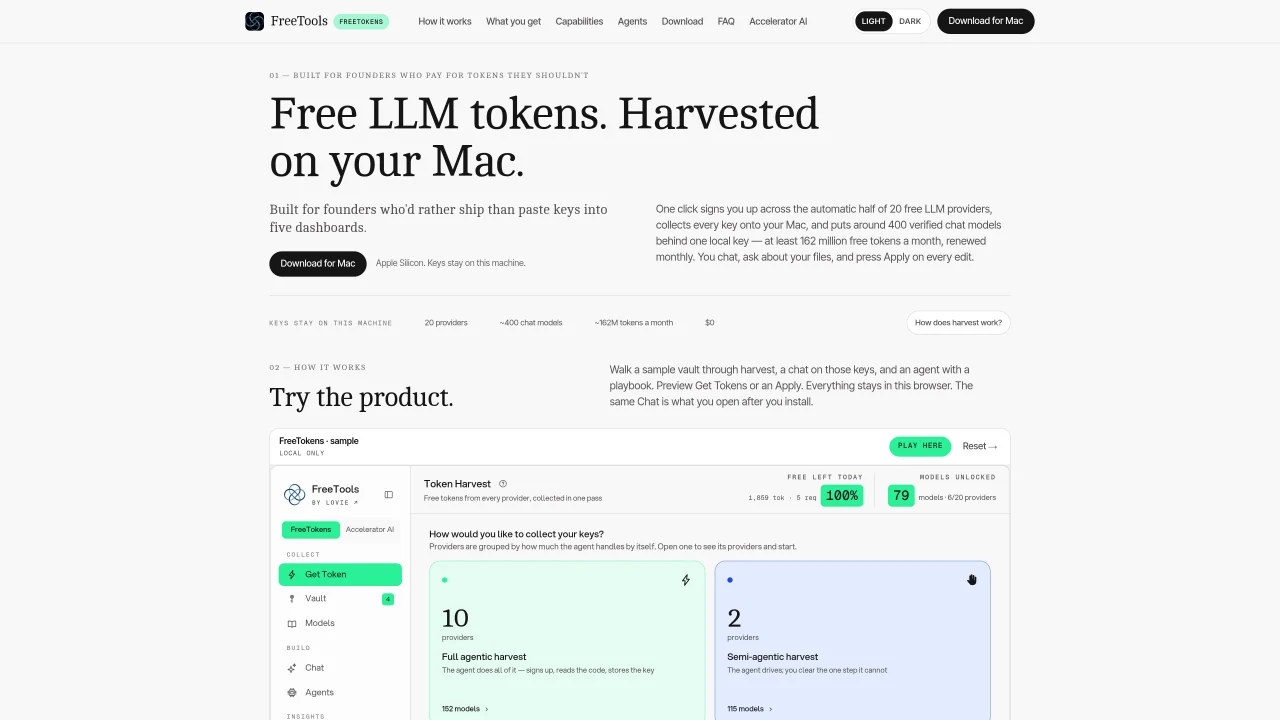
FreeTokens is a native Mac application that automates the collection and management of free LLM provider tokens directly on the user’s machine. The tool signs up for free tiers across 20 providers, consolidates keys into a local pool, and provides a single local key to access around 400 verified chat models. The app handles the signup process for 10 providers automatically, including reading verification codes from Gmail, while others require manual input such as CAPTCHAs or key pasting. All tokens are stored in the macOS Keychain, and requests are routed directly to providers without passing through an intermediary server. Users can chat, ask questions about documents, or run agents with playbooks, with edits requiring explicit approval before application. The app also supports integration with third-party tools like Claude Code, Codex CLI, and Aider via a local API endpoint.
FreeTokens is a native Mac application that automates the collection and management of free LLM provider tokens directly on the user’s machine. It signs up for free tiers across 20 providers, consolidates keys into a local pool, and provides a single local key to access around 400 verified chat models.
The tool is built for founders and developers who prefer to focus on building rather than manually managing multiple LLM provider dashboards and keys. It streamlines the process of accessing free LLM tokens for immediate use.
FreeTokens automates the signup process for 10 providers, including reading verification codes from Gmail, while others require manual input such as CAPTCHAs or key pasting. All tokens are stored securely in the macOS Keychain.
Yes, FreeTokens supports integration with third-party tools like Claude Code, Codex CLI, and Aider via a local API endpoint at http://localhost:8787/api/v1. The app writes each tool's config and checks the endpoint for functionality.
All tokens are stored in the macOS Keychain on the user’s machine, and requests are routed directly to the providers without passing through an intermediary server. FreeTokens does not see or store any tokens.
Download the Mac app for Apple Silicon, open it, and press 'Get Tokens' to begin the automated signup process. The app guides you through harvesting free keys and consolidates them into a local vault for immediate use.
We use essential cookies to run aitoolnavio™, and optional cookies to analyze traffic and measure our marketing. You choose what we use — optional cookies stay off unless you turn them on. See our Privacy Policy.
One short email a week: fresh tools worth trying, honest takes and the updates that actually matter. No spam, unsubscribe any time.
AI-powered website builder that generates a professional site in under a minute and includes tools for content, SEO, and analytics.
AI-powered coding platform that uses agents to plan, write, and test software with real-time feedback and verifiable artifacts.
Automate code, research, and documents using agents.
AI-powered code assistant that generates, reviews, optimizes, and debugs code with natural language prompts and editor integrations.
AI assistant for safe, reliable productivity with code, collaboration, and integrations.
AI-powered IDE for autonomous coding tasks and agentic development workflows
Privacy-focused AI chatbot that generates uncensored text, code, images, and translations without storing conversations or requiring an account.
A free web-based AI chatbot and agent for writing, coding, research, and content creation with multilingual support.
Write & run code in 50+ languages, auto-complete with AI, and code faster with an intuitive interface.
An IDE that automates legacy-to-modern code migration using autonomous coding agents.
AI models that return typed decisions with calibrated confidence for software automation
Practice coding challenges, improve technical skills, get detailed explanations, compare performance with peers.
Matched on what this tool does — grouped by the job you would be replacing.
matches One-click token harvesting across 20 providers · Local key management via macOS Keychain · Automatic model catalog updates
Free open-source AI gateway that routes requests across 236+ LLM providers from a single endpoint with automatic fallback.
Unified API to access hundreds of AI models from multiple providers
Unified API for routing AI models with spend control and usage tracking
matches Document-based chat with folder and file support · Agent playbook execution with approval-based edits · Third-party tool integration via localhost API
matches Third-party tool integration via localhost API · Access to ~400 verified chat models
Open-source desktop AI chat app that runs local LLMs offline or connects to cloud providers via API keys.
Runs private AI models entirely on a user’s Mac without cloud dependency
Unified local workspace for running AI models, automations and custom tools on a computer
Open-source AI gateway routing requests to any model or GPU at provider price
Unified API gateway for routing and managing AI model requests
OpenAI-compatible API for server-side multi-agent orchestration, LLM routing, and centralized observability.