AI-powered website builder that generates a professional site in under a minute and includes tools for content, SEO, and analytics.
52M visits/mo+0.7%#4 Coding & Development

Local AI integration for Godot game development with image tools and MCP support
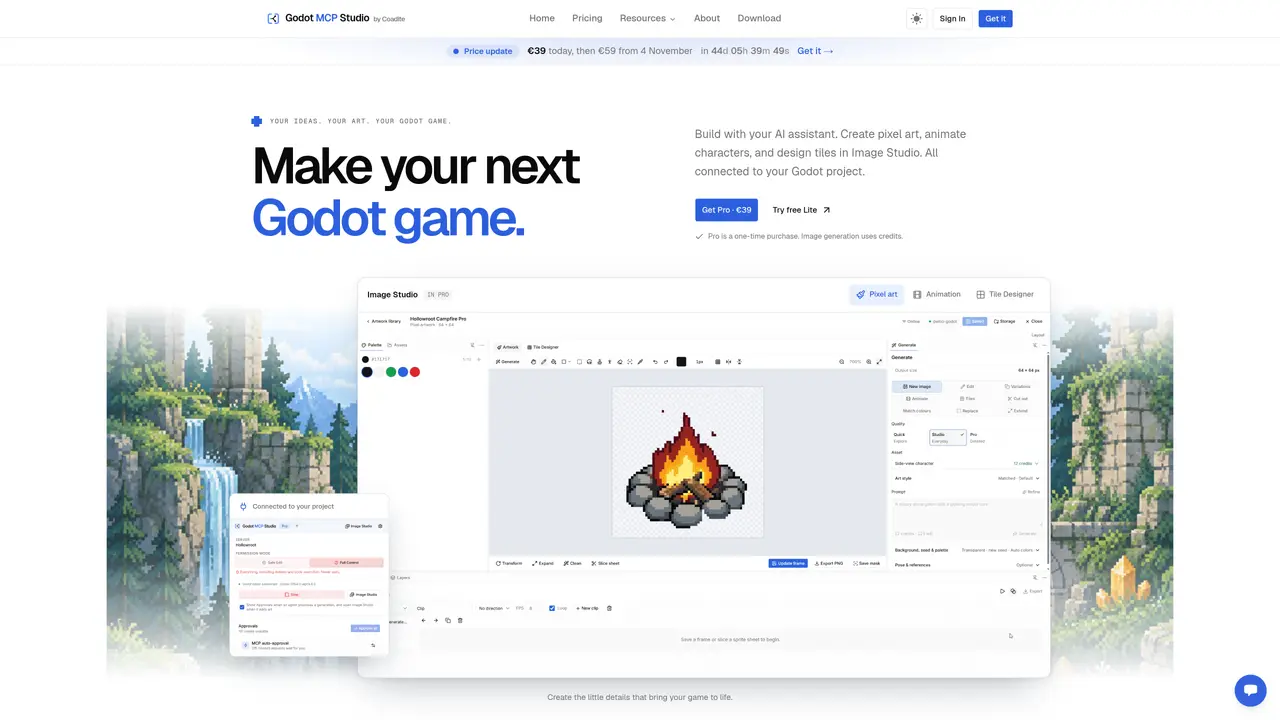
Godot MCP Studio connects AI assistants to a Godot project for game development tasks. The desktop application bridges the Godot editor with supported AI clients such as Claude Code, Cursor, and Cline, enabling agents to work directly within the open project. It includes Image Studio for creating pixel art, animating sprites, and designing tiles, with AI generation available in the Pro version using credits. The tool provides permission modes to control AI actions, including Safe Edit which requests confirmation before deletions or code execution, and Full Control which allows unrestricted changes. Pro features include on-demand playbooks for common game systems, ready-to-install templates, and runtime tools for playtesting by capturing screenshots and inspecting errors. Both Lite and Pro editions run locally with a Rust-based MCP server and a Godot editor addon that maintains a live connection to the project. The setup process is streamlined with a four-step configuration that detects the Godot project and installs the necessary components without requiring terminal commands.
Godot MCP Studio connects AI assistants like Claude Code, Cursor, or Cline directly to a Godot project, enabling agents to perform game development tasks such as creating pixel art, animating sprites, designing tiles, and editing code within the open project.
The tool is designed for game developers, artists, and teams who want to integrate AI assistants into their Godot workflow to streamline tasks such as asset creation, scripting, and playtesting.
The tool offers two permission modes: Safe Edit, which requests confirmation before deletions or code execution, and Full Control, which allows unrestricted changes by the AI assistant.
Yes, Image Studio in the Pro version supports AI-generated pixel art, animations, and tiles using credits, while drawing and editing tools are available without credits.
Setup involves four steps: selecting your Godot project, installing the editor addon with one click, generating the MCP configuration for your AI client, and testing the connection to start building.
The tool supports major AI clients including Claude Code, Cursor, Codex, Gemini CLI, Cline, Windsurf, OpenCode, Zed, Antigravity, and VS Code through MCP configuration files.
godotmcpstudio.com · third-party estimates from Similarweb
Last 2 months · grows by one month every month
Share of visits by channel
Share of visits · estimated visits
Coding & Development · Sep 2026
Traffic figures are third-party estimates, good for scale and trends; they can differ from a company's own numbers. Updated monthly.
We use essential cookies to run aitoolnavio™, and optional cookies to analyze traffic and measure our marketing. You choose what we use — optional cookies stay off unless you turn them on. See our Privacy Policy.
One short email a week: fresh tools worth trying, honest takes and the updates that actually matter. No spam, unsubscribe any time.
AI-powered website builder that generates a professional site in under a minute and includes tools for content, SEO, and analytics.
AI-powered coding platform that uses agents to plan, write, and test software with real-time feedback and verifiable artifacts.
Automate code, research, and documents using agents.
AI-powered code assistant that generates, reviews, optimizes, and debugs code with natural language prompts and editor integrations.
AI assistant for safe, reliable productivity with code, collaboration, and integrations.
AI-powered IDE for autonomous coding tasks and agentic development workflows
Privacy-focused AI chatbot that generates uncensored text, code, images, and translations without storing conversations or requiring an account.
A free web-based AI chatbot and agent for writing, coding, research, and content creation with multilingual support.
Write & run code in 50+ languages, auto-complete with AI, and code faster with an intuitive interface.
An IDE that automates legacy-to-modern code migration using autonomous coding agents.
AI models that return typed decisions with calibrated confidence for software automation
Practice coding challenges, improve technical skills, get detailed explanations, compare performance with peers.
Matched on what this tool does — grouped by the job you would be replacing.
matches Local Rust MCP server · Godot editor addon with live bridge · Safe Edit and Full Control permission modes
AI-powered web tool that converts text prompts or images into pixel art, sprite sheets, and frame-by-frame animations for game development.
AI-powered IDE for Godot projects that plans, builds and playtests changes