AI-powered website builder that generates a professional site in under a minute and includes tools for content, SEO, and analytics.
52M visits/mo+0.7%#4 Coding & Development
AI agent that diagnoses production alerts and proposes fixes
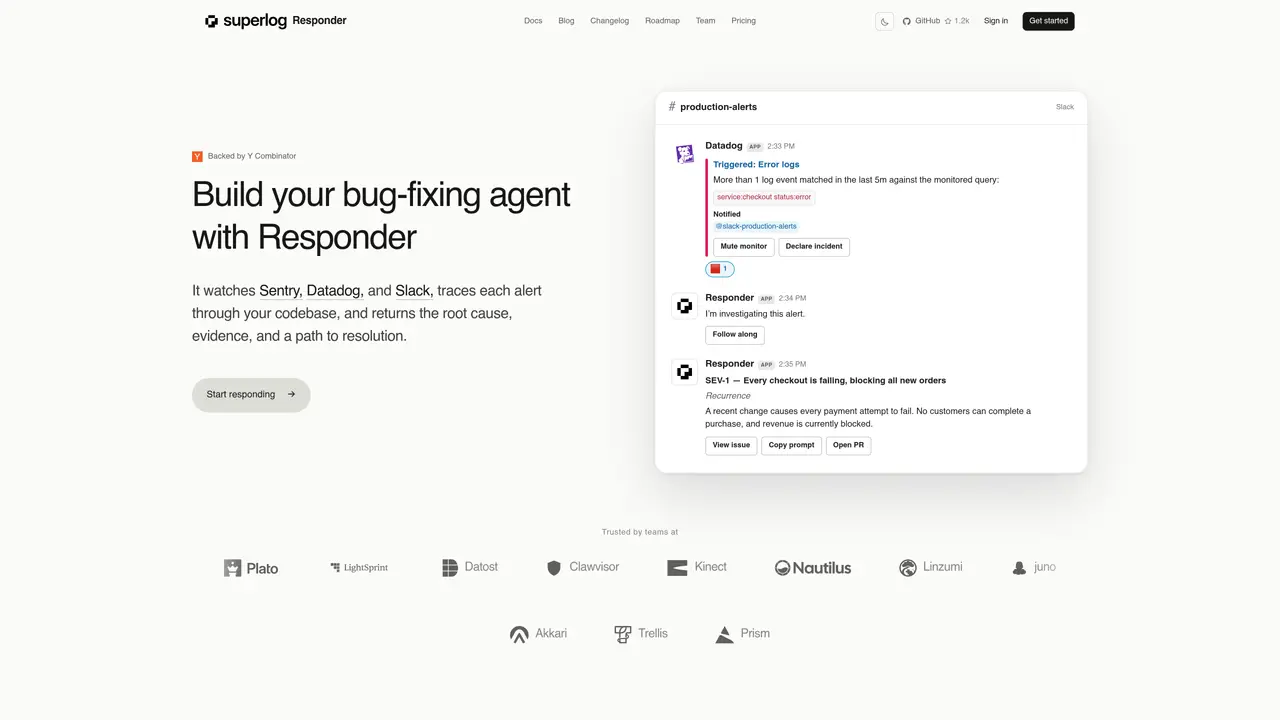
Responder integrates with observability platforms such as Sentry, Datadog, and Slack to monitor production alerts. When an alert triggers, it traces the issue through the codebase to identify the root cause, compiles evidence, and suggests a resolution path. The agent can automatically open pull requests for valid issues while filtering out noise. It provides complete context for debugging by accessing code, logs, and production telemetry. Teams can customize the agent’s behavior using custom prompts and configuration files like AGENTS.md or CLAUDE.md. Responder replies directly in Slack to keep stakeholders informed during incidents.
Responder integrates with Sentry for error tracking, Datadog for alerts and monitors, and Slack for notifications and incident management.
Responder traces alerts through the codebase to identify root causes, compiles evidence, and suggests resolution paths. It replies directly in Slack to keep stakeholders informed and can automatically open pull requests for valid issues.
Yes, teams can customize Responder using configuration files like AGENTS.md or CLAUDE.md and custom prompts to tailor its investigation and response approach.
Responder provides complete context by accessing the codebase, logs, and production telemetry, enabling agents to investigate issues with full visibility.
Yes, Responder filters out noise and only responds to real issues, reducing unnecessary alerts and improving incident response efficiency.
Start by connecting your observability platforms such as Sentry and Datadog, then configure Responder to monitor alerts and respond in Slack. Custom prompts and configuration files can be set up to align with your team's workflow.
We use essential cookies to run aitoolnavio™, and optional cookies to analyze traffic and measure our marketing. You choose what we use — optional cookies stay off unless you turn them on. See our Privacy Policy.
One short email a week: fresh tools worth trying, honest takes and the updates that actually matter. No spam, unsubscribe any time.
AI-powered website builder that generates a professional site in under a minute and includes tools for content, SEO, and analytics.
AI-powered coding platform that uses agents to plan, write, and test software with real-time feedback and verifiable artifacts.
Automate code, research, and documents using agents.
AI-powered code assistant that generates, reviews, optimizes, and debugs code with natural language prompts and editor integrations.
AI assistant for safe, reliable productivity with code, collaboration, and integrations.
AI-powered IDE for autonomous coding tasks and agentic development workflows
Privacy-focused AI chatbot that generates uncensored text, code, images, and translations without storing conversations or requiring an account.
A free web-based AI chatbot and agent for writing, coding, research, and content creation with multilingual support.
Write & run code in 50+ languages, auto-complete with AI, and code faster with an intuitive interface.
An IDE that automates legacy-to-modern code migration using autonomous coding agents.
AI models that return typed decisions with calibrated confidence for software automation
Practice coding challenges, improve technical skills, get detailed explanations, compare performance with peers.
Matched on what this tool does — grouped by the job you would be replacing.
matches Alert monitoring via Sentry, Datadog, and Slack · Root cause analysis of production issues · Automated pull request generation for fixes
An AI incident management platform that autonomously investigates alerts, finds root causes, and suggests fixes for engineering and SRE teams.
AI SRE platform that continuously analyzes Kubernetes and cloud infrastructure to auto-investigate alerts and propose remediation steps.
Automatically detects, investigates and fixes production issues in cloud applications
AI-native DevOps and SRE platform that automates cloud/Kubernetes reliability tasks with multi-agent intelligence.
matches Alert monitoring via Sentry, Datadog, and Slack · Noise filtering for alerts · Access to codebase, logs, and telemetry
matches Alert monitoring via Sentry, Datadog, and Slack · Noise filtering for alerts · Multi-platform integration
Automate error tracking, monitor application performance, and gain insights with advanced analytics.
Self-hosted error tracking with AI-generated fixes and GitHub pull requests
Unified AI-powered platform for real-time monitoring, analytics, and security across cloud infrastructure, applications, and services.
AI-powered platform for full-stack observability, anomaly detection, and automated root cause analysis without coding.
AI-driven IT incident automation and correlation tool.