
Unleash creativity: edit photos, videos, and designs with AI-enhanced tools.
16M visits/mo-11.4%#6 Image & Design
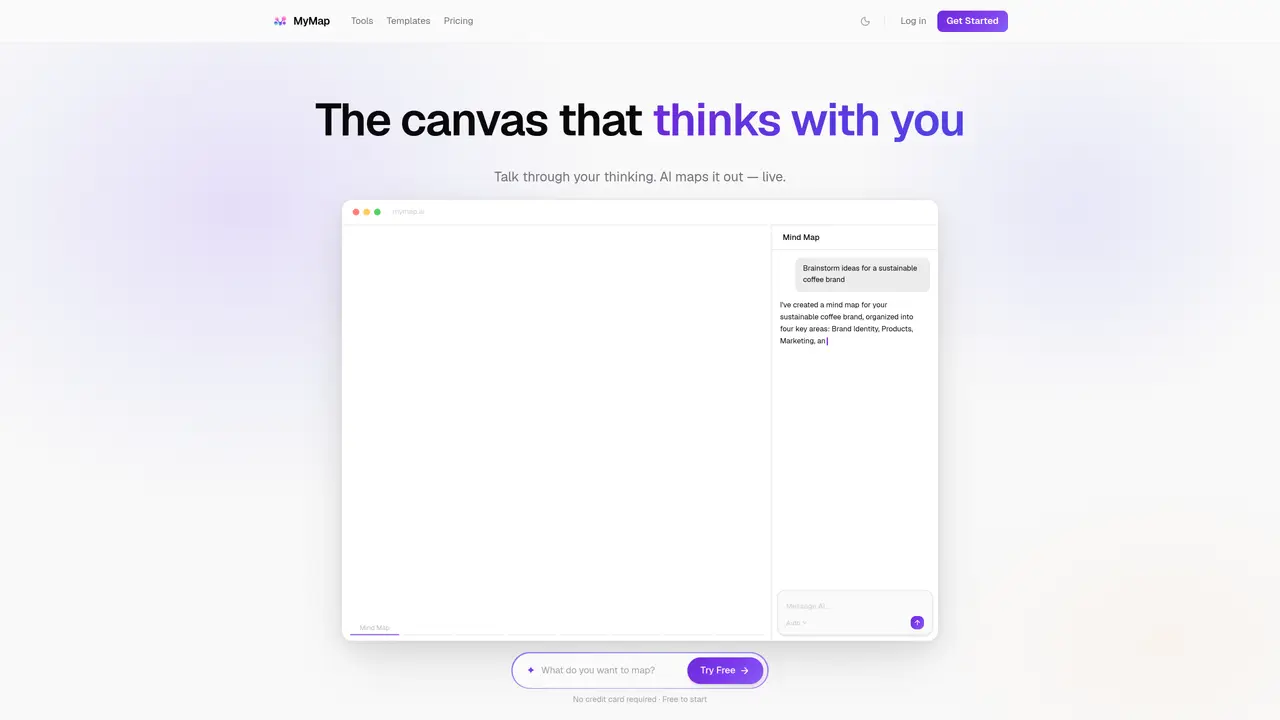
MyMap AI revolutionizes the way we create diagrams, offering an AI-driven solution for turning ideas into visual content. Designed for both individuals and professionals, MyMap AI simplifies the creation of flowcharts, mind maps, matrices, and presentations through an intuitive chat interface. Whether you’re a student, researcher, professional, or content creator, MyMap AI enhances productivity by automating the diagram creation process, eliminating the need for design skills. The tool allows users to create diagrams simply by chatting with the AI, integrating live web search results, and pulling relevant information from URLs. This feature is a game-changer for those who prefer a more conversational and less technical approach to diagram creation. MyMap AI supports multiple formats, including file uploads, web searches, and URL pasting. It also offers real-time collaboration features, allowing teams to work together on the same map. The tool provides various output options, including image and PDF exports, as well as sharing links. With its user-friendly interface and AI-native approach, MyMap AI is an essential tool for students, professionals, and content creators looking to create diagrams quickly and effortlessly.
MyMap AI is an AI-powered visual canvas that transforms conversations into structured mind maps, flowcharts, diagrams, and other visual formats directly on an infinite canvas. Unlike traditional chat tools, it generates and organizes visual content in real time based on user prompts.
Yes, MyMap AI offers a free tier with up to 20 AI credits per month, access to 3 canvas maps, and fast AI models such as Qwen 3, Gemini 3 Flash, and Claude Haiku 4.5. No credit card is required to start, and users can upgrade for additional features.
While ChatGPT generates text responses, MyMap AI creates structured visual content like mind maps, flowcharts, and diagrams directly on a canvas. Users can interact with the AI to build, rearrange, and refine visual representations of their ideas in real time.
MyMap AI supports creating mind maps, flowcharts, SWOT analyses, pros and cons comparisons, Gantt timelines, database schemas, project roadmaps, study guides, brainstorm maps, and slides. Users can generate these by describing their needs in natural language.
No, users can start creating immediately as a guest by typing a prompt on the homepage. Signing up is only required to save work and access maps later.
Free users have access to fast models like Qwen 3, Gemini 3 Flash, Claude Haiku 4.5, Minimax, and DeepSeek V3.2. Pro users can unlock premium models such as Claude Opus 4.7, GPT-5.5, and Grok 4.20, among others.
mymap.ai · third-party estimates from Similarweb
Last 4 months · grows by one month every month
Share of visits · estimated visits
Other countries: 60.2%
How people reach this site from other AI tools
202 a month · 0.1% of all visits
Image & Design · Sep 2026
Traffic figures are third-party estimates, good for scale and trends; they can differ from a company's own numbers. Updated monthly.
We use essential cookies to run aitoolnavio™, and optional cookies to analyze traffic and measure our marketing. You choose what we use — optional cookies stay off unless you turn them on. See our Privacy Policy.
One short email a week: fresh tools worth trying, honest takes and the updates that actually matter. No spam, unsubscribe any time.
Unleash creativity: edit photos, videos, and designs with AI-enhanced tools.
A drag-and-drop design platform for presentations and social graphics with AI photo tools and a large template library.
Create captivating, customizable presentations and easily share them across devices with a cloud-based platform.
Generate custom visuals for blogs, create unique social media images, and design eye-catching visuals for marketing campaigns.
Create stunning designs, edit photos, remove objects, make collages, and transform images with powerful AI tools and effects.
Create auto-resized campaign images and videos with DaVinci AI's generative media suite.
Create precise 3D models, collaborate on designs, and analyze simulations in real-time.
Cloudinary provides APIs and tools to integrate, manage, and optimize images and videos for AI-driven visual experiences.
Generate custom color palettes instantly with AI or from images for design projects.
Turn simple prompts into flyers, social posts, emails, event pages, and tickets using AI-powered design and marketing tools.
Generate high-quality images with flawless embedded text from text prompts, plus batch output and style control in a creative canvas.
Edit, transform, and enhance photos with text prompts using our free AI photo editor online.
Matched on what this tool does — grouped by the job you would be replacing.
matches AI-Native: Chat with the AI to create diagrams
MindMap AI is an AI-powered tool that turns text, PDFs, audio, video, and more into editable mind maps.
A chat-driven mind mapping and brainstorming tool that lets users create, edit, and organize mind maps through conversational prompts.
Turns text prompts into clear flowcharts, mind maps, and sequence diagrams for concept visualization.
Diagrimo is an AI diagram generator that converts text and ideas into professional visual diagrams instantly.
matches Collaboration: Team up with coworkers on the same map in real-time
matches Web Search: Create context-rich diagrams using live Google or Bing search results · Internet Access: Paste any URL, and the AI pulls out relevant info
Visual collaboration platform for creating diagrams, mind maps, wireframes, and workflows with real-time teamwork.
Visualize processes, design network diagrams, and collaborate in real-time with templates and easy-to-use interface.
AI-powered collaborative workspace for teams to generate editable diagrams, cloud architecture, docs, and task boards with real-time collaboration and templates.
Create stunning diagrams, collaborate in real-time, and utilize templates and icons for quick start.
AI-powered graph generator that turns text or data into interactive charts, mind maps, flowcharts, and knowledge graphs for reports, presentations, and web pages.
An AI-powered diagram generator that creates UML, ER, C4, and cloud architecture diagrams from natural language or code snippets in a web app.