
Remove image backgrounds instantly, save time with advanced AI, and create stunning images effortlessly.
54M visits/mo-8.6%#2 Image & Design

Generate photorealistic images with perfect text rendering, smart editing, and 4K resolution — no watermark, commercial use included.
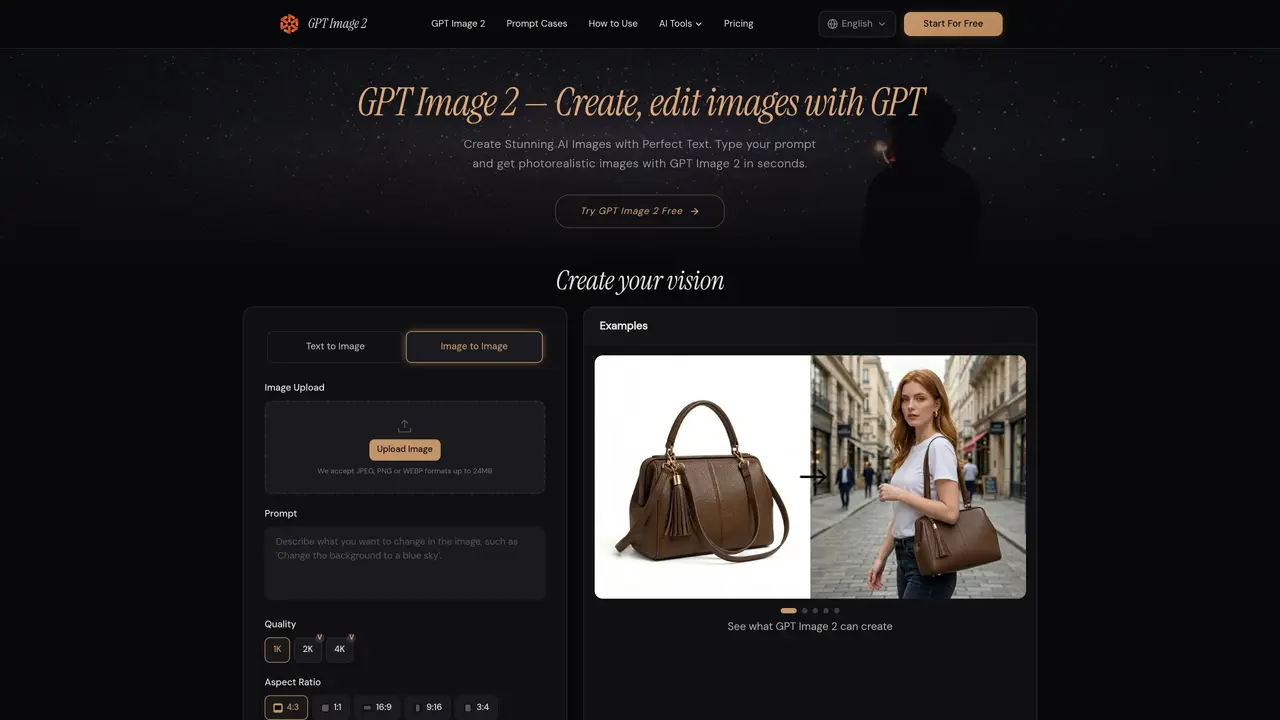
GPT Image 2 is a free online AI image generator powered by OpenAI GPT-4o. It allows users to create stunning AI images for free, with features such as 95%+ text rendering accuracy, 4K resolution, transparent background support, and smart photo editing. The tool can generate photorealistic photography, digital illustration, anime, flat design, and product renders all in one platform, from a single text prompt, in seconds. GPT Image 2 is designed for users who need to create high-quality images quickly and efficiently, such as e-commerce sellers, marketing teams, and freelance designers. The tool can be used for various purposes, including product photography, marketing materials, and social media content creation. With GPT Image 2, users can save time and money by automating the image creation process and reducing the need for manual editing and design work.
GPT Image 2 is a free online AI image generator and photo editor powered by OpenAI's GPT-4o model. Users input a text prompt describing the desired image, and the tool generates photorealistic or stylized visuals in seconds. It supports text-to-image, image-to-image, and smart editing capabilities through natural language instructions.
The tool is designed for creators, marketers, e-commerce sellers, freelance designers, and developers who need high-quality images quickly. It suits users who require photorealistic outputs, accurate text rendering, or rapid iteration on visual content without manual editing.
Yes, GPT Image 2 can generate images with transparent PNG backgrounds, making it ideal for creating logos, product cutouts, stickers, and UI elements without additional background removal steps.
The tool supports multiple visual styles, including photorealistic photography, digital illustration, anime, oil painting, flat design, and technical diagrams. It offers resolutions up to 4K (4096×4096 pixels) and presets like 1024×1024, 1536×1024, and 1024×1536.
Yes, users can upload existing images and edit them using natural language instructions. The tool applies inpainting to remove objects, swap backgrounds, adjust lighting, or add new elements without manual masking.
To get started, visit the GPT Image 2 website, enter a detailed text prompt describing your desired image, customize settings like resolution and style, then click generate. The tool provides examples and guides to help refine prompts for optimal results.
We use essential cookies to run aitoolnavio™, and optional cookies to analyze traffic and measure our marketing. You choose what we use — optional cookies stay off unless you turn them on. See our Privacy Policy.
One short email a week: fresh tools worth trying, honest takes and the updates that actually matter. No spam, unsubscribe any time.
Remove image backgrounds instantly, save time with advanced AI, and create stunning images effortlessly.
AI platform for upscaling images, enhancing photos, and generating high-quality creative assets with contextual detail.
Remove backgrounds, adjust colors, add text, filters, and shapes with ease.
Unleash creativity: edit photos, videos, and designs with AI-enhanced tools.
Transform photos effortlessly with AI: edit, enhance, and remove backgrounds.
Web and mobile AI platform for generating, editing, and training custom visuals from prompts with community models and face-swap tools.
Convert raster images into scalable vector graphics within seconds.
Create stunning designs, edit photos, remove objects, make collages, and transform images with powerful AI tools and effects.
Create stunning visuals, access image recognition and processing, and express creatively with natural language processing.
Cloudinary provides APIs and tools to integrate, manage, and optimize images and videos for AI-driven visual experiences.
All-in-one AI suite for creators to automate workflows, edit media, and generate content across video, design, and productivity tools.
Identify stolen identities, uncover copyright infringements, and find unauthorized use of images with precision.
GPT Image 2 — Free AI Image Generator & Photo EditorSubscription FLUX 3SubscriptionGPT Image 2 — Free AI Image Generator & Photo EditorSubscription
 GPT Image 2.5 AI Image GeneratorFreemiumGPT Image 2 — Free AI Image Generator & Photo EditorSubscription
 AI Photo GeneratorOne-timeGPT Image 2 — Free AI Image Generator & Photo EditorSubscription
 Qwen Image 3.0One-time
Matched on what this tool does — grouped by the job you would be replacing.
matches 95%+ text rendering accuracy · 4K resolution · Transparent background support
Online AI image generator and editor using the FLUX 3 model
Free online AI image generator using OpenAI's ChatGPT Image 2.5 model
Generates realistic photos from text prompts with no subscription required
AI image generator and editor for text-rich layouts and detailed prompts










