



Remove image backgrounds instantly, save time with advanced AI, and create stunning images effortlessly.
54M visits/mo-8.6%#2 Image & Design

Browser-based AI tool to sharpen, upscale, and restore digital photos
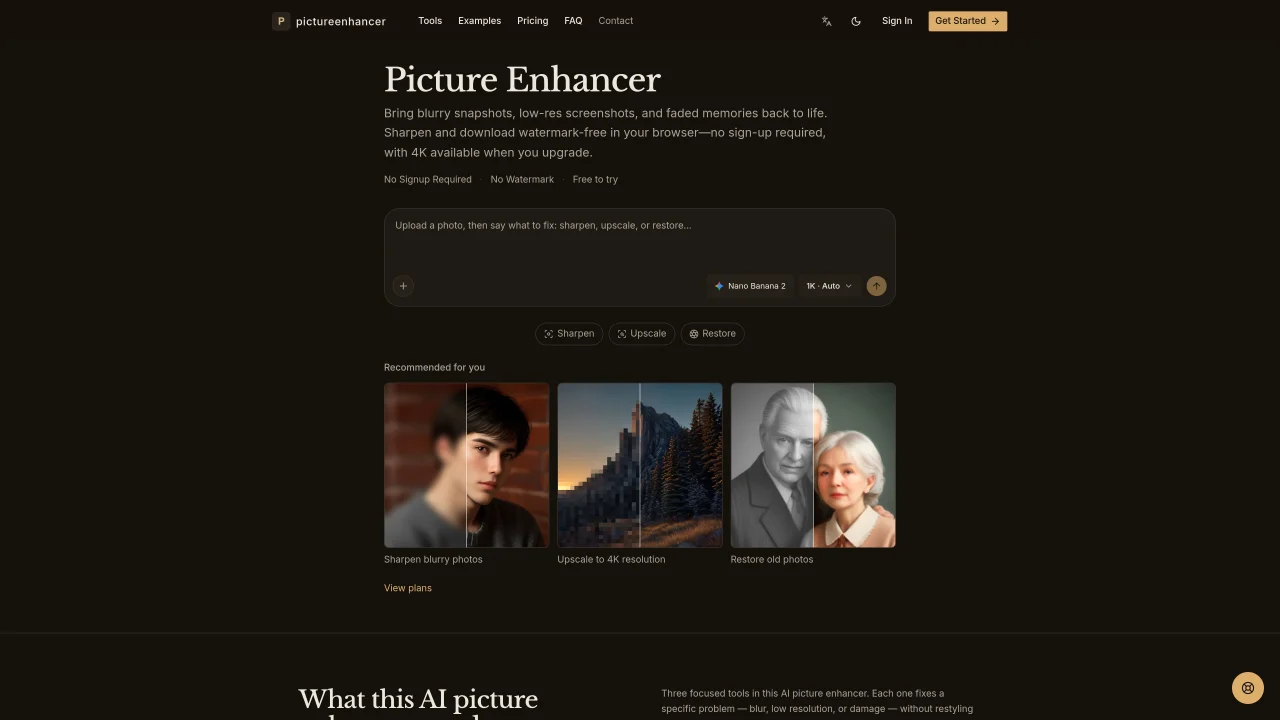
Picture Enhancer is an online application that improves digital images through three dedicated AI tools: sharpening, upscaling, and restoration. It targets specific issues such as blur from camera shake or missed focus, low resolution, and physical damage like scratches or fading in old prints. The sharpening tool recovers edge detail and compensates for motion blur or out-of-focus areas without altering the original style of the photo. The upscaling tool increases resolution by generating new pixels rather than stretching existing ones, producing cleaner enlargements. The restoration tool repairs scratches, tears, and color fading in aged photographs while preserving their original character. Users can process images directly in a web browser without creating an account, preview results, and download outputs up to 1K resolution for free. Paid plans unlock higher export sizes up to 4K and additional credits for commercial use.
Picture Enhancer is a web-based AI tool that improves digital images through three specialized functions: sharpening to recover detail from blur, upscaling to increase resolution without pixel stretching, and restoration to repair scratches, fading, and tears in old photos. It operates entirely in the browser and does not alter the original style of the image.
The tool is designed for creators, photographers, archivists, e-commerce sellers, and anyone needing to clean up blurry snapshots, low-resolution graphics, or damaged vintage prints. It helps restore family portraits, enhance product photos for online listings, and improve screenshots or digital illustrations.
No account or payment is required to begin. Simply upload an image, choose Sharpen, Upscale, or Restore, preview the result, and download the enhanced file. Free users receive 1K resolution outputs, while paid plans unlock higher export sizes and additional credits.
No, every enhanced image is delivered without a watermark, regardless of whether you use the free or paid version.
The tool accepts JPG, PNG, and WebP files up to 20MB. Free exports are capped at 1K resolution, while paid plans allow 2K or 4K outputs for professional or print use.
All uploads are processed via secure TLS encryption, and user files are never used to train AI models. Users retain full control to delete their sessions at any time.
We use essential cookies to run aitoolnavio™, and optional cookies to analyze traffic and measure our marketing. You choose what we use — optional cookies stay off unless you turn them on. See our Privacy Policy.
One short email a week: fresh tools worth trying, honest takes and the updates that actually matter. No spam, unsubscribe any time.
Remove image backgrounds instantly, save time with advanced AI, and create stunning images effortlessly.
AI platform for upscaling images, enhancing photos, and generating high-quality creative assets with contextual detail.
Remove backgrounds, adjust colors, add text, filters, and shapes with ease.
Transform photos effortlessly with AI: edit, enhance, and remove backgrounds.
Convert raster images into scalable vector graphics within seconds.
Quickly upscale multiple images, get stunning visuals in less time, and easily batch process images.
Enhance and edit photos with 15+ professional-grade tools, delivering HD quality results on both desktop and Android.
Automate image transformations, bulk upload and store images, and reduce load time with built-in CDN.
Free AI tool that adds realistic color to black and white images and enhances photo realism.
All-in-one AI platform for face swapping, image generation, upscaling, and art creation with free access and batch processing.
Edit, transform, and enhance photos with text prompts using our free AI photo editor online.
Upsize images for prints, enlarge artwork for wall displays, and create stunning visuals for online use.
Online AI tool that sharpens blurry photos, screenshots and old images
Online AI tool to sharpen photos and images without enlarging them
Online AI tool for restoring and upscaling photos with super-resolution
matches Upscale tool for increasing resolution up to 4K · No watermark on generated images
AI platform for upscaling images, enhancing photos, and generating high-quality creative assets with contextual detail.
Online AI image upscaler for enlarging and enhancing photos in bulk
matches Restore tool for repairing scratches, tears, and fading · No watermark on generated images
Restore old photos, resize images without losing details, and enhance digital art with AI technology.
Online AI tool that restores faded, scratched or damaged old photographs