AI chatbot for conversation, work, research, coding, and content creation.
5.9B visits/mo+5%#1 Chatbots & Assistants

AI image generator and editor integrated into Google Workspace for creating and editing images from text or existing files.
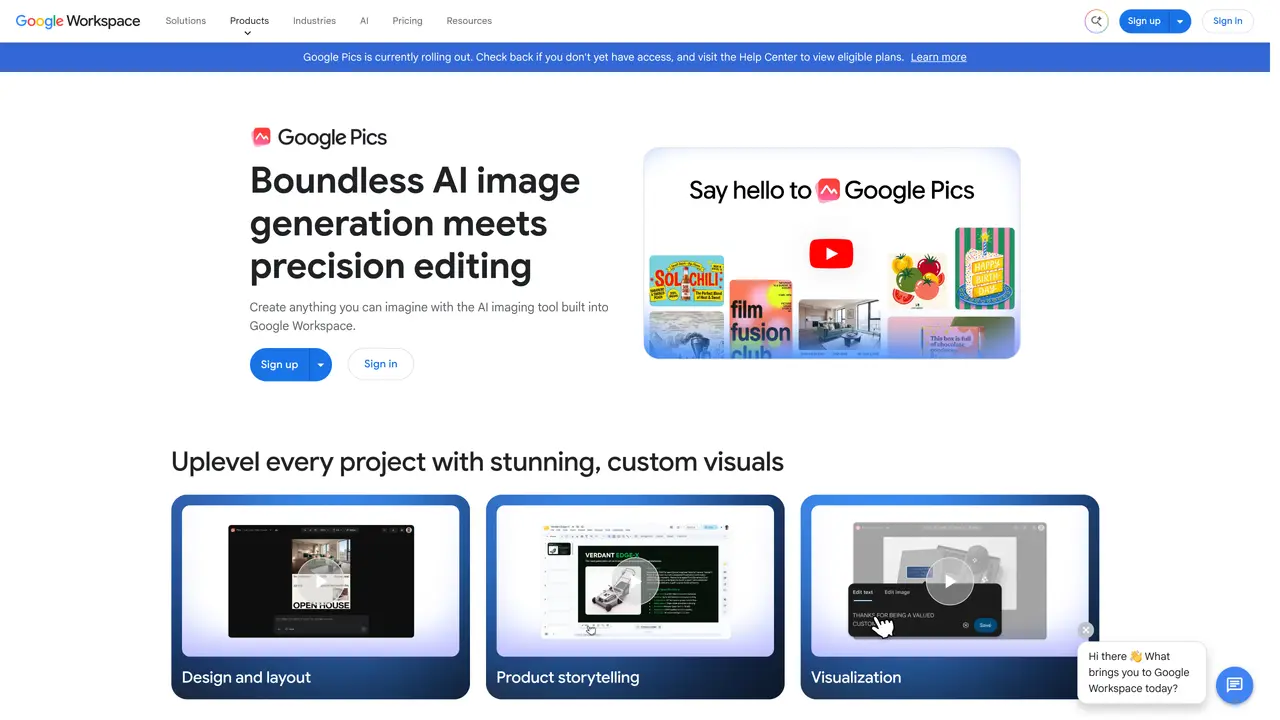
Google Pics is an AI-powered image generation and editing tool built into Google Workspace. Users can create images from text prompts or upload existing images from Google Drive, Photos, or local devices for editing. The tool supports precise object-based editing and automatically syncs creations across Workspace apps such as Slides, Docs, and Drive. It is designed for professionals and teams who need to generate or modify visuals directly within their existing workflows without switching between applications. Google Pics is available to subscribers of Workspace Business Standard and higher plans, as well as Google AI Pro and Ultra users. This integration streamlines content creation for presentations, documents, and collaborative projects by reducing the need for external editing software or stock images.
Google Pics is an AI-powered image generator and editor integrated into Google Workspace. It allows users to create images from text prompts or edit existing images with object-based precision, then automatically syncs the results across Workspace apps like Docs, Slides, and Drive.
Google Pics is designed for professionals and teams within organizations that use Google Workspace, particularly those needing to generate or modify visuals directly within their existing workflows without relying on external editing software.
No, Google Pics is not available for free. Access is restricted to subscribers of eligible Google Workspace plans, such as Business Standard and higher, as well as Google AI Pro and Ultra users.
To use Google Pics, ensure you are subscribed to an eligible Google Workspace or Google AI plan. Check your account for availability, and if not yet accessible, visit the Help Center for eligibility details and instructions.
Google Pics is integrated natively within Google Workspace, allowing seamless use across apps like Docs, Slides, and Drive. It does not appear to offer third-party integrations outside the Workspace ecosystem.
Common use cases include designing layouts for presentations, creating product storytelling visuals, rapid prototyping for visualization, developing instructional content, and enhancing communication with custom visuals in documents and slides.
We use essential cookies to run aitoolnavio™, and optional cookies to analyze traffic and measure our marketing. You choose what we use — optional cookies stay off unless you turn them on. See our Privacy Policy.
One short email a week: fresh tools worth trying, honest takes and the updates that actually matter. No spam, unsubscribe any time.
AI chatbot for conversation, work, research, coding, and content creation.
Generate captions, optimize content, and enhance with custom images for maximum engagement.
xAI builds Grok frontier AI models for reasoning, coding, voice, images, video, enterprise workflows, and developer APIs.
Explore and test Google’s experimental AI tools and prototypes before they become products.
Creates licensed videos, images, music.
Privacy-focused AI chatbot that generates uncensored text, code, images, and translations without storing conversations or requiring an account.
Web and mobile AI platform for generating, editing, and training custom visuals from prompts with community models and face-swap tools.
A drag-and-drop design platform for presentations and social graphics with AI photo tools and a large template library.
Generate unique artwork, customize with an intuitive interface, and push creative boundaries with AI-generated art.
Generate unique AI art, share your creations, and explore a vast selection of AI artwork.
Generate custom visuals for blogs, create unique social media images, and design eye-catching visuals for marketing campaigns.
Easily find and explore diverse AI art and prompts with a vast library of 10 million+ creations.
Matched on what this tool does — grouped by the job you would be replacing.
matches Generate images from text prompts · Edit uploaded images with AI-powered tools · Precise object-based editing capabilities
AI platform for upscaling images, enhancing photos, and generating high-quality creative assets with contextual detail.
Enhance and edit photos with 15+ professional-grade tools, delivering HD quality results on both desktop and Android.
Create and edit photorealistic images from text prompts and reference images without technical expertise.
Online AI image generator and editor from text or existing images
matches Sync creations across Google Workspace apps · Integration with Google Drive and Google Photos · Accessible within Google Docs, Slides, and Drive
Centralize knowledge, collaborate in real time, and edit documents with AI-powered tools in one cloud workspace.
Visual collaboration platform for creating diagrams, mind maps, wireframes, and workflows with real-time teamwork.
An infinite canvas workspace that merges web browsing, reading, and visual content organization in one app.
Collaborative AI canvas for teams to co-create decks, social posts, documents, and video with built-in scheduling and brand consistency.