Generate content, correct spelling, suggest synonyms to enhance writing.
173M visits/mo+0.1%#1 Productivity & Office

Collaborative AI canvas for teams to co-create decks, social posts, documents, and video with built-in scheduling and brand consistency.
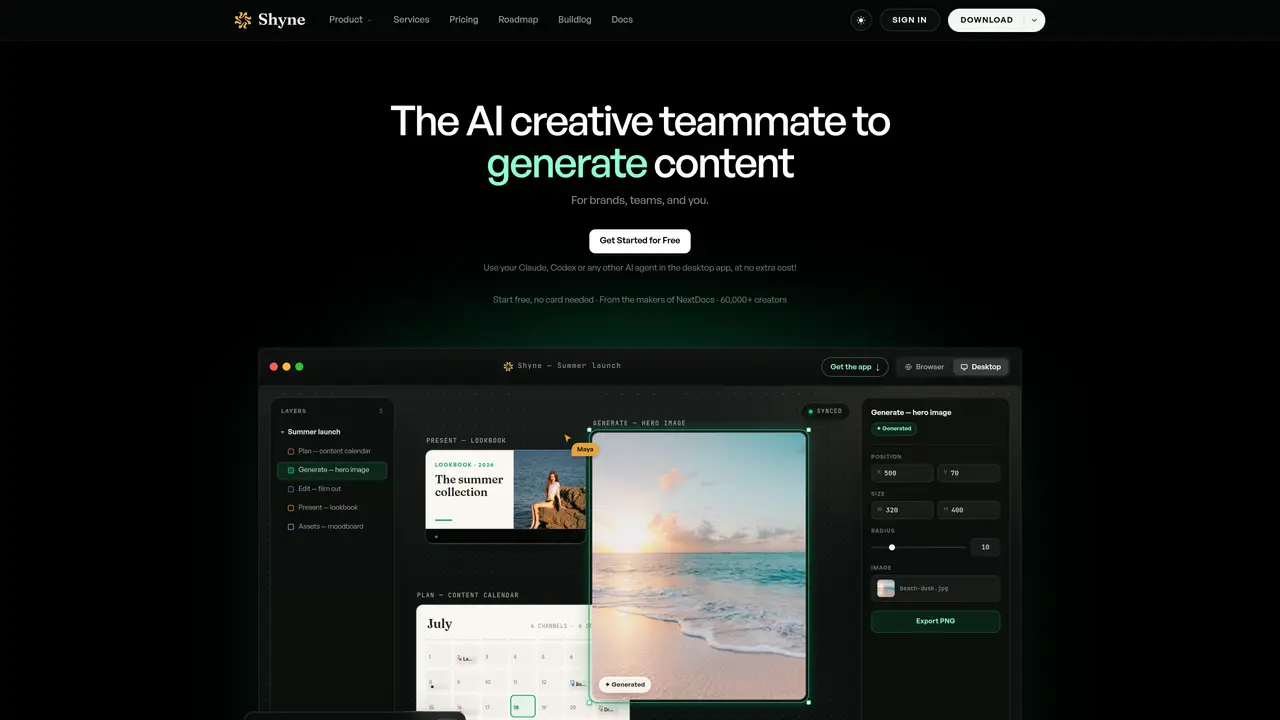
Shyne is a collaborative design platform that combines an infinite canvas with AI-powered assistance to help teams and individuals create presentations, documents, social media content, and videos in real time. The tool enables users to summon an AI teammate directly on any frame to generate images, draft copy, or adjust layouts while maintaining brand consistency across all assets. Shyne integrates a content calendar for planning and scheduling posts across multiple social channels, a video timeline for editing and exporting MP4 files, and supports external AI models through MCP for enhanced functionality. The platform is designed for both distributed teams and solo creators, accessible as a browser app or as a desktop application for Mac and Windows. Users can start projects from scratch or import existing media, which becomes editable layers on the canvas, allowing for seamless remixing and iteration. All outputs can be exported in various formats, ensuring compatibility with different presentation and publishing needs. Shyne emphasizes a unified workflow where teams and AI agents work simultaneously on the same surface, enabling faster iteration and cohesive brand execution across all creative outputs.
Shyne is an infinite canvas platform where teams and AI agents collaborate in real time to create presentations, documents, social media content, and videos. It is designed for brands, marketing teams, content creators, and solo professionals who need a unified workspace for ideation, design, and publishing.
Shyne allows users to summon an AI teammate directly on any frame to generate images, draft copy, or adjust layouts. Users can prompt the AI anywhere on the canvas and work alongside it in real time, with the ability to use external AI models via MCP for expanded capabilities.
Yes, Shyne supports integration with external AI models such as Claude, ChatGPT, or Gemini through MCP, allowing users to leverage their preferred AI tools within the platform at no extra cost.
Shyne supports the creation of presentations, pitch decks, documents, social media posts, videos, storyboards, moodboards, infographics, websites, wireframes, and mockups. Exports are available in formats such as PDF, PNG, MP4, HTML, PowerPoint, and Google Slides.
Shyne includes brand kits where users can set colors, fonts, and logos once. These settings are automatically applied across all assets created by users or the AI, ensuring every output remains unmistakably on-brand.
Shyne is accessible as a browser app and as a desktop application for Mac and Windows, making it suitable for both distributed teams and individual creators.
We use essential cookies to run aitoolnavio™, and optional cookies to analyze traffic and measure our marketing. You choose what we use — optional cookies stay off unless you turn them on. See our Privacy Policy.
One short email a week: fresh tools worth trying, honest takes and the updates that actually matter. No spam, unsubscribe any time.
Generate content, correct spelling, suggest synonyms to enhance writing.
Turn messy team ideas into actionable plans with Miro's visual workspace.
Leverage analytics, automate tasks, share documents, and coordinate projects.
Integrates AI into Airtable to analyze data, summarize insights, draft content, and automate workflows without prior AI experience.
Cloud accounting software that automates bookkeeping, invoicing, and financial reporting for small and growing businesses.
Streamline teamwork, manage projects, automate tasks efficiently.
Automate code, research, and documents using agents.
AI assistant for safe, reliable productivity with code, collaboration, and integrations.
Create customizable tables, databases, and spreadsheets, share data securely with team members.
Easy-to-use CRM platform that automates lead capturing, prioritizes tasks, and provides sales pipeline analytics for businesses of all sizes.
Transforms thoughts into actions, enhancing productivity and efficiency.
Write & run code in 50+ languages, auto-complete with AI, and code faster with an intuitive interface.
Matched on what this tool does — grouped by the job you would be replacing.
Paid placement · similar tools from listings that support aitoolnavio™
Instant lead response for home-service pros: your phone rings on every new lead, plus 14 days of follow-up
matches Real-time collaborative workspace on an infinite canvas · Brand kit enforcement across all generated content
matches Video timeline for editing and exporting MP4 files
matches Built-in content calendar for scheduling social media posts
Prompt up editable, on-brand multi-format files.
AI-powered platform for creating presentations, infographics, reports, and social media graphics from text prompts with built-in brand management and collaboration tools.
AI carousel post maker for marketers and creators to generate, design, schedule, and publish multi-slide posts across LinkedIn, Instagram, TikTok, X, and Threads.
AI-powered tool to generate branded LinkedIn and Instagram carousels from text
AI suite for generating images, video, audio and 3D assets in one workspace
Professional video editor with an infinite canvas and AI agent integration for direct footage analysis, editing, and export.
AI-powered platform for scheduling, creating, and approving social media content across multiple platforms.
AI-powered tool to create and publish social media content across multiple platforms simultaneously with automated optimization.