AI-powered video messaging tool that records, shares, and manages video messages with AI-generated titles, summaries, and tasks.
16M visits/mo-3.4%#5 Chatbots & Assistants

Professional video editor with an infinite canvas and AI agent integration for direct footage analysis, editing, and export.
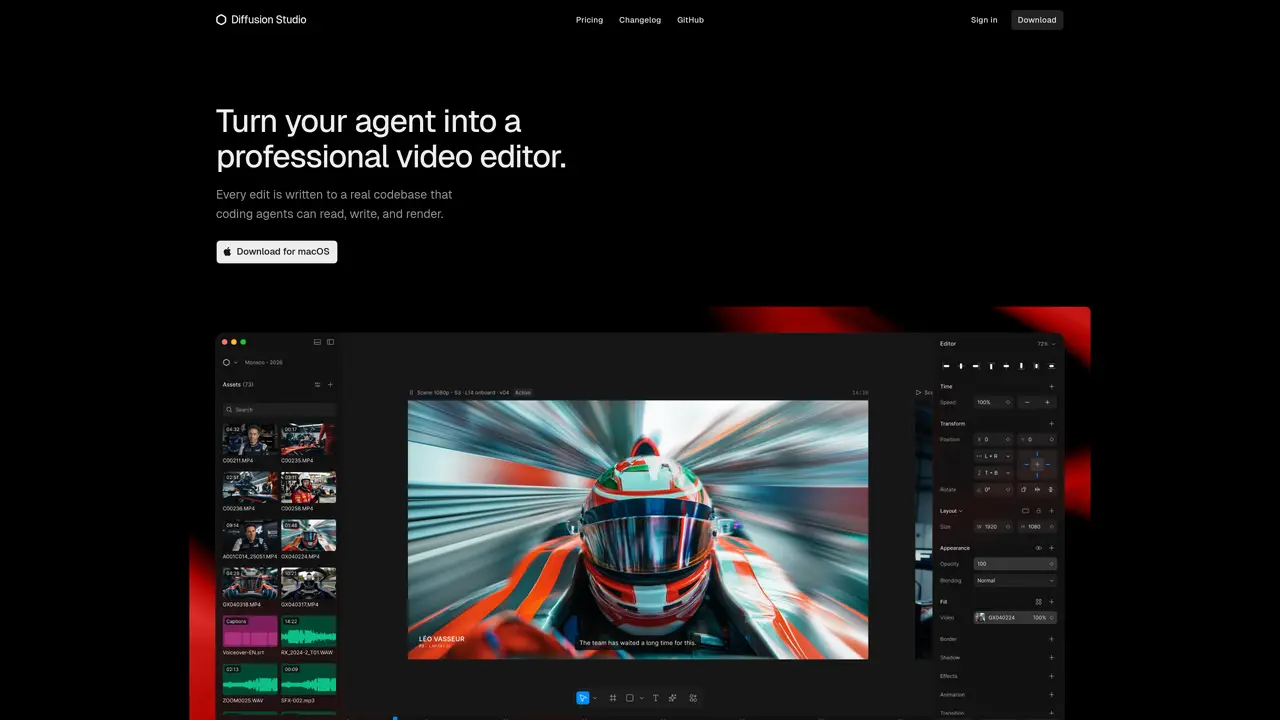
Diffusion Studio is a professional-grade video editor designed to collaborate with AI coding agents such as Claude Code, Codex, and Cursor. It provides a unified workspace that spans importing, editing, applying effects, managing audio, and exporting, all within a single interface. The tool supports an infinite canvas and timeline sequencing, enabling flexible project organization. Users can operate Diffusion Studio through a web browser, a macOS application, or a terminal, ensuring accessibility across different workflows. AI agents can directly analyze, edit, generate, and transcribe footage within the tool, streamlining complex editing tasks. The editor is open source and optimized for 4K playback and export, with sub-120ms canvas response times for smooth performance. It bridges the gap between human creativity and AI-driven automation, making it suitable for both individual creators and teams leveraging AI assistance.
Diffusion Studio is a professional AI video editor designed for both humans and coding agents. It provides an infinite canvas and timeline for editing, with support for agentic workflows where AI can analyze, edit, generate, and transcribe footage.
Yes. Everything created by an agent remains fully editable, allowing users to modify or refine the output. Agents can also continue working from any changes made by the user.
Diffusion Studio supports coding agents such as Claude Code, Codex, Cursor, Copilot, and Gemini CLI. Users can integrate their preferred agent by installing the macOS app and activating the Diffusion Studio skill.
The web version works without installation on Windows, macOS, and Linux. However, coding agent workflows require the macOS desktop app. The browser version is recommended for basic editing.
Diffusion Studio is free and open-source, including editing and exports. AI-powered actions like transcription or content generation consume credits, which are available in free and paid plans.
Teams can manage entire video productions in one project using the infinite canvas. Agents can produce and update variations, while reusable components can be stored in GitHub for consistent, on-brand production.
We use essential cookies to run aitoolnavio™, and optional cookies to analyze traffic and measure our marketing. You choose what we use — optional cookies stay off unless you turn them on. See our Privacy Policy.
One short email a week: fresh tools worth trying, honest takes and the updates that actually matter. No spam, unsubscribe any time.
AI-powered video messaging tool that records, shares, and manages video messages with AI-generated titles, summaries, and tasks.
Unleash creativity: edit photos, videos, and designs with AI-enhanced tools.
Record lectures, create tutorials, and securely share videos with teams.
Create stunning videos in a few clicks, customize with powerful tools, and automate editing without experience.
Create, convert, and enhance videos effortlessly with professional effects and royalty-free music.
Create marketing videos quickly, customize with templates, music, and photos, optimize for different platforms with AI.
Automate video editing, add text-to-speech voice-overs, and optimize videos for impactful results.
Freemium, uncensored AI video and image creation for individual creators with text-to-video, image effects, and gem-based upgrades for HD and no watermarks.
Create, edit, subtitle, and translate pro-grade videos instantly.
Cloudinary provides APIs and tools to integrate, manage, and optimize images and videos for AI-driven visual experiences.
All-in-one AI suite for creators to automate workflows, edit media, and generate content across video, design, and productivity tools.
Generate cinematic video clips from text or images and refine them with AI-powered editing tools for creators and visual professionals.
Matched on what this tool does — grouped by the job you would be replacing.
matches Infinite canvas and timeline sequencing · Unified workspace for import, editing, effects, audio, and export · AI agent integration for direct footage analysis and editing
Cloud-based video editor with AI-powered clip generation, voiceovers, and auto-subtitles for fast, browser-based editing.
An AI video platform for marketing teams and creators to generate storyboards, AI footage, edit clips, and export promotional videos.
Open-source macOS video editor that integrates AI agents directly into the timeline for text-to-video and collaborative editing.
Browser-based video creation with AI generation, editing, voice and collaboration
matches Infinite canvas and timeline sequencing · Unified workspace for import, editing, effects, audio, and export
matches AI-powered transcription and generation · AI video generation with pay-per-generation · AI image upscaling to increase resolution
AI-powered canvas workspace for organizing ideas, notes and plans in one place
Create interactive AI-powered HTML presentations, then play, share, embed, and export them directly from your browser.
Automate workflows and create content with multi-agent AI.
Collaborative AI canvas for teams to co-create decks, social posts, documents, and video with built-in scheduling and brand consistency.
AI platform for upscaling images, enhancing photos, and generating high-quality creative assets with contextual detail.
Generate full songs with vocals, lyrics, and instrumentals from text prompts in minutes.