AI chatbot for conversation, work, research, coding, and content creation.
5.9B visits/mo+5%#1 Chatbots & Assistants

Converts uploaded images into detailed AI image prompts for reuse
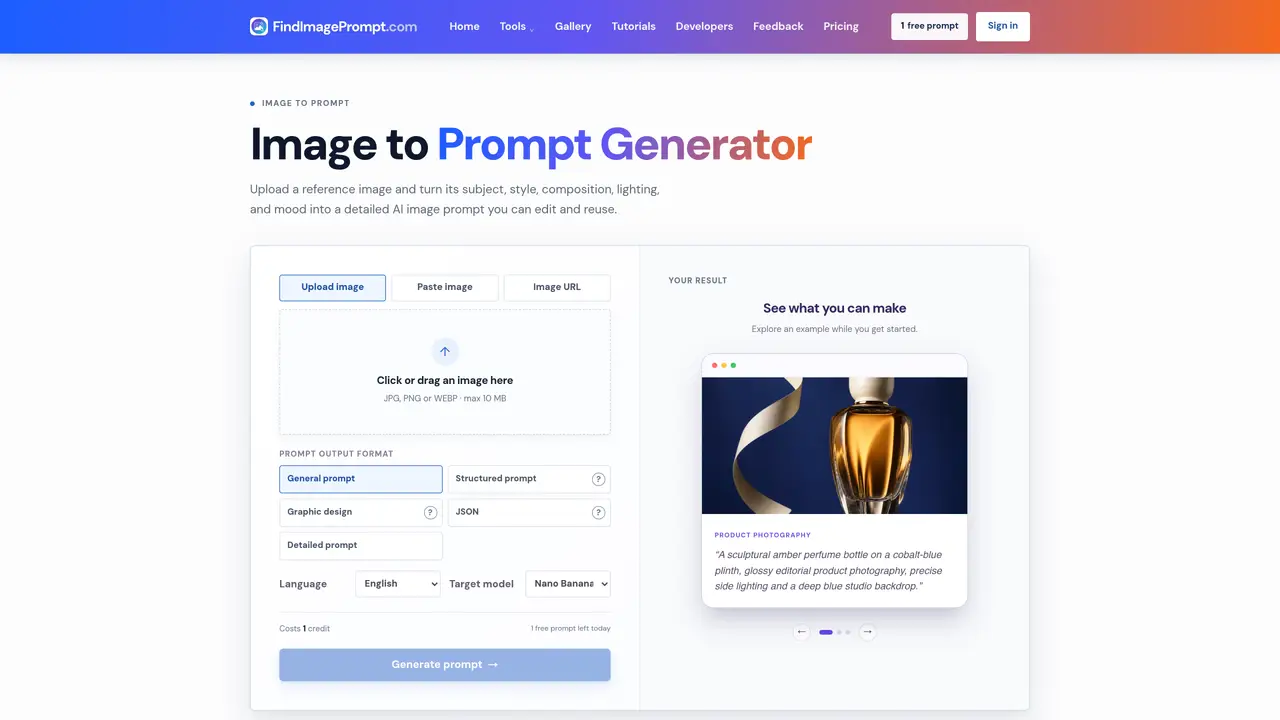
The Image to Prompt Generator takes a reference image and translates its visual elements—subject, style, composition, lighting, and mood—into a structured text prompt. Users can upload JPG, PNG, or WEBP files up to 10 MB or provide an image URL. The tool supports multiple output formats including general prompts, structured breakdowns, graphic-design analyses, and JSON, with language options spanning English, Spanish, French, German, Chinese, Korean, Russian, Japanese, Italian, Portuguese, Arabic, Hindi, Turkish, Vietnamese, and Indonesian. It also allows selection of target models such as Nano Banana, GPT Image Flux, Midjourney, and Stable Diffusion. The generated prompts can be edited and reused across different AI image generation platforms. The service is part of a broader toolkit that includes text-to-prompt conversion, image description, and AI image generation capabilities, designed to streamline creative workflows from idea to final output.
The Image to Prompt Generator converts a reference image into a detailed AI image prompt by analyzing its subject, style, composition, lighting, and mood. Users can upload images or provide URLs to generate reusable text prompts for AI image generation.
The tool is designed for creatives, designers, photographers, and anyone looking to translate visual references into structured prompts for AI image generators. It helps streamline workflows from idea to final output.
The tool supports JPG, PNG, and WEBP formats with a maximum file size of 10 MB. Users can upload images directly or provide an image URL for processing.
Yes, the generated prompts can be edited and reused across different AI image generation platforms. The tool allows users to refine and adapt the prompts to their specific needs.
The tool offers multiple output formats including general prompts, structured breakdowns, graphic-design analyses, and JSON. Users can also select from a range of languages and target models like Nano Banana, GPT Image Flux, Midjourney, and Stable Diffusion.
To get started, upload a reference image or provide an image URL, choose your desired output format, language, and target model, then generate the prompt. The tool provides examples to help users explore its capabilities.
We use essential cookies to run aitoolnavio™, and optional cookies to analyze traffic and measure our marketing. You choose what we use — optional cookies stay off unless you turn them on. See our Privacy Policy.
One short email a week: fresh tools worth trying, honest takes and the updates that actually matter. No spam, unsubscribe any time.
AI chatbot for conversation, work, research, coding, and content creation.
Generate captions, optimize content, and enhance with custom images for maximum engagement.
xAI builds Grok frontier AI models for reasoning, coding, voice, images, video, enterprise workflows, and developer APIs.
Explore and test Google’s experimental AI tools and prototypes before they become products.
Creates licensed videos, images, music.
Privacy-focused AI chatbot that generates uncensored text, code, images, and translations without storing conversations or requiring an account.
Web and mobile AI platform for generating, editing, and training custom visuals from prompts with community models and face-swap tools.
A drag-and-drop design platform for presentations and social graphics with AI photo tools and a large template library.
Generate unique artwork, customize with an intuitive interface, and push creative boundaries with AI-generated art.
Generate unique AI art, share your creations, and explore a vast selection of AI artwork.
Generate custom visuals for blogs, create unique social media images, and design eye-catching visuals for marketing campaigns.
Easily find and explore diverse AI art and prompts with a vast library of 10 million+ creations.
Matched on what this tool does — grouped by the job you would be replacing.
matches Image upload via file or URL · Structured prompt generation · JSON output format
AI image generator that turns multilingual text prompts into 4K images with prompt enhancement and image-to-prompt analysis.
Converts uploaded images into detailed text prompts for image generators
AI image generator and editor for text-rich layouts and detailed prompts
matches Target model selection · Commercial license included
Online AI image generator and editor using the FLUX 3 model
AI image and video generator supporting text-to-image, image-to-image, and video creation
Online AI image generator creating visuals from text prompts or reference images