AI chatbot for conversation, work, research, coding, and content creation.
5.9B visits/mo+5%#1 Chatbots & Assistants

Converts visual references into a single AI image prompt that preserves style across models
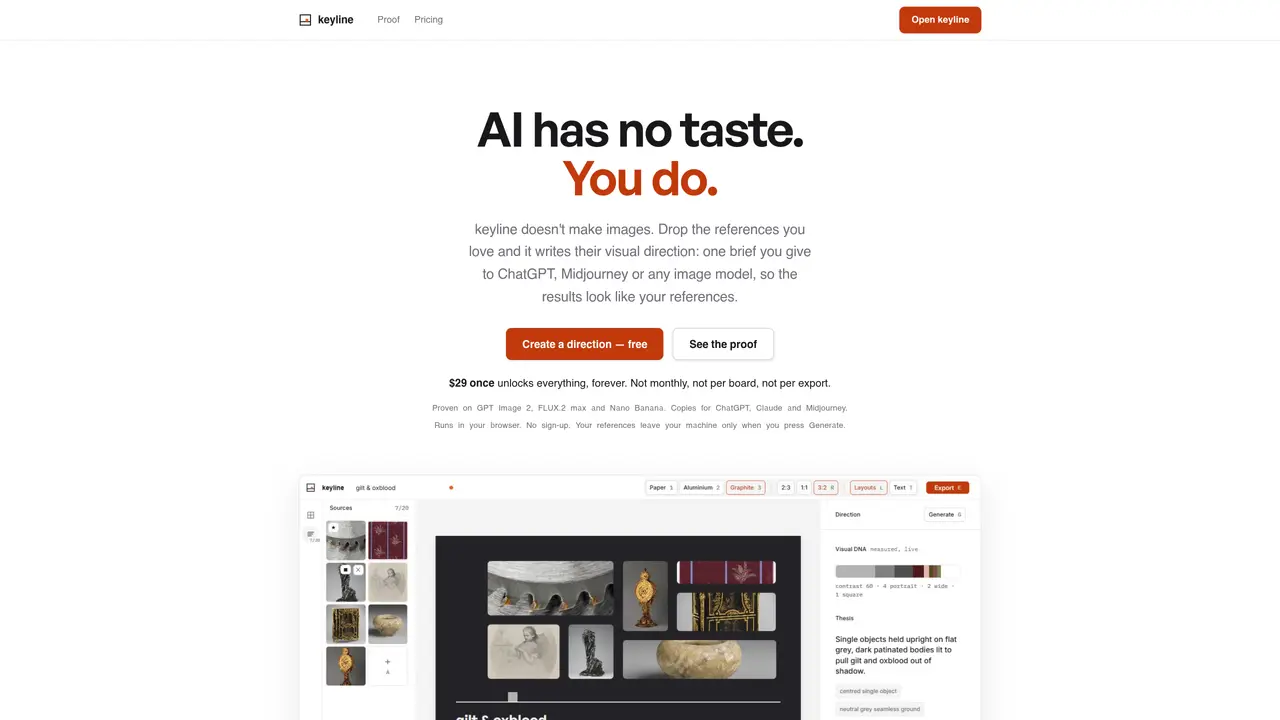
keyline is a browser-based tool that generates a single visual direction from a set of reference images. Users drop up to 20 images into the interface, where the tool composes them into a board and analyzes their visual properties such as palette, contrast, light, material, era, and mood. The compiled output is a detailed prompt with a [SUBJECT] slot that can be used with any image generation model, including ChatGPT, Claude, Midjourney, or others. The prompt is designed to maintain the user’s intended style regardless of the subject or model used. The tool measures eight color values with real weights from the reference pixels and provides a contrast score. Layouts are deterministic and can be reproduced with the same seed. The compiled prompt is displayed on screen and can be copied for immediate use. keyline operates entirely in the browser and does not require sign-up. References remain local until the user chooses to generate an image.
keyline analyzes a set of reference images and generates a single visual direction in the form of a detailed prompt with a [SUBJECT] slot. This prompt can be used with any image generation model to maintain the user's intended style.
keyline is designed for users who want to preserve their visual taste across different image generation models without repeatedly rewriting prompts or re-uploading references.
Users drop up to 20 reference images into the browser-based interface. The tool composes them into a board, measures visual properties like palette and contrast, and compiles a prompt tailored for models like ChatGPT, Claude, or Midjourney.
No, keyline operates entirely in the browser and does not require sign-up. Users can start using the tool immediately without providing any personal information.
Yes, keyline compiles a single direction that can be reused across different models by simply changing the [SUBJECT] slot in the prompt.
Reference images remain local in the user's browser by default. They only leave the user's machine if the user chooses to generate an image using the compiled prompt.
We use essential cookies to run aitoolnavio™, and optional cookies to analyze traffic and measure our marketing. You choose what we use — optional cookies stay off unless you turn them on. See our Privacy Policy.
One short email a week: fresh tools worth trying, honest takes and the updates that actually matter. No spam, unsubscribe any time.
AI chatbot for conversation, work, research, coding, and content creation.
Generate captions, optimize content, and enhance with custom images for maximum engagement.
xAI builds Grok frontier AI models for reasoning, coding, voice, images, video, enterprise workflows, and developer APIs.
Explore and test Google’s experimental AI tools and prototypes before they become products.
Creates licensed videos, images, music.
Privacy-focused AI chatbot that generates uncensored text, code, images, and translations without storing conversations or requiring an account.
Web and mobile AI platform for generating, editing, and training custom visuals from prompts with community models and face-swap tools.
A drag-and-drop design platform for presentations and social graphics with AI photo tools and a large template library.
Generate unique artwork, customize with an intuitive interface, and push creative boundaries with AI-generated art.
Generate unique AI art, share your creations, and explore a vast selection of AI artwork.
Generate custom visuals for blogs, create unique social media images, and design eye-catching visuals for marketing campaigns.
Easily find and explore diverse AI art and prompts with a vast library of 10 million+ creations.
Matched on what this tool does — grouped by the job you would be replacing.
matches Reference-based prompt generation · Per-model prompt dialects · Board composition with role assignment
A free web-based AI image generator and editor for creators, offering text-and-image prompting, local edits, and style reference.
Browser-based image and short video generation with reference-led edits
AI image generator and editor that preserves subject detail while altering style or composition
Browser-based AI image generator converting text prompts into images with optional reference guidance
matches Eight color measurements with hex codes and percentages · Photo-based color analysis
matches Deterministic seeded layouts · Local processing with optional export · Keyboard-first navigation
AI tool that determines a user’s 12-season color palette from a photo or quiz
Generate stunning palettes, customize balance, saturation, brightness, and create complementary colors for cohesive schemes.
AI system that generates complete brand identities from a single prompt
AI platform for upscaling images, enhancing photos, and generating high-quality creative assets with contextual detail.
AI-powered image translation, description, generation and editing