AI chatbot for conversation, work, research, coding, and content creation.

LineSVG
$20/moStarting price
0Popularity
About LineSVG
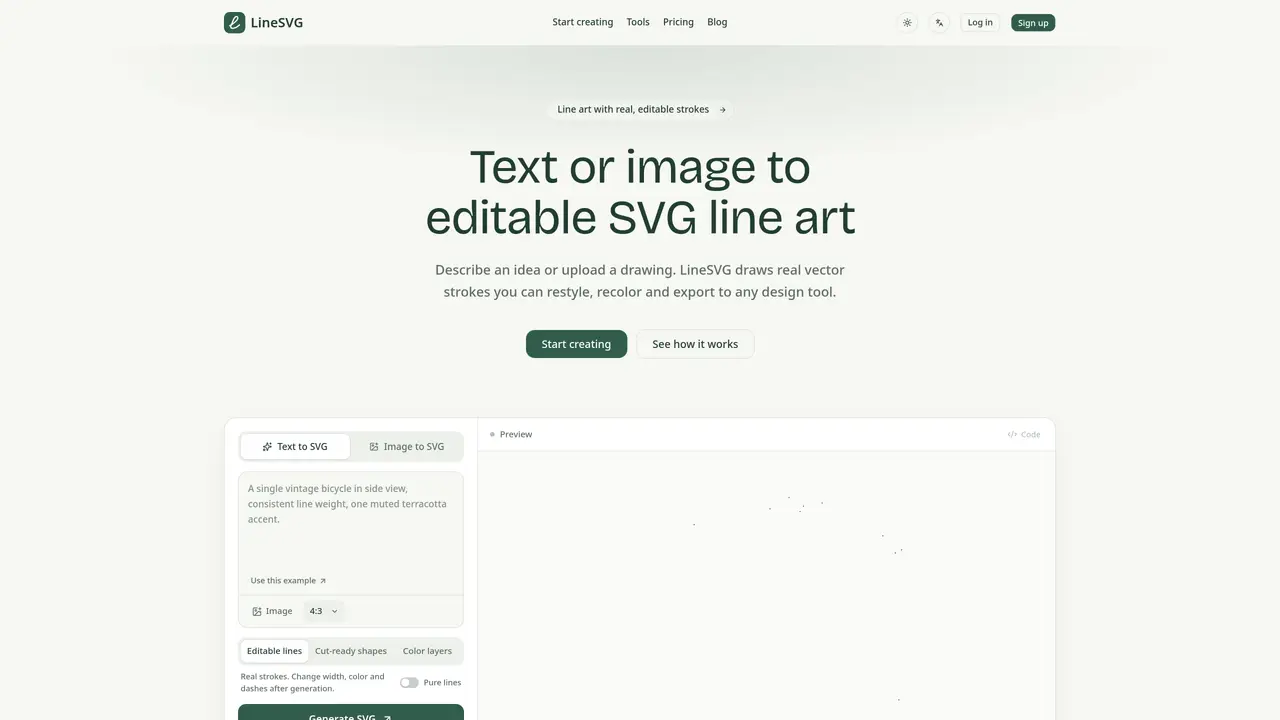
LineSVG converts text prompts or raster images into editable SVG line art. The tool generates real vector strokes rather than filled outlines, allowing users to adjust stroke width, color, dashes and other properties after creation. Outputs are compatible with design software such as Figma, Illustrator and Inkscape. The service offers multiple specialized tools for different use cases, including botanical line art, one-line drawings and photo-to-line conversion. Generation occurs in real time with a live preview, and users can export SVG or PNG files or copy the SVG code directly. The platform supports PNG, JPG and WebP input formats and provides adjustable aspect ratios for output. Credit-based pricing allows occasional or professional use with monthly allowances that reset after 30 days.
Key features
- Text-to-SVG generation
- Image-to-SVG conversion
- Real-time stroke preview
- Adjustable stroke width, color and dashes
- SVG export and code inspection
- PNG export option
- Multiple aspect ratio presets
- Creation history and saved versions
Use cases
- Creating botanical line art for labels and packaging
- Converting photos into editable vector line art
- Transforming hand-drawn sketches into vector paths
Pros
- Produces real SVG strokes instead of filled outlines
- Allows post-generation adjustments to stroke properties
- Live preview during generation
- Multiple specialized tools for different line-art styles
- Supports export to common design software
Cons
- Requires credits for generation tasks
- Credit allowances expire after 30 days
- No free tier beyond welcome credits
- Limited to SVG and raster image input formats
Frequently asked questions about LineSVG
What is LineSVG and how does it differ from ordinary vectorization tools?
LineSVG converts text prompts or raster images into editable SVG line art, generating real vector strokes rather than filled outlines. Unlike ordinary vectorization tools, it produces actual SVG strokes that can be adjusted in width, color, and dashes after generation.
Who is LineSVG suitable for?
LineSVG is suitable for designers, illustrators, and creators who need editable vector line art for print, web, or crafting purposes. It caters to both occasional users and professionals with higher-volume workflows.
How does the pricing model work?
LineSVG operates on a credit-based pricing system where each generation consumes credits. Users can choose monthly or annual subscriptions with a set number of credits, or purchase credit packs as needed. Credits reset monthly and unused credits expire after 30 days.
What input formats does LineSVG support?
LineSVG supports PNG, JPG, and WebP input formats for image-based generation. Text prompts can also be used to create line art directly.
Can I export the generated line art to design software?
Yes, LineSVG outputs are compatible with design software such as Figma, Illustrator, and Inkscape. Users can export SVG or PNG files or copy the SVG code directly for further editing.
How do I get started with LineSVG?
To get started, visit the LineSVG website, choose a tool based on your use case, describe your idea or upload an image, and watch the line art generate in real time. Adjust the strokes as needed and export the final result.