Discover personalized recipes, explore new ideas, and save favorites for easy access.
91K visits/mo+15.9%#141 Lifestyle & Education
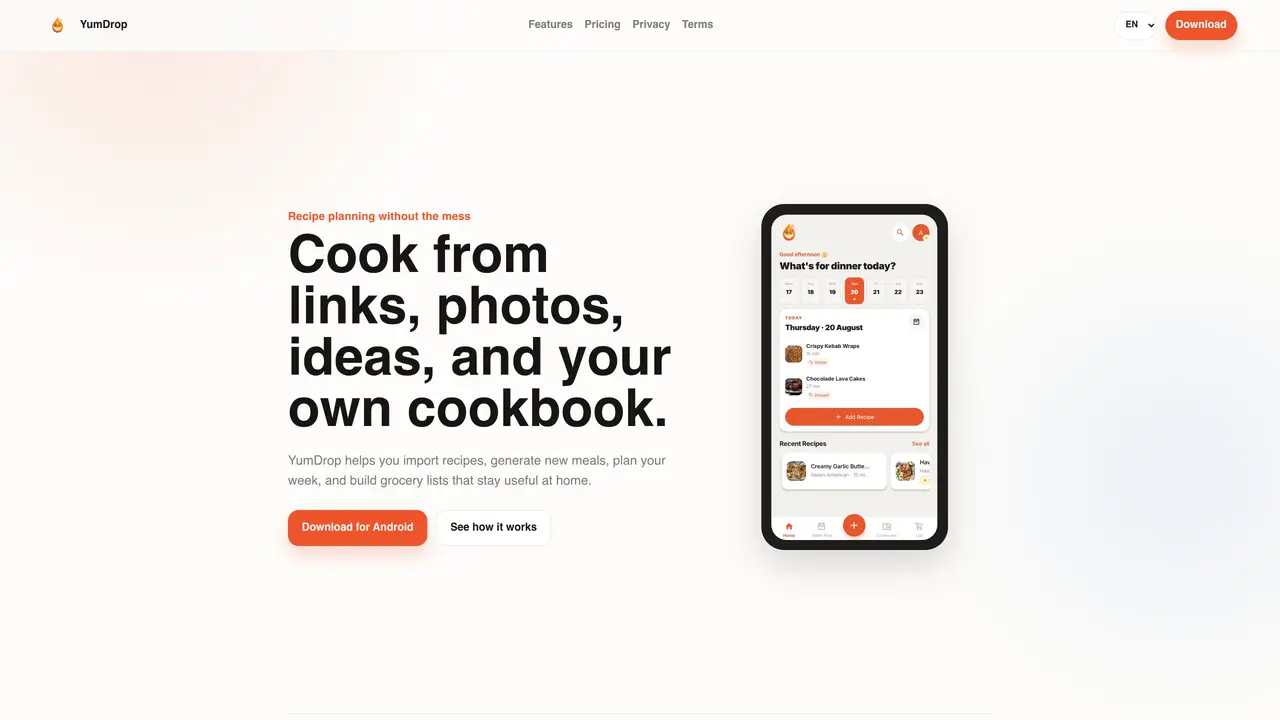
YumDrop consolidates recipe saving, meal planning, and grocery management into a single application. Users can import recipes from links or social videos, generate new meal ideas using AI, and organize weekly meal plans based on dietary preferences and available ingredients. The app converts imported recipes into structured formats and allows users to build, assign, and track grocery lists with reminders. Household members can collaborate through shared cookbooks, collections, and grocery lists using the Circle feature, where owners control permissions and invite codes. Recipes and meal plans can be saved, favorited, sorted into collections, and searched by time, rating, or difficulty. The application supports multiple languages and integrates with Google Play for subscription management and billing.
YumDrop consolidates recipe saving, meal planning, and grocery management into one application. It allows users to import recipes from links or social videos, generate new meal ideas using AI, organize weekly meal plans, and build grocery lists with reminders.
YumDrop is designed for households looking to streamline cooking, meal planning, and grocery management. It is particularly useful for individuals or families who want to collaborate on meal plans and grocery lists.
YumDrop offers a free plan with basic features, while paid plans unlock additional capabilities such as more recipe imports, AI-generated recipes, and Circle sharing. Paid subscriptions are managed through Google Play.
YumDrop integrates with Google Play for subscription management and billing. It also uses trusted service providers like Firebase, Google Cloud, and AI services to operate its features.
AI-generated recipes and imported content may contain errors, so users should always review ingredients, allergens, and instructions. YumDrop is not intended as medical, nutrition, allergy, or professional dietary advice.
Download YumDrop from the Google Play Store, create an account, and start importing recipes, planning meals, or generating grocery lists. Paid features can be unlocked through subscription plans managed in the app.
yumdropapp.com · third-party estimates from Similarweb
Share of visits · estimated visits
Lifestyle & Education · Sep 2026
Traffic figures are third-party estimates, good for scale and trends; they can differ from a company's own numbers. Updated monthly.
We use essential cookies to run aitoolnavio™, and optional cookies to analyze traffic and measure our marketing. You choose what we use — optional cookies stay off unless you turn them on. See our Privacy Policy.
One short email a week: fresh tools worth trying, honest takes and the updates that actually matter. No spam, unsubscribe any time.
Discover personalized recipes, explore new ideas, and save favorites for easy access.
Find perfect recipes, create gourmet dishes, and cook meals quickly with this time-saving tool.
FoodiePrep is an AI-powered meal planning assistant that helps you create personalized recipes, plan your meals, and manage your grocery shopping.
AI recipe app that generates meals from available ingredients
App that suggests recipes based on available ingredients, preferences and time
Automate meal planning, create unique dishes, and share AI-generated recipes for exciting culinary experiences.
Personalize meals, craft unique recipes, and cook delicious dishes effortlessly with AI-powered technology.
AI-powered app that generates healthy recipes from fridge contents to reduce waste and save money
Transform YouTube cooking videos into recipes with instructions and ingredient lists.
Create custom recipes, generate recipes for any occasion, and customize cooking details for the perfect meal.
Easily prepare meals with curated ingredients, avoiding food waste and shopping stress.
AI-powered app that turns photos of pantries or meals into recipes and grocery lists
Matched on what this tool does — grouped by the job you would be replacing.
matches AI-generated meal ideas with ingredients and steps · Weekly meal planning based on preferences and ingredients · Recipe import from links and social videos
FoodiePrep is an AI-powered meal planning assistant that helps you create personalized recipes, plan your meals, and manage your grocery shopping.
Create custom recipes, generate recipes for any occasion, and customize cooking details for the perfect meal.
AI recipe app that generates meals from available ingredients
Quickly search recipes, input dietary restrictions, inventory, and generate personalized suggestions.
matches Grocery list creation with reminders and assignments · Shared cookbooks and grocery lists via Circle feature
Mobile app that extracts and saves recipes from links, social media and screenshots
AI-powered family meal planning, grocery lists and budgeting
Converts public TikTok, Instagram and YouTube recipe videos into editable grocery lists