
Enhance learning with AI-driven flashcards, tests, and games.
72M visits/mo+70.8%#1 Lifestyle & Education

AI-generated practice exams and quizzes from uploaded lecture slides or past papers
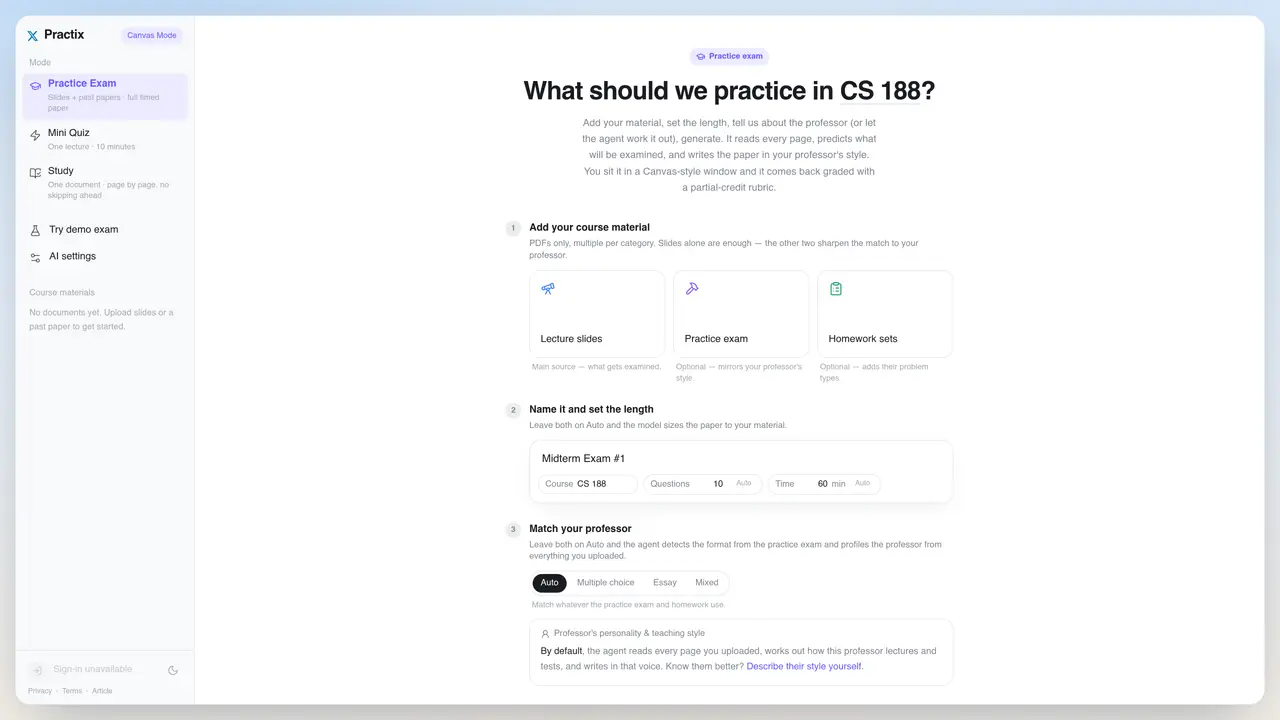
Practix generates timed practice exams and quizzes from user-uploaded course materials such as lecture slides or past papers. Users can upload multiple documents per category—lecture slides as the primary source, optional practice exams, or homework sets—to refine the generated content. The tool allows naming the exam and setting its length, with auto-sizing based on the uploaded material. It also offers options to match the professor’s teaching style, either automatically by analyzing the provided documents or manually by describing the professor’s style. The generated exam is presented in a Canvas-style interface where users can take the test under timed conditions. After completion, the exam is graded with a partial-credit rubric, providing feedback on performance. The tool requires an OpenRouter API key to function, which must be added in the AI settings.
Practix generates timed practice exams and quizzes from user-uploaded course materials such as lecture slides or past papers. It creates exams in a Canvas-style interface where users can take tests under timed conditions and receive graded feedback with a partial-credit rubric.
Practix is designed for students who want to prepare for exams by practicing with materials tailored to their specific courses and professors. It is particularly useful for those studying subjects with structured lecture slides or past papers.
Practix can automatically analyze uploaded documents to detect the professor's format and teaching style. Alternatively, users can manually describe the professor's style to refine the generated exam content.
Users can upload lecture slides as the main source, along with optional practice exams or homework sets. These documents help the tool refine the generated content to better match the professor's style and exam patterns.
Yes, Practix requires an OpenRouter API key to function, which must be added in the AI settings. This key enables the tool to generate and grade exams based on the uploaded materials.
To get started, upload your course materials such as lecture slides or past papers, name your exam, and set its length. Then, generate the exam in a Canvas-style interface where you can take it under timed conditions and receive graded feedback.
We use essential cookies to run aitoolnavio™, and optional cookies to analyze traffic and measure our marketing. You choose what we use — optional cookies stay off unless you turn them on. See our Privacy Policy.
One short email a week: fresh tools worth trying, honest takes and the updates that actually matter. No spam, unsubscribe any time.
Enhance learning with AI-driven flashcards, tests, and games.
IB and MYP exam prep platform with 35k+ practice questions, AI grading, flashcards, and study tools for students and schools.
AI-powered learning app that helps students and pupils organize study materials, stay motivated, and improve grades with smart tools and features.
Solvely is an AI homework-help app that solves math, science, and liberal arts problems with photos.
Learn AI fundamentals, develop new skills and join a knowledgeable mentor community.
An AI tutoring platform that converts PDFs, YouTube videos, slides, and lectures into notes, quizzes, flashcards, and chat-based study help.
Web-based AI flashcard generator that converts PDFs, text, images, and YouTube links into Anki-compatible decks for faster study creation.
AI study tool that turns class materials into personalized quizzes, flashcards, and summaries to make studying faster and less stressful.
Learn Anything Joyfully - From the Best Sources, Faster
Revolutionizes studying with tailored, AI-driven academic assistance.
Revolutionize learning with AI chatbots, 200M+ papers, writing aid, cross-platform.
Revolutionizing reading with AI-driven, personalized tutoring.
Matched on what this tool does — grouped by the job you would be replacing.
matches Upload lecture slides, past papers, or homework sets · Auto-size exam length based on uploaded material · Auto-detect or manually set professor's teaching style
AI tool that converts study materials into customizable practice exams and quizzes
Turn documents, slides, or videos into auto-graded multilingual quizzes in seconds with AI.
Create tailored quizzes, search existing quizzes, and use automated grading for quick assessment.
Online PTE practice platform with AI-scored mock tests and exam-focused question predictions