Generate content, correct spelling, suggest synonyms to enhance writing.
173M visits/mo+0.1%#1 Productivity & Office

Notes.ai is a mac app that transcribes recordings, video files, and YouTube videos into text and stores them in users' Notion workspaces.
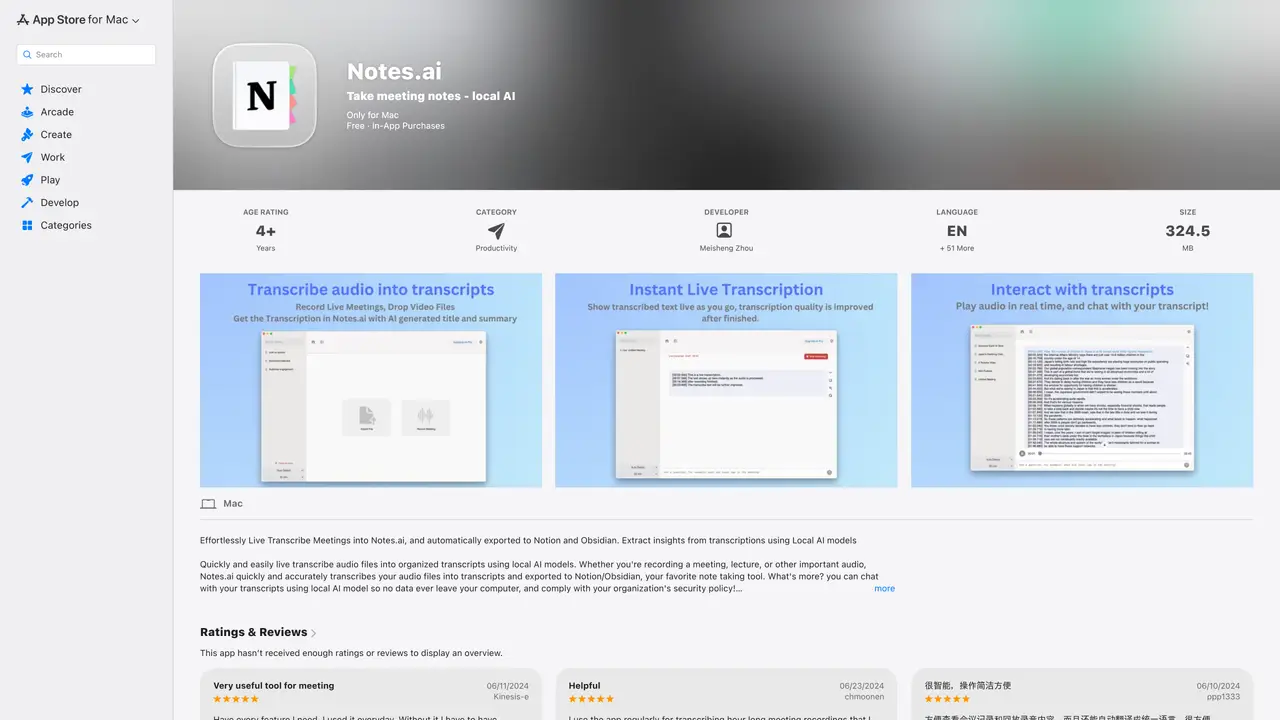
Notes.ai is a mac app that accurately transcribe recordings, video files and youtube videos into text and seamlessly stores them into an aggregated Meetings List page in users’ Notion workspaces for easy organization and access. When recording a meeting on Mac, both microphone and system audio are captured so it can be used to record any live meeting(e.g Zoom, Google Meet). To ensure privacy, all audio data is processed locally, no data leaves user’s device. Once transcription is completed, the text gets stored into an aesthetic notion template for future access. Notes.ai can also be configured to integrate with google calendar. When a google calendar event starts, Notes.ai can automatically start recording and transcription of meetings. Leveraging Notes.ai and Notion Q&A, users will be able to extract insights from meetings and long video effortlessly.
Apple Inc.
Cupertino, United States · Founded 1976
Notes.ai is a macOS app that transcribes live meetings, audio files, video files, and YouTube videos into text using local AI models. It automatically exports transcriptions to Notion or Obsidian for organization and provides a chat feature to extract insights from transcripts while keeping all data on the user's device.
Notes.ai is designed for professionals, students, and anyone who needs accurate and private transcription of meetings, lectures, or videos. It is particularly useful for users who rely on Notion or Obsidian for note-taking and organization.
No, Notes.ai processes all audio and transcription locally on the user's device, so it does not require an internet connection. This ensures privacy and compliance with security policies.
Yes, Notes.ai can record and transcribe system audio, including Zoom meetings, even when using AirPods. It captures both microphone and system audio for comprehensive transcription.
Notes.ai integrates with Notion and Obsidian, automatically exporting transcriptions to a dedicated template in either platform for easy organization and access.
To get started, download Notes.ai from the Mac App Store, install it, and follow the setup instructions to configure it with your Notion or Obsidian account. You can then start recording meetings or importing audio/video files for transcription.
We use essential cookies to run aitoolnavio™, and optional cookies to analyze traffic and measure our marketing. You choose what we use — optional cookies stay off unless you turn them on. See our Privacy Policy.
One short email a week: fresh tools worth trying, honest takes and the updates that actually matter. No spam, unsubscribe any time.
Generate content, correct spelling, suggest synonyms to enhance writing.
Markdown-based note-taking and personal knowledge management app that turns notes into a connected system of ideas.
Capture, organize, and share ideas, notes, and documents effortlessly.
Easily create and track training courses, design learning environments, and access from any device with an intuitive interface.
An AI-powered note-taking app for students and professionals to write, sketch, annotate PDFs, record audio, and generate summaries, quizzes, and flashcards.
Handwritten note-taking app with searchable ink, PDF annotation, synced audio, and AI-powered study tools.
AI-powered process documentation tool that captures workflows into visual step-by-step guides with screenshots, editing, and exports.
AI web app that transcribes audio, video, and YouTube links into text in 98 languages with summaries, mind maps, and export formats for students and teams.
A note-taking and spaced-repetition flashcard app for students and learners, with PDF annotation plus AI tools for generating cards, quizzes, and study summaries.
AI-powered research assistant for organizing, analyzing, and synthesizing information from notes and documents.
Capture thoughts, create documents, and access on any device for convenient organization and productivity.
AI-powered PDF editor with built-in agents for summarization, translation, and document analysis.
Matched on what this tool does — grouped by the job you would be replacing.
matches Transcribes recordings, video files, and YouTube videos into text · Stores transcriptions in users' Notion workspaces for easy organization and access · Captures both microphone and system audio during live meetings
Streamline meeting notes and action items with AI, ensuring efficiency and data security.
Privacy-first desktop notetaker that captures local device audio, auto-joins meetings, and exports structured notes without bots or recordings.
Automatically record Mac meetings, generate notes and follow-ups.
matches Transcribes recordings, video files, and YouTube videos into text · Processes audio data locally to ensure privacy
Automate audio transcription, convert recordings to transcripts, and transcribe lectures in multiple languages.
Offline AI tool that transcribes speech to text, cleans transcripts, and reads text aloud directly on your device.
Transcribe audio in real-time, no internet needed, 99% accuracy for recordings up to 10 minutes.
Convert audio to text, access files anywhere, and review with accuracy.