Generate content, correct spelling, suggest synonyms to enhance writing.
173M visits/mo+0.1%#1 Productivity & Office

Converts spoken words into structured markdown locally on macOS and iOS
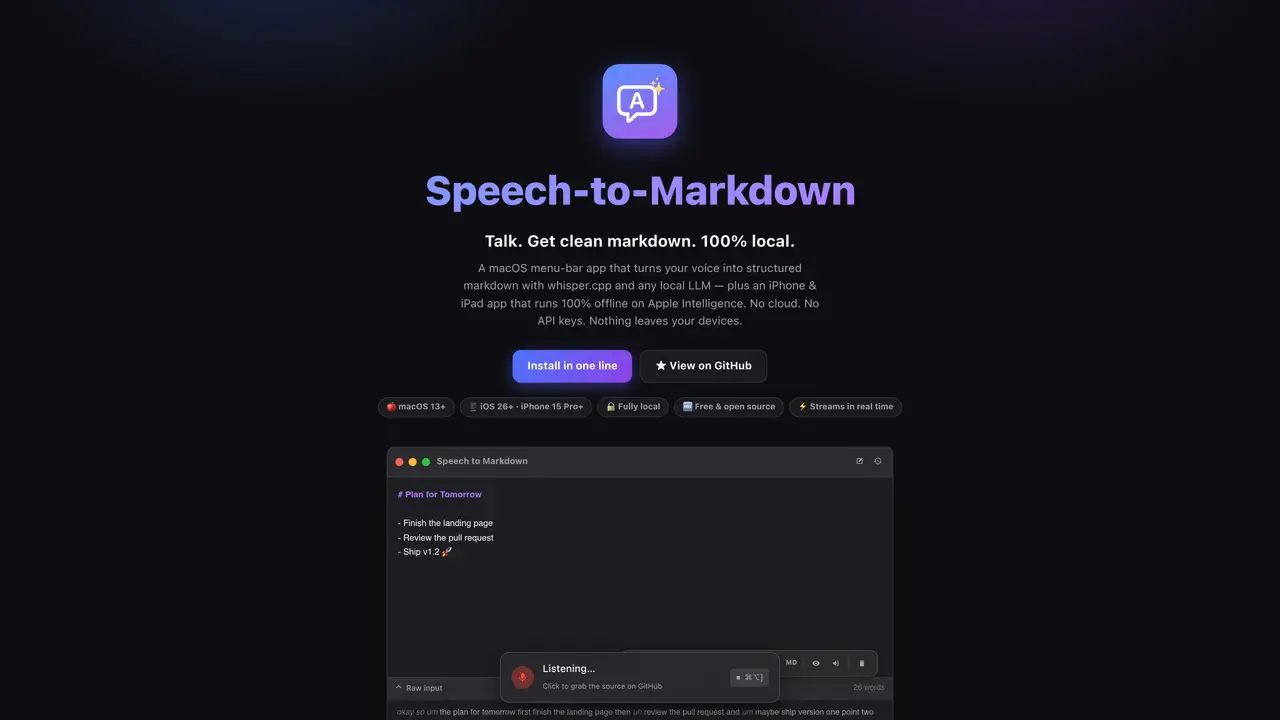
Speech-to-Markdown is a macOS menu-bar application and an iPhone/iPad app that converts voice input into structured markdown documents entirely offline. The macOS app uses whisper.cpp for on-device speech recognition and a local LLM server to format the transcribed text into clean markdown, plain text, or HTML in real time. Users can choose between two modes: Global Dictation, which types transcribed speech directly into any application via a hotkey, and Agent Mode, which streams voice input into a structured document that updates continuously as the user speaks. The app supports session history, allowing users to restore previous documents and continue recording. Output formats can be toggled between Markdown, plain text, and HTML, with each format applying specific formatting rules. The macOS app requires a local LLM server running on the user’s device, supporting multiple open-source LLM servers such as omlx, Ollama, LM Studio, and llama.cpp. The iOS app operates entirely offline using Apple Intelligence and does not require additional dependencies.
Speech-to-Markdown is a macOS menu-bar application and an iPhone/iPad app that converts voice input into structured markdown documents entirely offline. The macOS app uses whisper.cpp for on-device speech recognition and a local LLM server to format the transcribed text into clean markdown, plain text, or HTML in real time.
The tool is designed for users who prefer hands-free note-taking, writers, developers, and anyone who wants to convert spoken words into structured documents without relying on cloud services or internet connectivity.
No, the tool operates entirely offline. The macOS app uses local models and servers, while the iOS app relies on Apple Intelligence, ensuring no data leaves the user's devices.
Installation is done via a one-line command in Terminal, which sets up dependencies and builds the app. On first launch, grant Microphone and Accessibility permissions, then download a Whisper model from the app's settings.
The macOS app offers Global Dictation, which types transcribed speech directly into any application via a hotkey, and Agent Mode, which streams voice input into a structured document that updates continuously as the user speaks.
The macOS app supports multiple open-source LLM servers, including omlx, Ollama, LM Studio, and llama.cpp, all of which must be running locally on the user's device.
We use essential cookies to run aitoolnavio™, and optional cookies to analyze traffic and measure our marketing. You choose what we use — optional cookies stay off unless you turn them on. See our Privacy Policy.
One short email a week: fresh tools worth trying, honest takes and the updates that actually matter. No spam, unsubscribe any time.
Generate content, correct spelling, suggest synonyms to enhance writing.
Markdown-based note-taking and personal knowledge management app that turns notes into a connected system of ideas.
Capture, organize, and share ideas, notes, and documents effortlessly.
Easily create and track training courses, design learning environments, and access from any device with an intuitive interface.
An AI-powered note-taking app for students and professionals to write, sketch, annotate PDFs, record audio, and generate summaries, quizzes, and flashcards.
Handwritten note-taking app with searchable ink, PDF annotation, synced audio, and AI-powered study tools.
AI-powered process documentation tool that captures workflows into visual step-by-step guides with screenshots, editing, and exports.
AI web app that transcribes audio, video, and YouTube links into text in 98 languages with summaries, mind maps, and export formats for students and teams.
A note-taking and spaced-repetition flashcard app for students and learners, with PDF annotation plus AI tools for generating cards, quizzes, and study summaries.
AI-powered research assistant for organizing, analyzing, and synthesizing information from notes and documents.
Capture thoughts, create documents, and access on any device for convenient organization and productivity.
AI-powered PDF editor with built-in agents for summarization, translation, and document analysis.
Matched on what this tool does — grouped by the job you would be replacing.
matches Real-time streaming transcription and formatting · Global Dictation mode for typing directly into any app · Hotkey-based control for hands-free operation
Windows speech-to-text tool that types spoken words anywhere using local processing
On-device voice dictation for macOS with push-to-talk
Local speech-to-text for macOS with no cloud processing
Offline dictation tool for macOS that types spoken words into any application
matches On-device speech recognition with whisper.cpp · Agent Mode for structured document creation · Support for Markdown, plain text, and HTML output
matches Local cleanup of punctuation and casing · Automatic punctuation, capitalization, and filler-word removal · AI-powered text cleanup and tone adjustment
Offline AI voice-to-text app for macOS and iOS that formats transcribed speech into clean text for emails, code, or documents.
Offline voice assistant and dictation tool for desktop
Voice dictation, email drafting and structured notes for macOS
Free, open-source AI voice dictation app for Windows, Mac, and Linux with real-time transcription and AI polishing.
Voice-to-text tool that converts speech into formatted text across Windows apps
Windows dictation tool that converts speech to polished text in any app