AI assistant for safe, reliable productivity with code, collaboration, and integrations.

Sensefold
$16/moStarting price
0Popularity
About Sensefold
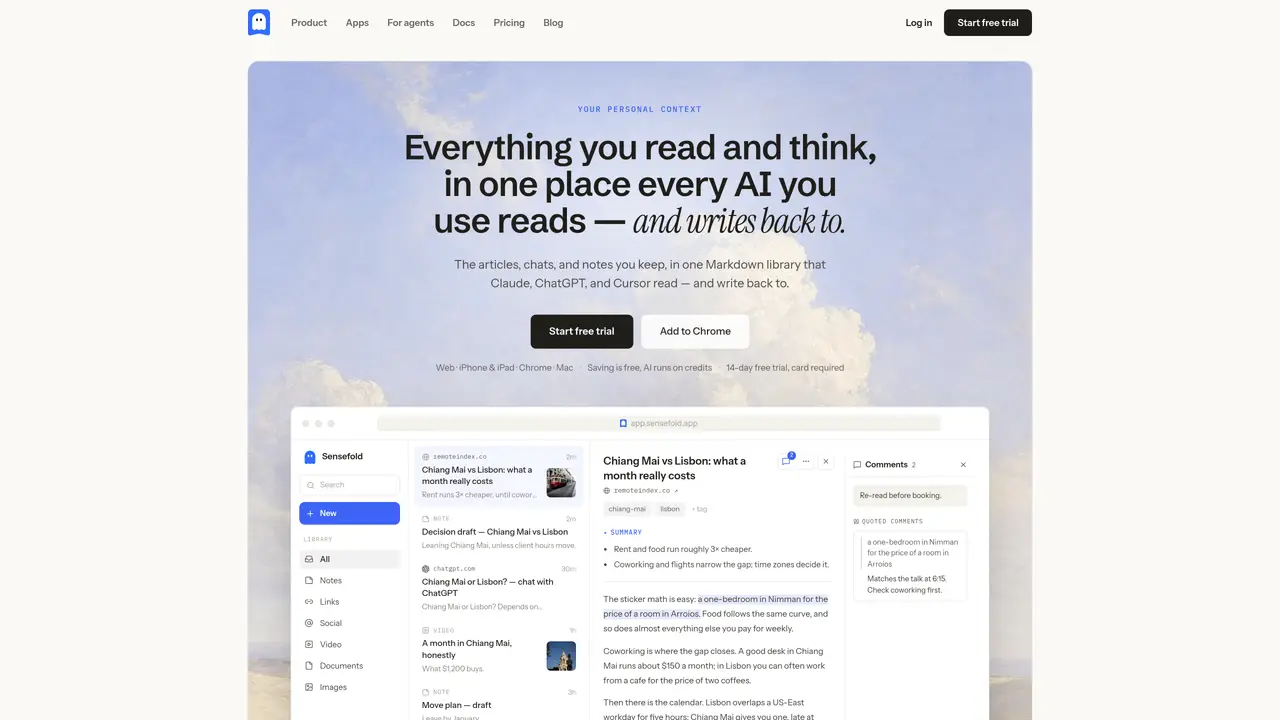
Sensefold provides a unified Markdown library where users can collect articles, chats, notes, videos, PDFs, and images from multiple sources. The platform automatically generates summaries and tags for saved content and supports OCR for PDFs and screenshots. Users can capture content via a Chrome extension, iPhone/iPad share sheet, or direct upload, with real-time sync across devices. The library is designed to be read and written back to by AI models such as Claude, ChatGPT, and Cursor, enabling seamless continuity of research and decision-making across different tools and sessions. It is particularly useful for researchers, remote workers, and decision-makers who need to maintain context over time.
Key features
- Chrome extension for web capture
- iPhone & iPad share sheet integration
- OCR for PDFs and screenshots
- Automatic AI summaries and tagging
- Keyword and semantic search
- Markdown export of entire library
- MCP access for custom AI workflows
- Real-time sync across four apps
Use cases
- Researchers compiling and analyzing sources across sessions
- Remote workers maintaining context for client work
- Decision-makers tracking pros, cons, and notes for choices
Pros
- Unified Markdown library for cross-tool context sharing
- Automatic summaries, tags, and OCR for saved content
- Real-time sync across Chrome, iPhone, iPad, and Mac
- Supports multiple capture sources including AI chats, videos, PDFs, and web pages
- MCP access for custom AI integrations
Cons
- AI processing requires credits, which reset monthly
- No free plan; AI features are paid-only
- Credit packs expire after use
- Limited to Markdown format for library content
Frequently asked questions about Sensefold
What is Sensefold and what does it do?
Sensefold is a personal context library that collects articles, chats, notes, videos, PDFs, and images from multiple sources into a unified Markdown library. It automatically generates summaries and tags for saved content and supports OCR for PDFs and screenshots.
Who is Sensefold designed for?
Sensefold is designed for researchers, remote workers, and decision-makers who need to maintain context over time across different tools and sessions. It is particularly useful for individuals who frequently switch between AI models like Claude, ChatGPT, and Cursor.
How does Sensefold work with AI models?
Sensefold’s Markdown library is read and written back to by AI models such as Claude, ChatGPT, and Cursor, enabling seamless continuity of research and decision-making. This allows users to carry their thinking across different models and sessions without losing context.
How can I capture content in Sensefold?
Content can be captured via a Chrome extension, iPhone/iPad share sheet, or direct upload. The platform also supports OCR for PDFs and screenshots, ensuring that saved content is easily accessible and searchable.
Does Sensefold support real-time sync across devices?
Yes, Sensefold offers real-time sync across multiple apps and devices, ensuring that all saved content and notes are up-to-date and accessible wherever you are.
Is there a free trial available for Sensefold?
Sensefold offers a 14-day free trial, but it requires a card to start. After the trial, AI usage is billed on a credit-based system.