Create marketing videos quickly, customize with templates, music, and photos, optimize for different platforms with AI.
4.4M visits/mo-5%#12 Video & Animation

Local AI tool that turns long gameplay footage into shareable highlight reels
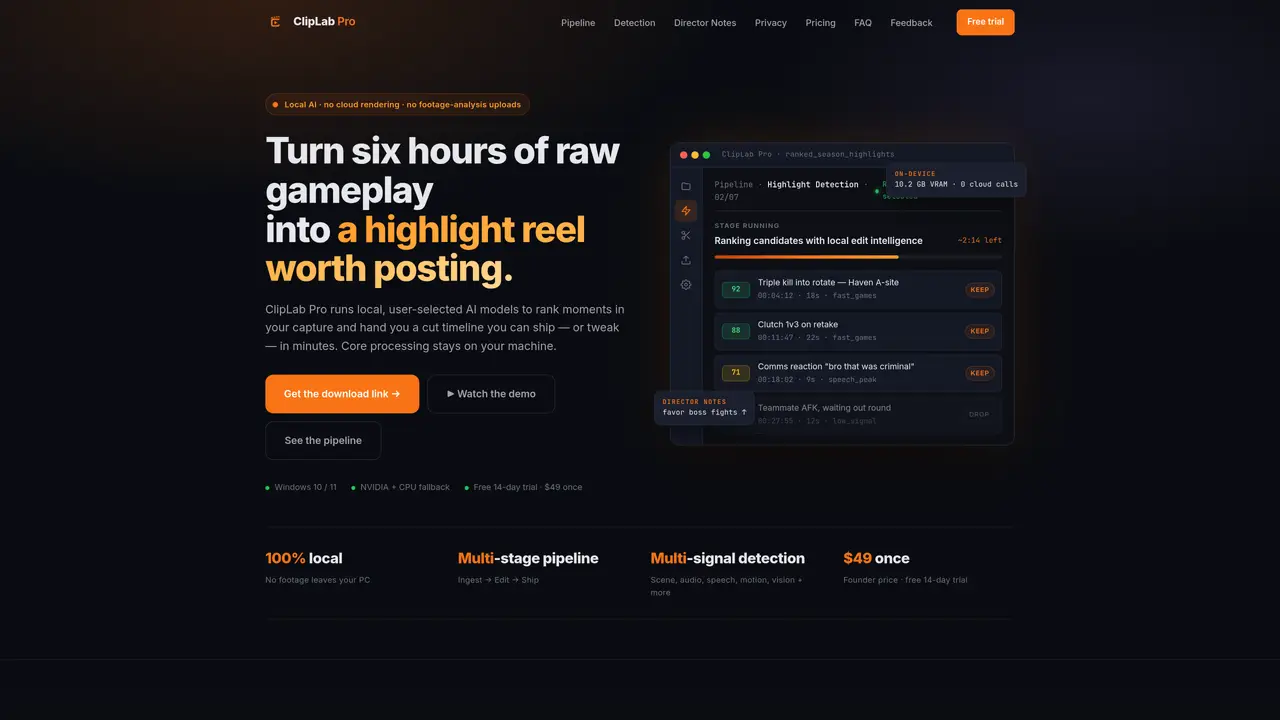
ClipLab Pro is a local AI-powered editor designed to transform lengthy gameplay captures into polished highlight reels. It processes footage entirely on the user’s machine using user-selected AI models to detect and rank standout moments, producing an editable timeline that can be exported or refined. The tool operates through a seven-stage pipeline—ingesting, detecting highlights, editing, assembling, captioning, generating thumbnails, and compiling metadata—each stage producing artifacts for the next. Users can pause at any point to inspect, adjust, or resume the workflow, ensuring transparency rather than a black-box process. Director Notes allow users to define their preferred editing style in plain English, influencing pacing, clip selection, and output length per project. The software supports multi-signal detection, combining scene changes, audio peaks, speech reactions, motion intensity, and vision cues to identify the most engaging moments. Rendering and branding options are included, with optional meme effects and time-synced captions generated locally.
ClipLab Pro is a local AI-powered editor that transforms lengthy gameplay captures into polished highlight reels by processing footage entirely on the user’s machine using user-selected AI models.
The tool is designed for gamers, content creators, and editors who want to quickly turn raw gameplay footage into shareable highlight reels without relying on cloud services.
It operates through a seven-stage pipeline—ingesting, detecting highlights, editing, assembling, captioning, generating thumbnails, and compiling metadata—each stage producing artifacts for the next.
Footage, transcripts, and AI inference stay on your PC; network calls are limited to licensing, updates, downloads, support reports you send, and YouTube actions you start.
Yes, Director Notes allow users to define their preferred editing style in plain English, influencing pacing, clip selection, and output length per project.
Local AI video work needs VRAM; a 12 GB+ NVIDIA GPU is recommended for full-speed processing, while CPU fallback exists but is significantly slower.
cliplabpro.com · third-party estimates from Similarweb
Last 2 months · grows by one month every month
Share of visits by channel
Share of visits · estimated visits
Video & Animation · Sep 2026
Traffic figures are third-party estimates, good for scale and trends; they can differ from a company's own numbers. Updated monthly.
We use essential cookies to run aitoolnavio™, and optional cookies to analyze traffic and measure our marketing. You choose what we use — optional cookies stay off unless you turn them on. See our Privacy Policy.
One short email a week: fresh tools worth trying, honest takes and the updates that actually matter. No spam, unsubscribe any time.
Create marketing videos quickly, customize with templates, music, and photos, optimize for different platforms with AI.
AI video clipping and editing tool that turns long videos into short clips with captions, reframing, and one-click social publishing.
Boost social media engagement, produce AI music videos, and remix videos with any style effortlessly.
Create promotional videos effortlessly with WeVideo's intuitive drag-and-drop interface.
An AI creation platform for turning images into videos, adding twist endings, and building interactive roleplay stories.
Drag-and-drop video maker for creating professional product demos, explainer videos, and ads without coding skills.
AI-powered video clipping and editing tool that extracts viral moments, adds captions, and schedules shorts for TikTok, YouTube, and Instagram.
Submagic is an AI tool that helps content creators create viral reels and shorts 10 times faster than any other video editing tool.
Turn text or links into short, viral-ready videos for TikTok, Instagram, and YouTube without editing skills.
Turns long videos into ready-to-post short clips for TikTok, Reels, and YouTube Shorts in minutes.
AIReel lets creators make AI-generated videos from text or image in minutes.
AI-powered tool for accurate captions, video clipping, and impactful face centering.
Matched on what this tool does — grouped by the job you would be replacing.
matches Local AI highlight detection · Multi-signal analysis (scene, audio, speech, motion, vision) · Time-synced local speech-to-text with profanity filter
Turns long videos into ready-to-post short clips for TikTok, Reels, and YouTube Shorts in minutes.
AI-powered platform that turns raw video and audio into shareable clips with auto-editing, captions, and platform-ready exports.
AI-assisted web video editor that repurposes long videos into social-ready clips with automatic keyframes, subtitles, and aspect-ratio exports.
Local AI video editor for Windows that turns long footage into publish-ready shorts
matches Director Notes for project-specific editing style · Brand overlays and meme effects · Metadata generation for titles, descriptions, tags
AI video editor that edits videos by text transcript
AI platform that repurposes long videos into short clips, auto-generates SEO assets, and schedules cross-platform publishing.
AI-powered content creation tools for social media creators
AI-powered video SEO, thumbnails, clips, captions and multi-platform distribution