AI-powered video messaging tool that records, shares, and manages video messages with AI-generated titles, summaries, and tasks.
16M visits/mo-3.4%#5 Chatbots & Assistants

Create custom videos effortlessly with AI-generated suggestions and an intuitive drag-and-drop interface.
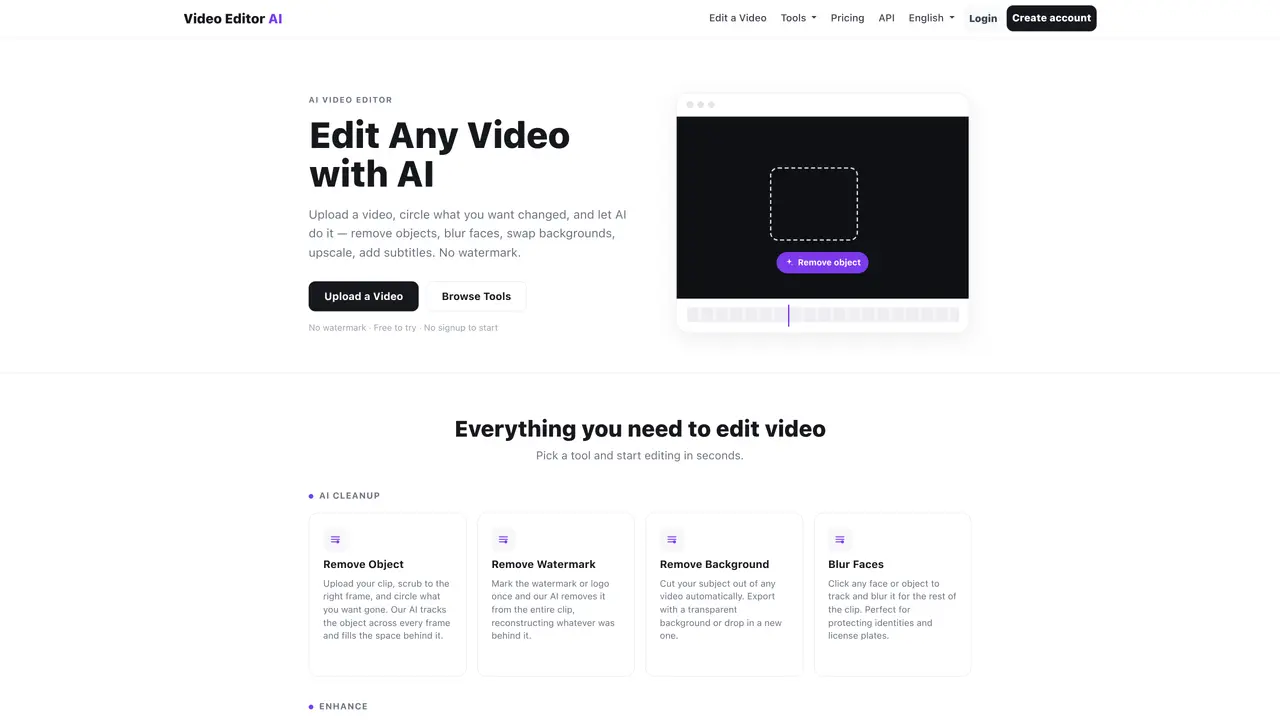
Video Editor AI is an AI-powered tool that makes it easy to edit or create videos. With an intuitive drag-and-drop interface, users can customize their videos with precision and ease. Powered by AI technology, Video Editor AI automatically suggests the best design elements to add and will even suggest entire videos based on user-provided keywords. What’s more, the tool provides numerous example scenarios for users to draw inspiration from and replicate. Whether you’re a novice or a professional video editor, Video Editor AI has something to offer. It’s a powerful tool to help create stunning videos without having to spend hours in complicated software. Plus, it’s designed to be intuitive and easy to use, so users can get to work quickly and efficiently. With Video Editor AI, you’ll be able to transform your videos into something special in just a few clicks.
Video Editor AI is an online platform that uses artificial intelligence to edit videos. Users can upload a video, select an editing task such as removing objects, watermarks, or backgrounds, and let the AI process the changes automatically.
The tool is designed for both beginners and professionals who need to edit videos quickly without complex software. It suits content creators, marketers, and anyone looking to enhance or modify video content efficiently.
Video Editor AI offers a free trial to start editing without signing up. Further usage may require an account or subscription, depending on the features and volume of edits needed.
Yes, users can mark a watermark or logo in a video, and the AI will remove it from the entire clip, reconstructing the background behind it automatically.
Yes, the platform can auto-transcribe videos, generate subtitles, and translate or dub content into multiple languages while maintaining natural-sounding voices.
To get started, users can upload a video directly to the platform, choose an editing tool such as removing an object or adding subtitles, and let the AI process the changes. No advanced software or technical skills are required.
videoeditorai.com · third-party estimates from Similarweb
Last 2 months · grows by one month every month
Traffic figures are third-party estimates, good for scale and trends; they can differ from a company's own numbers. Updated monthly.
We use essential cookies to run aitoolnavio™, and optional cookies to analyze traffic and measure our marketing. You choose what we use — optional cookies stay off unless you turn them on. See our Privacy Policy.
One short email a week: fresh tools worth trying, honest takes and the updates that actually matter. No spam, unsubscribe any time.
AI-powered video messaging tool that records, shares, and manages video messages with AI-generated titles, summaries, and tasks.
Unleash creativity: edit photos, videos, and designs with AI-enhanced tools.
Record lectures, create tutorials, and securely share videos with teams.
Create stunning videos in a few clicks, customize with powerful tools, and automate editing without experience.
Create, convert, and enhance videos effortlessly with professional effects and royalty-free music.
Create marketing videos quickly, customize with templates, music, and photos, optimize for different platforms with AI.
Automate video editing, add text-to-speech voice-overs, and optimize videos for impactful results.
Freemium, uncensored AI video and image creation for individual creators with text-to-video, image effects, and gem-based upgrades for HD and no watermarks.
Create, edit, subtitle, and translate pro-grade videos instantly.
Cloudinary provides APIs and tools to integrate, manage, and optimize images and videos for AI-driven visual experiences.
All-in-one AI suite for creators to automate workflows, edit media, and generate content across video, design, and productivity tools.
Generate cinematic video clips from text or images and refine them with AI-powered editing tools for creators and visual professionals.
Matched on what this tool does — grouped by the job you would be replacing.
matches Generate custom videos with AI-powered suggestions · Create stunning videos in minutes with an intuitive drag-and-drop interface · Draw inspiration from example scenarios for quick and easy editing
Automate video editing, add text-to-speech voice-overs, and optimize videos for impactful results.
RecCloud is a comprehensive tool for AI-driven video creation, editing, and enhancement.
Web-based AI creative platform for fast video, image, and music generation with editing and enhancement tools.
Web-based AI editor that upscales videos to 4K, removes backgrounds and watermarks, generates subtitles, makes clips, and translates videos.