Generate lifelike human videos with AI, making professional video creation fast and accessible for any user.
41M visits/mo+26.2%#1 Video & Animation

Generate custom visuals, save resources, and serve multiple purposes like promotion, tutorials, and educational content.
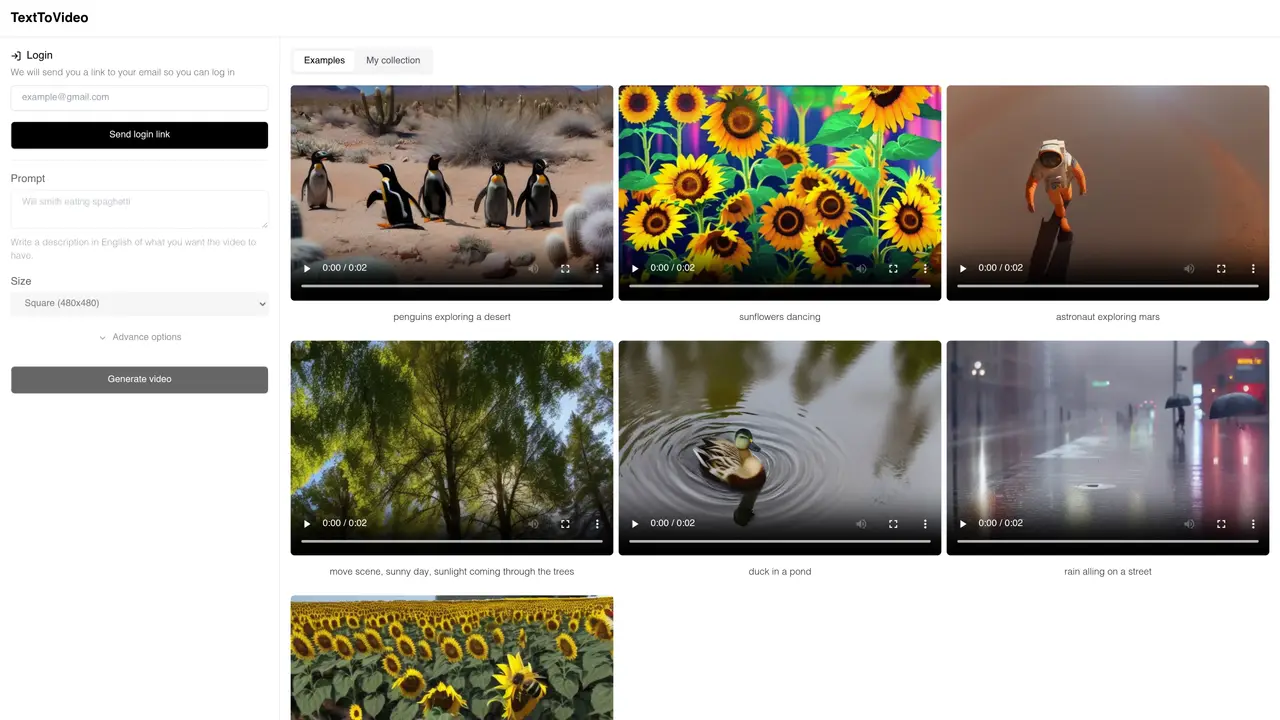
Text to Video AI is an innovative tool that allows users to create compelling videos with ease. Developed by @markdoppler_, this AI-powered tool is designed to make video creation simple and accessible. With Text to Video AI, users can create videos from written descriptions with no prior experience or technical know-how. All they need to do is write an English language description of the content they want to appear in the video. Text to Video AI will then generate visuals and convert them into a video in no time. The videos created with Text to Video AI are of professional quality and can be used for various purposes such as promotion, video tutorials, and educational content. It can be used by businesses, educators, and individuals alike to create engaging content quickly and easily. With Text to Video AI, users can save time, money, and effort while creating high-quality videos.
Text to Video AI converts written English descriptions into videos by generating visuals and compiling them into a playable video format. Users provide a prompt describing the desired content, and the tool creates the video automatically.
The tool is designed for businesses, educators, content creators, and individuals who need to produce videos quickly without prior video editing experience. It is particularly useful for promotional content, tutorials, and educational materials.
Users can start by entering a written description of the video content in English. After selecting video dimensions (square, portrait, or landscape), they can adjust creativity settings and optional negative prompts before generating the video.
The tool supports three aspect ratios: square (480x480), portrait (480x720), and landscape (720x480). These formats allow users to tailor videos for different platforms and use cases.
Yes, users can adjust the temperature setting to influence the model's creativity. Higher values produce more diverse and imaginative results, while lower values yield more predictable outputs.
A negative prompt allows users to specify elements they do not want in the video, such as 'low quality.' This helps refine the output by excluding undesired features from the generated visuals.
We use essential cookies to run aitoolnavio™, and optional cookies to analyze traffic and measure our marketing. You choose what we use — optional cookies stay off unless you turn them on. See our Privacy Policy.
One short email a week: fresh tools worth trying, honest takes and the updates that actually matter. No spam, unsubscribe any time.
Generate lifelike human videos with AI, making professional video creation fast and accessible for any user.
xAI builds Grok frontier AI models for reasoning, coding, voice, images, video, enterprise workflows, and developer APIs.
AI-powered video messaging tool that records, shares, and manages video messages with AI-generated titles, summaries, and tasks.
Explore and test Google’s experimental AI tools and prototypes before they become products.
Creates licensed videos, images, music.
Web and mobile AI platform for generating, editing, and training custom visuals from prompts with community models and face-swap tools.
Create stunning videos in a few clicks, customize with powerful tools, and automate editing without experience.
Create, convert, and enhance videos effortlessly with professional effects and royalty-free music.
Create engaging videos with voiceovers, music, and customizations using a library of royalty-free assets.
Create auto-resized campaign images and videos with DaVinci AI's generative media suite.
Freemium, uncensored AI video and image creation for individual creators with text-to-video, image effects, and gem-based upgrades for HD and no watermarks.
Generate cinematic video clips from text or images and refine them with AI-powered editing tools for creators and visual professionals.
Matched on what this tool does — grouped by the job you would be replacing.
matches Generate custom visuals from written descriptions · Save resources by automating video creation · Serve multiple purposes such as promotion, tutorials, and educational content
Create simple and engaging videos with an easy-to-use, AI-powered video maker platform.
AI video generator that turns text or images into high-quality videos with 30 free generations monthly.
Transform text to engaging videos swiftly with AI-driven simplicity and creativity.
Create professional videos from text inputs, no ML experience needed, for education and business purposes, with quick results.
matches Generate custom visuals from written descriptions · Save resources by automating video creation
matches Create professional-quality videos in no time · Accessible for businesses, educators, and individuals
AI platform for upscaling images, enhancing photos, and generating high-quality creative assets with contextual detail.
Create stunning, customizable visuals with ease, giving your brand a professional look in just a few clicks.
AI image generator for commercial visuals, thumbnails and social media graphics
Online AI photo editor for editing images with text prompts and references
Create custom social media animations, generate website landing page videos, and produce product explainer video animations.
AI-powered tool that converts property photos into cinematic videos with branding, captions, and music for real estate marketing.