
Generate AI images, discover unique prompts, and save favorite images for quick reference.
4.5M visits/mo+9.2%#24 Image & Design

Explore and understand MidJourney prompts, identify patterns, uncover insights, and save/share findings with others.
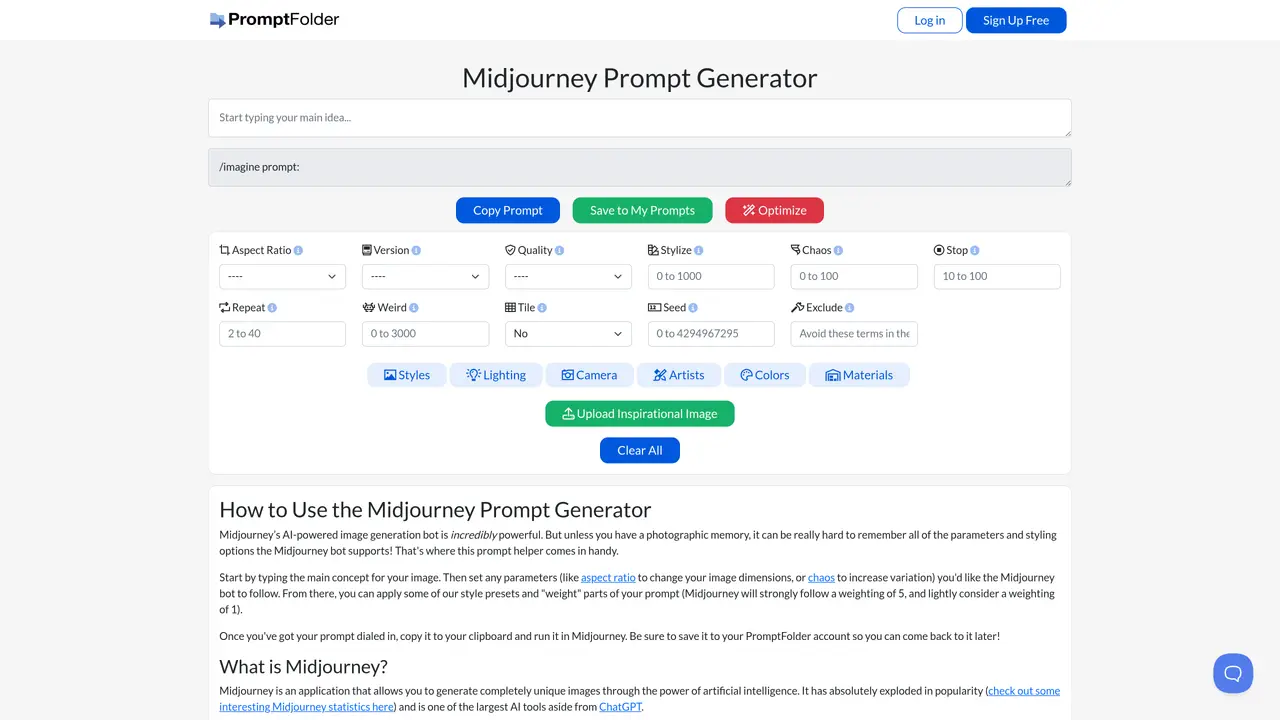
MidJourney Prompt Helper is an intuitive, open-source tool designed to make complex MidJourney prompts easier to explore and understand. With its easy-to-use interface, users can quickly and intuitively get an overview of styles, categories, and other important information about MidJourney prompts. The app’s visualizations make it simple to identify patterns and uncover insights in the data. Plus, you can save your work and share your findings with others. From beginners to experts, MidJourney Prompt Helper is perfect for anyone who wants to quickly and easily explore and understand MidJourney prompts. With its straightforward features and intuitive design, it’s the ideal tool for learning, exploring, and discovering trends in MidJourney data. With MidJourney Prompt Helper, you can quickly gain valuable insights into MidJourney prompts and make informed decisions about your data.
The MidJourney Prompt Helper is a tool designed to simplify the creation of MidJourney prompts by providing an intuitive interface for selecting parameters, styles, and other options. It helps users build and optimize prompts by offering presets, aspect ratio adjustments, and style selections to generate more precise AI images.
The tool is suitable for anyone using MidJourney, from beginners to experienced users. It is particularly helpful for those who want to streamline the prompt creation process and explore different styling options without needing to memorize MidJourney’s parameters.
Start by entering your main concept or idea, then adjust parameters like aspect ratio, chaos, or stylization using the provided options. You can apply style presets and weight parts of your prompt before copying it to use directly in MidJourney. Saved prompts can be revisited later for future use.
Yes, the tool allows users to save prompts to their PromptFolder account, enabling them to revisit and reuse their prompts at a later time. This feature helps maintain a library of optimized prompts for consistent or repeated use.
Yes, the tool provides options to customize various MidJourney parameters, including aspect ratio, quality settings, stylization levels, and chaos values. Users can also apply specific style presets and weight different parts of their prompts to influence the output.
The tool offers a free tier for basic usage, allowing users to create and save prompts. Additional features or advanced functionalities may require a subscription, depending on the plan chosen by the user.
We use essential cookies to run aitoolnavio™, and optional cookies to analyze traffic and measure our marketing. You choose what we use — optional cookies stay off unless you turn them on. See our Privacy Policy.
One short email a week: fresh tools worth trying, honest takes and the updates that actually matter. No spam, unsubscribe any time.
Generate AI images, discover unique prompts, and save favorite images for quick reference.
Discover and share image and text prompts for AI generation, with courses and community support.
Browser tools and guides for composing and refining Suno AI music prompts
Discover ideal prompts, reduce API costs, and monetize your own ideas.
Enhance prompt clarity with actionable, improvement insights.
A Chrome extension and web app that refines, saves, and reuses AI prompts across multiple platforms like ChatGPT, Claude, and Copilot.
AI low-code prompt generator for system designs and AI workflows
Transform prompts for better results, generate prompts for classroom discussions, and access a library of 200+ inspiring prompts.
Track, manage, and explore OpenAI API requests with a comprehensive dashboard and intuitive UI.
AIForWork.co is the most advanced ChatGPT prompt and resource library with custom GPTs and helpful resources.
All-in-one content creation tool for bloggers, featuring over 70 AI-powered tools to inspire ideas, generate outlines and titles, and rewrite existing content.
Matched on what this tool does — grouped by the job you would be replacing.
matches Easily explore and understand MidJourney prompts · Quickly identify patterns and uncover insights · Visualizations to simplify complex data
Automate data extraction, analysis, generate visualizations, identify patterns, and make predictions effortlessly.
Gain insights into customer behavior, identify trends, and explore data with an intuitive UI.
Get AI-driven insights, visualize data, find patterns, and build reports faster with Sloped's powerful tools.
Analyze large datasets, uncover trends and outliers, and generate visually appealing visualizations with an intuitive data platform.
matches Save and share findings with others
Create customizable tables, databases, and spreadsheets, share data securely with team members.
Easily analyze and visualize data, uncover trends, and leverage predictive analytics and machine learning.
Create reports, analyze complex data, and integrate with popular cloud services and databases.
Plot is an intuitive plotting tool that lets users visualize data, customize graphs, and share insights effortlessly.