25 AI Tools Every Student Should Know in 2026
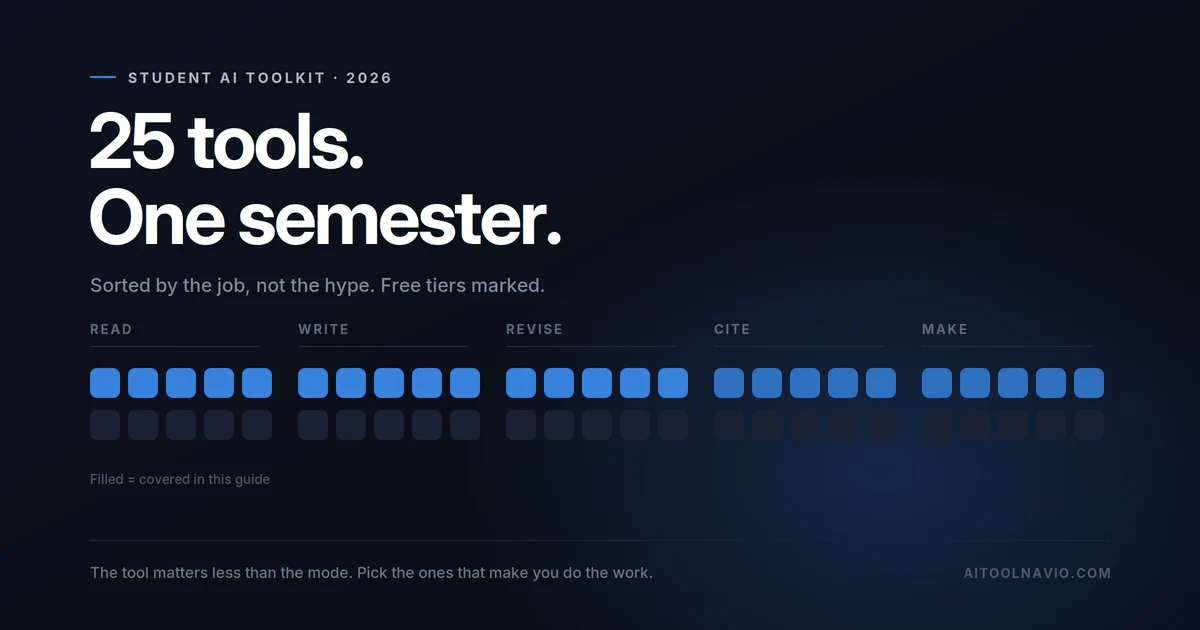
Twenty-five tools, grouped by the job you actually need done. Every free tier checked, every student discount verified, and the ones that make you dumber flagged.
Most “AI tools for students” lists are written by people who are not students. You can tell, because they recommend twenty-five tools that all do the same thing — write an essay for you — and none that help with the part you’re actually stuck on.
This one is grouped by the job. Five jobs, five tools each. Every free tier below was checked in September 2026, every student discount verified on the vendor’s own page, and anything that changed recently is flagged — because half the guides you’ll find still recommend free tiers that no longer exist.
One thing before the list, because it changes how you should read it.
The mode matters more than the tool
There’s now decent evidence that using AI in “just give me the answer” mode actively hurts learning — you get the output, you feel like you understood it, and you didn’t. The feeling of fluency is the problem. It’s indistinguishable from the real thing until the exam.
So the tools worth your time are the ones that make you do the work: spaced repetition, grounded Q&A over your own lecture notes, Socratic tutors that refuse to just answer. Those are marked [makes you work] below. The ones that produce finished text are marked [produces output] — useful, but use them at the end of a task, never at the start.
Job 1 — Reading dense material
The single biggest time sink in any degree. Four hundred pages a week, of which maybe forty matter.
- NotebookLM [makes you work] — upload your own readings and lecture slides, then ask questions answered only from those sources. Because it’s grounded in what you gave it, it can’t invent a citation. The audio overview feature turns a reading pack into something you can listen to on the bus. Free tier: 100 notebooks, 50 sources each, 50 queries a day, 3 audio overviews a day. Genuinely generous. Note: Google renamed this to Gemini Notebook in July 2026; old links still work.
- Claude — the strongest of the general assistants on long documents. Paste in a forty-page PDF and ask it to find the argument structure. Free tier: yes, with caps.
- ChatGPT [produces output] — the default for a reason. Free tier: unlimited text chat, everything expensive metered. Note it now carries ads on the free and Go tiers.
- SciSpace — chat with a research paper, get the methodology explained in plain language. Built specifically for academic PDFs rather than documents in general.
- Scholarcy — turns a paper into summary flashcards and extracts its references automatically. Good for the “I have thirty papers and a week” situation.
Job 2 — Finding the right sources
Where most undergraduate research actually goes wrong. Not writing — finding.
- Semantic Scholar — free, non-profit, ~200M papers, with plain-language TLDRs and citation context showing how a paper was cited. No paid tier, no catch. Start here.
- Elicit — describe your research question and it screens papers and extracts findings into a comparison table. The free tier covers unlimited search and summaries; the agentic features are paywalled at $49/month, which is not a student price.
- Consensus — searches for what studies actually concluded, not just what exists. Students and faculty get 40% off with a .edu or .ac email — one of the better verified student deals here.
- ResearchRabbit — feed it one good paper and it maps the citation network around it. Free tier covers 310M+ articles and up to 50 seed papers, which is plenty for a dissertation. It’s no longer entirely free — there’s a paid tier now — but the free one still does the job.
- Connected Papers — a visual similarity graph from a single seed paper. The fastest way to find the adjacent literature your supervisor will ask why you missed.
Job 3 — Citations and reference management
- Zotero — free, open-source, and the correct default. Collects sources from your browser, formats bibliographies in any style, plugs into Word and Google Docs. App is free; only cloud storage costs (300MB free, $20/year for 2GB). It has no built-in AI, which is fine — you want this part boring and correct.
- Mendeley — the main alternative, with a solid Word plugin. Worth knowing it’s owned by Elsevier, a publisher. Zotero is the safer long-term home for your library.
- Obsidian [makes you work] — local Markdown notes that link to each other. Free for personal use, and students get 40% off Sync and Publish. The linking is the point: it forces you to connect ideas rather than pile them up.
- Notion — students get the Plus plan free with a university email, re-verified annually. Be clear on what that includes: Plus, not full Notion AI, which is a Business-tier feature.
- RemNote [makes you work] — notes, PDF annotation and spaced repetition in one app, which is a genuinely good fit for medicine and law. 25% education discount — but note it doesn’t apply to AI credits, and you must buy through the web app, not the mobile store.
Job 4 — Actually remembering it
The job everything else is in service of, and the one AI is least helpful with — because there’s no shortcut to retrieval practice.
- Anki [makes you work] — the spaced-repetition standard. Free on desktop and Android; iOS is a one-time $24.99, not a subscription. Unglamorous and unbeaten.
- Quizlet [makes you work] — friendlier than Anki with AI-generated sets. Plus is $19.99/year. Check what’s still free before relying on it — the free tier has shrunk repeatedly over the years.
- Khanmigo [makes you work] — deliberately Socratic: it asks you questions instead of handing over answers. $4/month. Aimed at school and early undergraduate level, but it’s the only tool here explicitly designed not to do your work for you.
- Photomath — photograph a maths problem, get worked steps. Step-by-step is in the free tier, which is unusually honest.
- Wolfram Alpha — the reliable one for maths. Chatbots are confidently wrong at arithmetic in ways that are hard to spot; this isn’t. $5/month billed annually for students — the cheapest genuine student discount in this entire guide. Step-by-step working is Pro-only.
Job 5 — Producing the thing
- Grammarly [produces output] — grammar and tone, plus something more useful than people realize: Pro includes an AI-text detector, so you can see roughly what a marker’s software might see in your own writing. Free tier gives 100 AI prompts a month; Pro is $12/month.
- QuillBot [produces output] — paraphrasing and summarizing. Read this carefully: Turnitin explicitly detects AI-paraphrased text and names tools like QuillBot. Use it to understand a sentence, not to disguise one.
- Otter.ai — lecture transcription. 20% student discount with a .edu email. The free tier’s hard limit is three lifetime file uploads, so it’s for live recording, not processing a term’s backlog.
- Speechify — text-to-speech for heavy reading loads, and a serious accessibility tool if you’re dyslexic. 25% student discount via student verification services.
- Gamma [produces output] — prompt to presentation in about a minute, which is exactly what you want at 11pm before a seminar. Watch the free tier: its credits are a one-time grant, not a monthly refresh.
Three more worth knowing
- Goblin Tools — breaks an overwhelming task into steps sized for a brain that doesn’t want to start. Beloved by ADHD students. Web version free.
- Napkin AI — turns text into diagrams. 500 free credits per week, which is unusually generous.
- GitHub Copilot — free for verified students through the GitHub Student Developer Pack, which also bundles a pile of other developer tools.
The student deals actually worth claiming
Most “student discounts” are 10% off something you didn’t need. These five are real:
| Tool | Deal | Catch |
|---|---|---|
| Gemini | One year of Google AI Pro free for students | Must redeem before 31 Dec 2026. Card required; auto-renews at full price. International students get AI Plus instead, and some countries are excluded |
| Wolfram Alpha | $5/mo billed annually | Step-by-step is Pro-only, which is the whole reason to buy it |
| Notion | Plus plan free | Does not include full Notion AI. Re-verify yearly |
| Consensus | 40% off | Needs a .edu or .ac email |
| Obsidian | 40% off Sync and Publish | The app itself was already free |
And one that catches people out constantly: Canva for Education is K-12 only. University students get plain Canva Free unless the institution has bought Canva Campus. Try your university email — but ask IT before assuming.
On AI detection, since you’re going to ask
Short version: the detectors are less reliable than your institution’s policy implies, and that cuts both ways.
The commonly quoted “under 1% false positives” figure traces to a blog post from early 2023 — before most of the models you’d use today existed. Independent research has repeatedly found worse: one study of fourteen detectors found none reached 80% accuracy. Non-native English speakers are flagged far more often than native speakers. So are neurodivergent writers.
Institutions have noticed. Curtin University disabled AI detection entirely from January 2026. Turnitin itself now hides scores under 20% because that band was too unreliable to display, and states plainly that a score should not be the sole basis for action against a student. Its strategic bet has shifted from scoring finished text to observing the writing process — draft history, typing patterns, construction time.
Practical advice, not legal advice: keep your drafts. Version history in Google Docs or Word is the single best protection against a false accusation, and it costs you nothing. Don’t reach for a “humanizer” — those are detected too, and using one turns an argument about your writing into an argument about your conduct.
If you only pick three
NotebookLM for reading, Anki for remembering, Zotero for citations. All three have real free tiers, none of them writes anything for you, and together they cover the parts of a degree that actually take the time.
Add a general assistant — Claude or ChatGPT — for explanation, and claim the Gemini student year while it’s still available. That’s a complete setup for roughly nothing.
Keep exploring
FAQ
What is the best free AI tool for students?
NotebookLM, because its free tier is generous and it only answers from sources you upload — so it can’t invent a citation. Semantic Scholar is the best entirely free research tool, with no paid tier at all.
Do students get AI tools for free?
Some, yes. Google offers students a free year of AI Pro if redeemed before 31 December 2026, Notion gives students its Plus plan free, and GitHub Copilot is free through the Student Developer Pack. Wolfram Alpha, Consensus, Obsidian, RemNote, Otter and Speechify all offer verified student discounts.
Will my university detect AI writing?
It may try, but detection is unreliable in both directions — false positives disproportionately affect non-native English speakers, and paraphrasing tools defeat it. Some universities have disabled it. Keep your drafts and version history; that’s the best evidence of your own process.
Is using AI cheating?
It depends entirely on your institution’s policy and the specific assessment, so read those rather than a blog. The more useful question is whether a given use helps you learn — a tool that hands you finished text usually doesn’t, even where it’s permitted.
Which AI tools actually help you learn rather than just finish work?
Anki and RemNote for spaced repetition, NotebookLM for grounded questioning of your own material, Khanmigo for Socratic tutoring, and Obsidian for linking ideas. All of them make you do the retrieval, which is the part that builds memory.
Liked this? We do one every Friday.
The week's new AI tools, what each one actually does, and the ones worth your time — written the same way as this post.
One email a week · unsubscribe in one click