AI Tool Pricing Explained: Free vs Freemium vs Paid, and What You Actually Get
The price on the page is the easy part. What decides your actual bill is the unit they've chosen to meter you in — and in 2026 that unit changed underneath a lot of people.
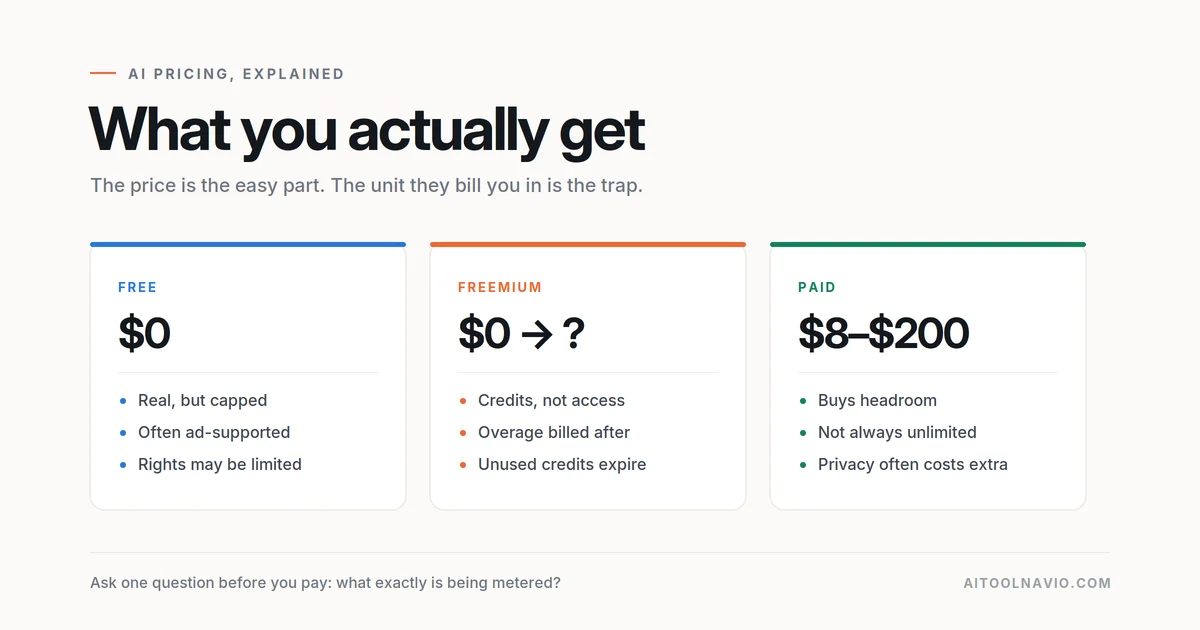
In 2026 the interesting thing about AI pricing isn’t that it went up. It’s that the unit changed.
One major coding tool kept every headline price exactly the same — $10, $39, $19, $39 — while switching what those prices buy from “requests” to “tokens.” Nothing on the pricing page moved. What you got for the money did. Developers noticed, and the summary that stuck was blunt: you will get less, but pay the same price.
That’s the pattern worth understanding, because it repeats across the category. The price is the easy part. The unit they’ve chosen to meter you in is what decides your actual bill — and most people don’t find out which unit they bought until the month they go over.
This guide is the plain-language version: the seven kinds of “free”, the five ways of metering, the traps that are documented rather than rumored, and a method for estimating your cost before you hand over a card.
Part 1 — There are seven different things called “free”
“Free tier” on a pricing page can mean any of these, and they are not remotely equivalent.
- Genuinely free, capped. Real product, real limits, no expiry. Typically unlimited on the cheap axis — plain text chat — with everything expensive metered separately. Perfectly usable.
- A metered demo. A hard monthly count, often with the good models locked. Enough to evaluate, not enough to work with. Watch for free tiers that don’t let you choose the model — that’s the tell.
- Free with ads. New and now mainstream. ChatGPT began showing ads on its Free and Go tiers in February 2026, targeted using your conversation topic and past chats, and had expanded to six countries by August. Ads don’t appear on Pro, Business, Enterprise or Education. Free users can opt out — in exchange for fewer daily messages, which is the clearest possible demonstration that your attention and your quota are the same currency.
- Free, but your output is public. The one that catches people out. On cheaper tiers of several image generators, everything you make appears in a public gallery for anyone to see and remix. Private mode is a paid feature. If you’re doing client work or anything unannounced, the free tier isn’t free — it’s disclosure.
- Free, but you don’t fully own it. Commercial rights can be gated by plan or by your employer’s revenue. Midjourney’s terms require a Pro or Mega plan for you to own your output if you or your company gross over $1,000,000 a year.
- “Open”, but license-gated at scale. Open-weight models you can download and self-host free — up to a threshold. Meta’s Llama license cuts off free use above 700 million monthly active users; Stability’s community license above $1M annual revenue. Neither is an OSI open-source license. Fine for you; a legal question for a large employer.
- One-time credits dressed as a free tier. The sneakiest. You’re granted a pile of credits on signup that never refresh. It reads like a monthly allowance. It’s a trial with the word “free” on it. Gamma’s free plan works this way.
Part 2 — Five ways of metering, and why it matters
1. Flat subscription
One price, broadly unlimited. Rare now at the frontier, and “unlimited” almost always carries the qualifier “subject to abuse guardrails.”
2. Credits
You buy a pot of credits and actions draw them down. The critical question is whether the credit is pegged to a currency. GitHub’s AI credits are worth exactly $0.01 each and it publishes per-model token rates, so you can do the arithmetic. Abstract credits that aren’t pegged to anything, with no published cost-per-action, cannot be budgeted at all — and some vendors say so outright, warning that cost depends on model, speed, resolution and tool.
3. Tokens at API rates
The most transparent and the least intuitive. You’re billed for text going in and coming out, at published per-million-token rates. Honest, but it means the same action costs different amounts on different days depending on how much context is involved.
4. Rolling windows vs monthly pools
This one genuinely changes how a tool feels to use. A monthly pool resets on your billing date — you can burn it all in a weekend and then be stuck for three weeks. A rolling window — Anthropic uses five-hour sessions — punishes bursts but forgives you within hours. Codex runs on five-hour windows too, which means a heavy morning can leave you throttled by mid-afternoon.
Neither is better. But if your work is bursty, a rolling window suits you, and if it’s steady, a monthly pool does.
5. Included credits, then overage
The dominant hybrid. You get an allowance; past it you keep working and pay the difference. Learn to spot the phrase “billed in arrears” — it means you find out the cost after you’ve spent it. Set a hard budget cap on day one wherever the vendor offers one.
Part 3 — The traps, documented
Unused credits usually vanish
GitHub’s billing documentation is admirably direct: “Unused credits are forfeited, and your allowance resets to the full monthly amount” at the start of each calendar month. Most vendors work this way. And here’s the reading rule that matters: if the docs are silent on rollover, assume forfeiture. No vendor forgets to mention a benefit.
Half your allowance may be the half they can shrink
This one is under-reported and worth knowing. GitHub splits included credits into base credits — “they never change” — and a flex allotment explicitly designed to “adapt as AI economics evolve.” On the $100 Max plan that’s 10,000 base and 10,000 flex. Literally half the headline number sits in the bucket the vendor has reserved the right to reduce.
The annual discount is a rate, not a payment
“$17/month billed annually” is a $204 check today. And on some plans prepaying a year still doesn’t bank capacity — Midjourney’s GPU hours reset monthly even on annual plans, so you get a discount, not a buffer.
One genuinely consumer-friendly counterexample: ChatGPT Plus has no annual option at all. OpenAI doesn’t accept prepayment for it.
Privacy is frequently a paid upgrade
Covered above, but it bears repeating as a pricing question rather than a features question: on several tools, going from “everyone can see my work” to “nobody can” is a tier upgrade, not a setting.
Per-seat pricing bills assigned seats, not used ones
Team plans typically charge per granted seat. A colleague who logged in once in March is still on the invoice in September. Audit seats quarterly.
A vendor did apologize for one of these
Worth knowing this happened, because it’s the clearest proof the confusion is real and not just you. After restructuring individual pricing in June 2025, Cursor published a statement: “Our recent pricing changes for individual plans were not communicated clearly, and we take full responsibility.” It refunded unexpected charges over a defined window. Migrations from one unit to another are genuinely hard to communicate — and vendors don’t always get it right.
Part 4 — What the big tools actually cost right now
| Tool | Free | Entry | Mid | Top |
|---|---|---|---|---|
| ChatGPT | $0, with ads | Go $8 | Plus $20 | Pro tiers; the $200 tier paused new signups in Sept 2026 |
| Claude | $0 | Pro $20 ($17 annual) | Max from $100 | Max $200 · Team $25/seat |
| GitHub Copilot | 2,000 completions | Pro $10 (1,500 credits) | Pro+ $39 (7,000) | Max $100 (20,000) |
| Cursor | Hobby | Pro $20 · Start ₹649 in India | Pro Plus $60 | Ultra $200 · Teams $40/user |
| Midjourney | None | Basic $10 | Standard $30 | Pro $60 · Mega $120 |
| Ideogram | Weekly credits | Plus $20 | Pro $60 | Team $30/user |
One India-specific note worth flagging: Cursor’s ₹649 Start plan covers only its own models and excludes third-party models entirely. Cheaper, but a real restriction rather than just a smaller allowance.
Part 5 — How to estimate your cost before you pay
Step 1: Find out what’s being metered
Messages per rolling window? Dollar-pegged credits? Raw tokens? GPU seconds? You cannot compare two plans until you know they’re selling the same kind of thing — and often they aren’t.
Step 2: Convert the plan into a dollar ceiling
Dollar-pegged plans make this easy, which is the strongest argument for preferring them. Copilot Pro’s 1,500 credits are $15 of model usage for a $10 subscription. Cursor Pro is explicitly $20 of usage at API pricing. If a vendor won’t let you do this arithmetic, that is itself the finding.
Step 3: Understand the context effect — this is where estimates fail
Your cost per message is not constant. It scales with how much is in the conversation, because the whole thread gets reprocessed on every turn.
Anthropic documents this openly: around 45 messages per five-hour window in short conversations, but with one large attachment in the thread, “you may only be able to send 15 messages.” Same plan, same spend, a third of the output.
That single fact explains most of the gap between what people budget and what they use. Long threads and big uploads burn quota far faster than short ones.
Step 4: Measure in the trial, don’t guess
Run one week of genuinely representative work. Not exploring — real tasks, including one long, attachment-heavy session, because that’s the shape that breaks budgets. Record what you consumed and when you hit a limit. Multiply by 4.3, then add 30–50% headroom, because the expensive weeks are the deadline weeks.
Step 5: Ask these six questions
- Do unused credits roll over, or are they forfeited?
- How much of my allowance is the part the vendor reserves the right to shrink?
- At the cap — hard stop, slower service, or automatic billing?
- Is my output private by default, or is that an upgrade?
- Do I have commercial rights on this tier, at my company’s revenue?
- Does the annual discount buy me a buffer, or only a rate?
Step 6: Red flags a credit system will bite you
- Credits aren’t pegged to a currency and no cost-per-action is published
- The docs are silent on rollover
- Any feature where the model used isn’t disclosed — you can’t price what you can’t identify
- Overage is on by default and billed in arrears
- Introductory bonus credits with an end date
Part 6 — Is anyone regulating this?
Slowly, and less than you’d hope.
In the US, the FTC’s “click-to-cancel” rule was finalized in 2024 and then struck down by a federal appeals court in 2025. The FTC restarted the rulemaking in March 2026 and is taking comment — so as things stand there is no operative federal click-to-cancel rule, which is worth knowing before you assume canceling will be easy.
In the EU, the proposed Digital Fairness Act is consulting on mandatory cancellation buttons, auto-renewal off by default, and explicit consent before a free trial converts to paid. Proposals under consultation, not law. Dark patterns that make canceling harder than subscribing are already prohibited under the Digital Services Act.
The one thing to take away
Before you subscribe to anything, ask a single question: what exactly is being metered, and can I convert it into dollars?
If the answer is clear — 1,500 credits at a cent each, or $20 of usage at published rates — you can budget it, and you’ll know when you’re close. If the answer is a number of abstract units with no published per-action cost, you’re not buying a plan. You’re buying a surprise, and you’ll find out its size at the end of the month.
Put it into practice
- Start with what costs nothing: free AI tools
- Compare two tools side by side before you commit
- Pricing referenced here: ChatGPT · Claude · GitHub Copilot · Cursor · Midjourney · Ideogram
- Which AI tools give students a genuine discount
FAQ
What’s the difference between free and freemium?
A free tool is free at its full scope. A freemium tool gives you a limited slice to demonstrate the paid version — capped counts, restricted models, or output that’s public by default. Most “free” AI tools are freemium.
Are AI credits the same as money?
Sometimes literally. GitHub’s AI credits are worth $0.01 each, so 1,500 credits is $15 of usage. Other vendors use abstract credits with no published conversion, which means you can’t forecast spend — treat that as a warning sign.
Do unused AI credits roll over?
Usually not. GitHub’s documentation states unused credits are forfeited monthly. If a vendor’s docs don’t mention rollover, assume they expire.
Why did my AI bill go up when the price didn’t change?
Most likely the unit changed. Several tools kept headline prices identical while switching from counting requests to counting tokens, which means the same subscription buys a different amount of work.
Is ChatGPT free tier really free?
It costs no money, but since February 2026 it carries ads targeted using your conversation topics and past chats. You can opt out of ads in exchange for fewer daily messages. Paid tiers from Plus upward have no ads.
How do I avoid surprise AI bills?
Set a hard budget cap where the vendor offers one, keep overage opt-in rather than default, and trial for a week with genuinely representative work — including one long, attachment-heavy session, since context length is what actually drives cost.
Liked this? We do one every Friday.
The week's new AI tools, what each one actually does, and the ones worth your time — written the same way as this post.
One email a week · unsubscribe in one click