Revolutionize transcription with unmatched accuracy, speed, and language support.
27M visits/mo+0.9%#4 Audio & Voice
Local Windows audio/video transcription with speaker labels and editable exports
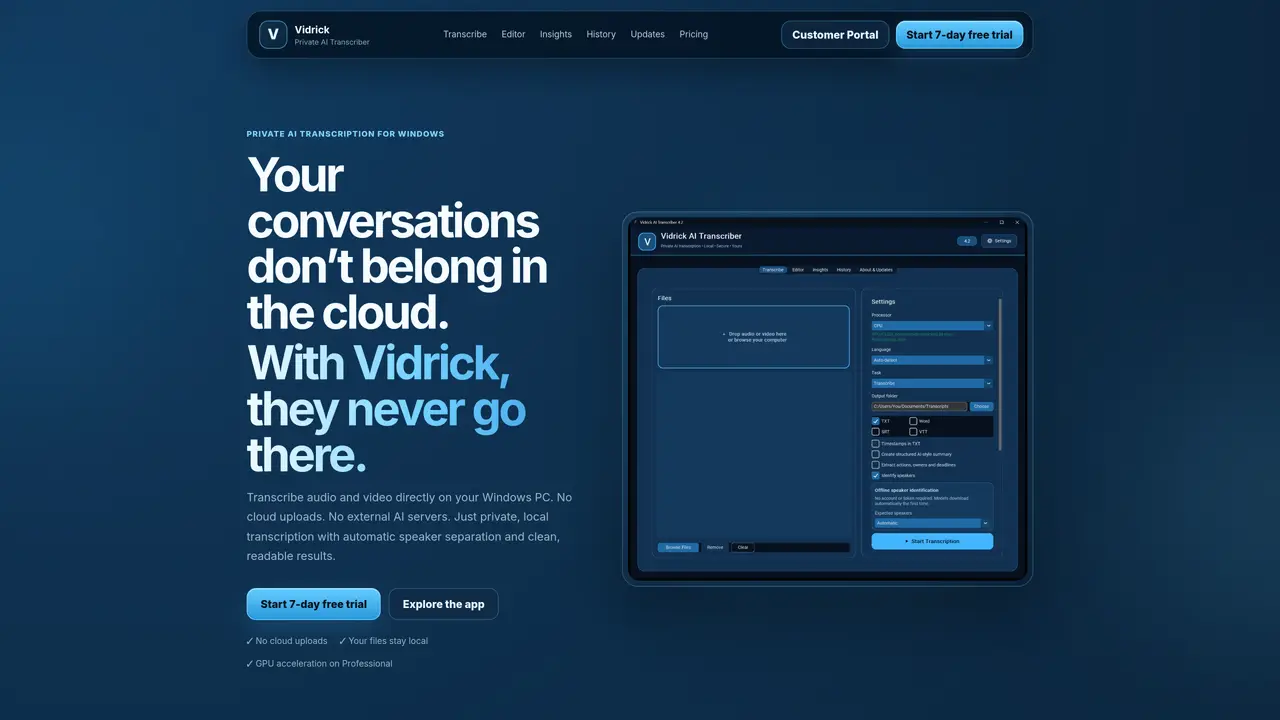
Vidrick AI Transcriber is a Windows desktop app for recorded interviews, podcasts, meetings and other audio/video files. Your audio and video recordings are transcribed locally on your Windows PC; nothing from those recordings is uploaded to the cloud for transcription. Internet access is required for account setup, component downloads and license checks. It supports 57 languages plus Auto-detect, automatic speaker labels, a built-in transcript editor, TXT/DOCX/SRT/VTT exports, local history and local AI Insights. Transcripts, speaker labels and AI-generated insights require human review. Personal costs $6.99/month and uses the CPU. Professional costs $13.99/month, adds compatible NVIDIA GPU acceleration and commercial use, and supports up to 3 activated computers. Business licensing is custom. A 7-day Professional trial requires no credit card and has no automatic charge. There are no per-minute transcription fees. A Mac version is in early development, with no download or release date yet.
A Windows desktop app that transcribes recorded interviews, podcasts, meetings and other audio and video files on your own PC, with speaker labels, a built-in editor and TXT, DOCX, SRT and VTT exports.
No. Your audio and video are transcribed locally on your Windows PC. Internet access is still needed for account setup, component downloads and license checks.
Personal is $6.99/month and runs on the CPU. Professional is $13.99/month, adds compatible NVIDIA GPU acceleration and commercial use, and works on up to 3 activated computers. Business licensing is custom. There are no per-minute transcription fees.
Yes. A 7-day Professional trial needs no credit card and doesn’t charge you automatically when it ends.
57 languages, plus Auto-detect.
Transcripts, speaker labels and AI-generated insights should be checked by a person before you rely on them. The built-in editor lets you correct them.
We use essential cookies to run aitoolnavio™, and optional cookies to analyze traffic and measure our marketing. You choose what we use — optional cookies stay off unless you turn them on. See our Privacy Policy.
One short email a week: fresh tools worth trying, honest takes and the updates that actually matter. No spam, unsubscribe any time.
Revolutionize transcription with unmatched accuracy, speed, and language support.
Hardware device that records conversations and converts them into searchable transcripts, summaries, and notes.
Automate transcription, generate summaries, identify speakers, and timestamps for video-conferencing conversations.
NoteGPT – Convert Speech to Text and Text to Speech with AI
Automatically record, transcribe, take notes, and create summaries with key insights during meetings.
Transforms audio/video to summarized text, instantly, across platforms.
Transcribe and summarize audio or video recordings with AI-powered speech recognition and summarization.
Automatically transcribe meetings, create summaries, and securely store audio files in a searchable format.
Convert audio and video into text, sync transcripts with media, and edit easily.
Streamline healthcare admin tasks, and enhance patient focus with Heidi AI.
Create transcripts of meetings, voice-overs for videos, and transcribe and review customer feedback efficiently.
Wearable AI device that captures conversations and meetings, then auto-generates transcripts, summaries, action items, mind maps, and searchable notes.
Matched on what this tool does — grouped by the job you would be replacing.
matches Local audio and video file transcription on Windows · CPU processing; compatible NVIDIA GPU acceleration with Professional
Browser-based audio and video transcription with server-side Whisper API handling
Offline AI transcription app that turns audio and video into editable captions in 60+ languages with SRT/VTT export.
Browser extension that transcribes and summarizes audio or video locally in Chrome, Brave, or Edge
matches Automatic speaker labels with review and editing · Built-in transcript editor
matches 57 languages plus Auto-detect · TXT, DOCX, SRT and VTT exports
matches Local AI Insights for summaries, key points and action items
AI-powered transcription service that converts audio and video into editable, timestamped text with speaker labels and noise reduction.
Transcribes audio and video files into text with timestamps and speaker labels
Transcribes audio or video into speaker-labeled, editable text with AI summaries
Revolutionize transcription with unmatched accuracy, speed, and language support.
Converts audio and video files to text with high accuracy and fast processing
Web app that converts audio and video files into searchable text with timestamps and subtitles
AI web app that transcribes audio, video, and YouTube links into text in 98 languages with summaries, mind maps, and export formats for students and teams.
AI-powered service to transcribe audio and video files with customizable styles, subtitles, and multilingual support.
Transcribes audio and video files to text in 90+ languages