Generate content, correct spelling, suggest synonyms to enhance writing.
173M visits/mo+0.1%#1 Productivity & Office
Browser extension that transcribes and summarizes audio or video locally in Chrome, Brave, or Edge
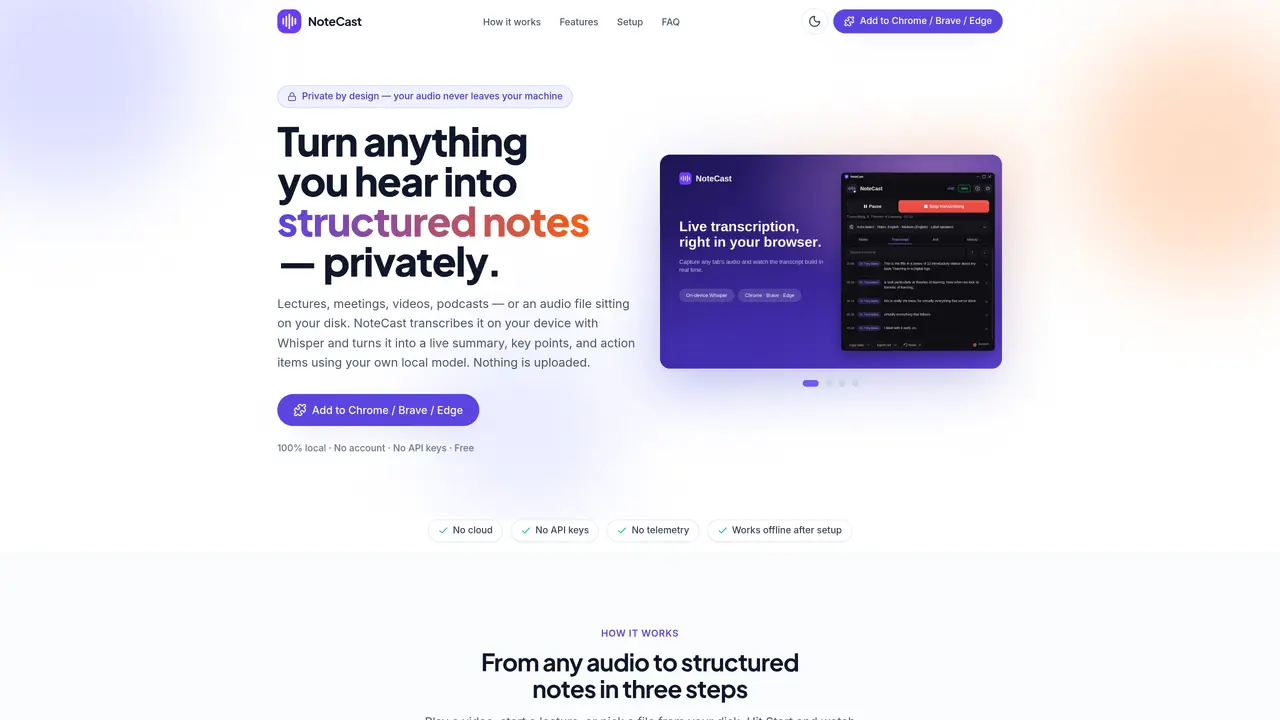
NoteCast is a browser extension for Chrome, Brave, and Edge that performs on-device transcription and note generation. It captures audio from browser tabs, microphone input, or local files and transcribes it locally using Whisper. The transcript is then processed by a local Ollama model to produce structured notes including summaries, key points, action items, and open questions. All processing occurs on the user’s machine with no cloud involvement, telemetry, or account requirements. The tool supports live sessions or file-based transcription and works fully offline after initial setup. Users can interact with sessions by asking questions about the content, searching transcripts, and editing both transcripts and notes. Sessions are saved locally with no imposed limits, allowing for archiving, renaming, and exporting in multiple formats such as Markdown, plain text, or subtitles.
NoteCast is a browser extension for Chrome, Brave, and Edge that transcribes audio from browser tabs, microphones, or local files directly on the user’s device using Whisper. It then processes the transcript with a local Ollama model to generate structured notes, summaries, key points, and action items without relying on cloud services or requiring an account.
NoteCast is designed for individuals who need private, on-device transcription and note-taking, such as students, professionals attending meetings or lectures, content creators, or anyone who wants to capture and organize spoken content without sending data to external servers.
No, NoteCast operates fully offline after the initial setup. All transcription and note generation occur locally on the user’s machine, and no data is uploaded to the cloud or shared externally.
Yes, users can edit both transcripts and notes directly within the interface. Changes to the transcript automatically update the notes, and users can also regenerate or refine notes in different styles or formats as needed.
NoteCast supports transcription from browser tabs, microphone input, or local audio/video files in formats such as MP3, WAV, M4A, OGG, FLAC, MP4, WEBM, and MOV. It can also capture audio from YouTube videos and other web content.
To get started, install the NoteCast extension from the Chrome Web Store, Brave Add-ons, or Edge Add-ons. Once installed, the tool will guide you through setting up Whisper and an Ollama model locally. After setup, you can begin transcribing audio from tabs, microphones, or files directly in your browser.
notecast.net · third-party estimates from Similarweb
Last 2 months · grows by one month every month
Share of visits by channel
Share of visits · estimated visits
How people reach this site from other AI tools
31 a month · 1.7% of all visits
Productivity & Office · Sep 2026
Traffic figures are third-party estimates, good for scale and trends; they can differ from a company's own numbers. Updated monthly.
We use essential cookies to run aitoolnavio™, and optional cookies to analyze traffic and measure our marketing. You choose what we use — optional cookies stay off unless you turn them on. See our Privacy Policy.
One short email a week: fresh tools worth trying, honest takes and the updates that actually matter. No spam, unsubscribe any time.
Generate content, correct spelling, suggest synonyms to enhance writing.
Markdown-based note-taking and personal knowledge management app that turns notes into a connected system of ideas.
Capture, organize, and share ideas, notes, and documents effortlessly.
Easily create and track training courses, design learning environments, and access from any device with an intuitive interface.
An AI-powered note-taking app for students and professionals to write, sketch, annotate PDFs, record audio, and generate summaries, quizzes, and flashcards.
Handwritten note-taking app with searchable ink, PDF annotation, synced audio, and AI-powered study tools.
AI-powered process documentation tool that captures workflows into visual step-by-step guides with screenshots, editing, and exports.
AI web app that transcribes audio, video, and YouTube links into text in 98 languages with summaries, mind maps, and export formats for students and teams.
A note-taking and spaced-repetition flashcard app for students and learners, with PDF annotation plus AI tools for generating cards, quizzes, and study summaries.
AI-powered research assistant for organizing, analyzing, and synthesizing information from notes and documents.
Capture thoughts, create documents, and access on any device for convenient organization and productivity.
AI-powered PDF editor with built-in agents for summarization, translation, and document analysis.
Matched on what this tool does — grouped by the job you would be replacing.
matches Live transcript generation every 10–30 seconds · Structured notes including summaries and action items · Speaker labeling and renaming
Real-time AI meeting assistant that transcribes on-device, summarizes discussions, extracts action items, and translates 140+ languages.
Chrome extension that records, transcribes and summarizes meetings in Google Meet, Zoom Web and Teams
Captures audio and screen locally, transcribes with speaker separation, and generates private AI summaries without cloud dependency.
AI-powered meeting transcription and note-taking tool
matches On-device transcription with Whisper · Multiple export formats: Markdown, text, SRT, VTT · Session history with unlimited local storage
matches YouTube timeline deep-links for precise seeking · Multiple export formats: Markdown, text, SRT, VTT
Transcribes audio and video files to text in 90+ languages
An AI note-taking app for Apple devices that records, transcribes, and summarizes audio or video into searchable notes and action items.
Convert public TikTok, Reels, YouTube, and Facebook videos into editable transcripts with batch processing and multiple export formats.
Converts YouTube videos to timestamped transcripts and AI summaries in multiple languages