Generate content, correct spelling, suggest synonyms to enhance writing.
173M visits/mo+0.1%#1 Productivity & Office

Converts YouTube videos to timestamped transcripts and AI summaries in multiple languages
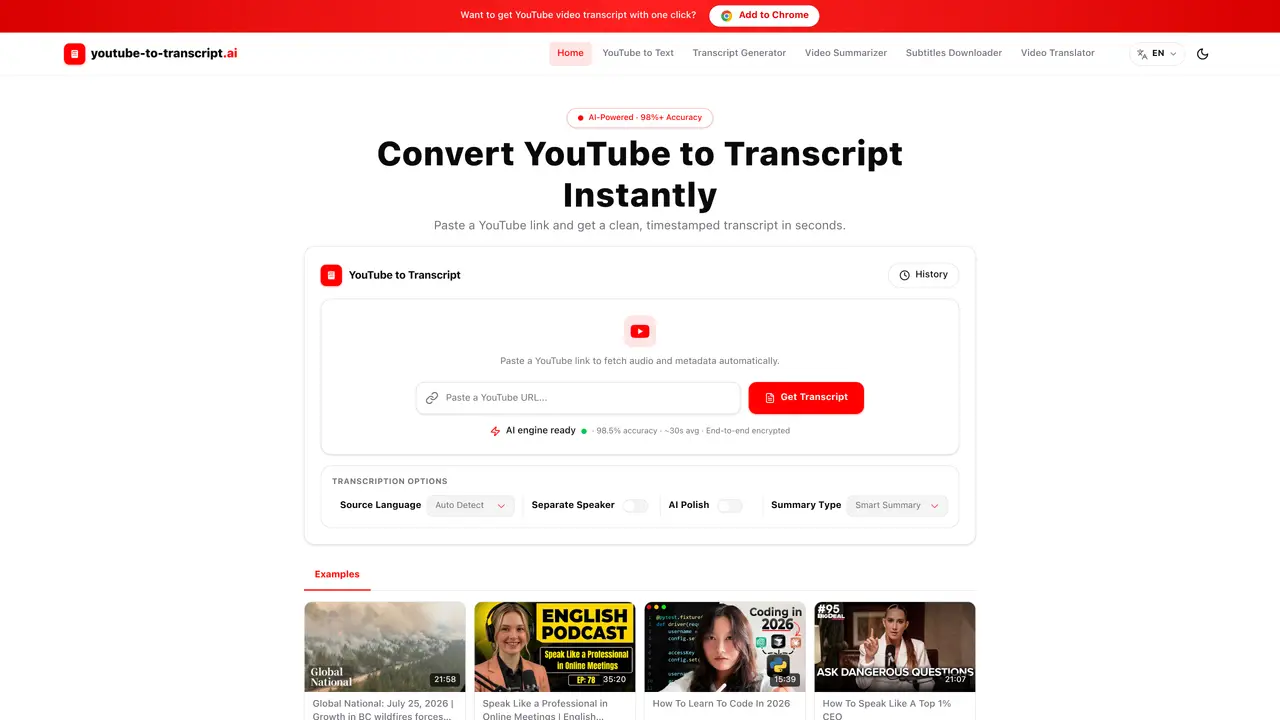
This tool converts YouTube videos into timestamped transcripts and AI-generated summaries. It supports over 50 languages and can automatically detect the source language. The process involves pasting a YouTube link, which triggers subtitle retrieval or speech recognition if subtitles are unavailable. The resulting transcript includes timestamps and can be exported in formats such as TXT, SRT, VTT, DOCX, or CSV. Users can also generate AI-powered summaries, separate speaker identification, and polished study notes. The tool is designed for efficiency, processing videos in approximately 30 seconds with claimed accuracy above 98%. It is particularly useful for interviews, lectures, meetings, and content repurposing where manual note-taking is impractical.
YouTube to Transcript with AI is a tool that converts YouTube videos into timestamped transcripts and AI-generated summaries. It supports over 50 languages and can automatically detect the source language.
The tool is designed for students, creators, marketers, editors, researchers, and professionals who need to extract text from videos for note-taking, content repurposing, or summarization without manual typing.
Users paste a YouTube link, and the tool retrieves existing subtitles or uses speech recognition if subtitles are unavailable. The transcript is generated with timestamps and can be reviewed, copied, or downloaded in various formats.
Transcripts can be exported in TXT, SRT, VTT, DOCX, or CSV formats for use in editing tools, subtitle workflows, spreadsheets, or content planning.
Yes, the tool can separate speaker names in the transcript, making it easier to read, verify, and repurpose content from meetings, podcasts, interviews, or panel discussions.
The tool provides AI-powered summaries such as Smart Summary, Chapter Summary, Core Points, and Study Notes, which help users quickly understand key ideas from videos.
We use essential cookies to run aitoolnavio™, and optional cookies to analyze traffic and measure our marketing. You choose what we use — optional cookies stay off unless you turn them on. See our Privacy Policy.
Generate content, correct spelling, suggest synonyms to enhance writing.
Turn messy team ideas into actionable plans with Miro's visual workspace.
Leverage analytics, automate tasks, share documents, and coordinate projects.
Integrates AI into Airtable to analyze data, summarize insights, draft content, and automate workflows without prior AI experience.
Cloud accounting software that automates bookkeeping, invoicing, and financial reporting for small and growing businesses.
Streamline teamwork, manage projects, automate tasks efficiently.
Automate code, research, and documents using agents.
AI assistant for safe, reliable productivity with code, collaboration, and integrations.
Create customizable tables, databases, and spreadsheets, share data securely with team members.
Easy-to-use CRM platform that automates lead capturing, prioritizes tasks, and provides sales pipeline analytics for businesses of all sizes.
Transforms thoughts into actions, enhancing productivity and efficiency.
Write & run code in 50+ languages, auto-complete with AI, and code faster with an intuitive interface.
Matched on what this tool does — grouped by the job you would be replacing.
Paid placement · similar tools from listings that support aitoolnavio™
Instant lead response for home-service pros: your phone rings on every new lead, plus 14 days of follow-up
matches AI-powered transcription with 98%+ accuracy · Auto language detection for 50+ languages · Timestamped transcript generation
matches AI-powered transcription with 98%+ accuracy · Auto language detection for 50+ languages · Timestamped transcript generation
matches AI-powered transcription with 98%+ accuracy · Auto language detection for 50+ languages · Timestamped transcript generation
AI web app that transcribes audio, video, and YouTube links into text in 98 languages with summaries, mind maps, and export formats for students and teams.
Convert public TikTok, Reels, YouTube, and Facebook videos into editable transcripts with batch processing and multiple export formats.
Free audio transcription, YouTube captions and subtitle conversion with AI summarization
Extracts, summarizes, and translates YouTube video transcripts with timestamps
AI-powered transcription tool that converts audio/video to text with speaker labels and supports 99+ languages.
Transcribes audio and video files to text in 90+ languages
Web app that converts audio and video files into searchable text with timestamps and subtitles
Free online audio and video transcription with timestamps
Transcriptik is a free TikTok transcript tool that turns any TikTok video into text in seconds.
Free AI-powered tool to convert public Facebook videos into text transcripts
Converts TikTok, Reels and Shorts videos into timestamped transcripts
One short email a week: fresh tools worth trying, honest takes and the updates that actually matter. No spam, unsubscribe any time.