Generate captions, optimize content, and enhance with custom images for maximum engagement.
46M visits/mo-10%#3 Image & Design

A lightweight site observability MCP that lets AI agents query and analyze website performance, errors, ads, and uptime in plain language.
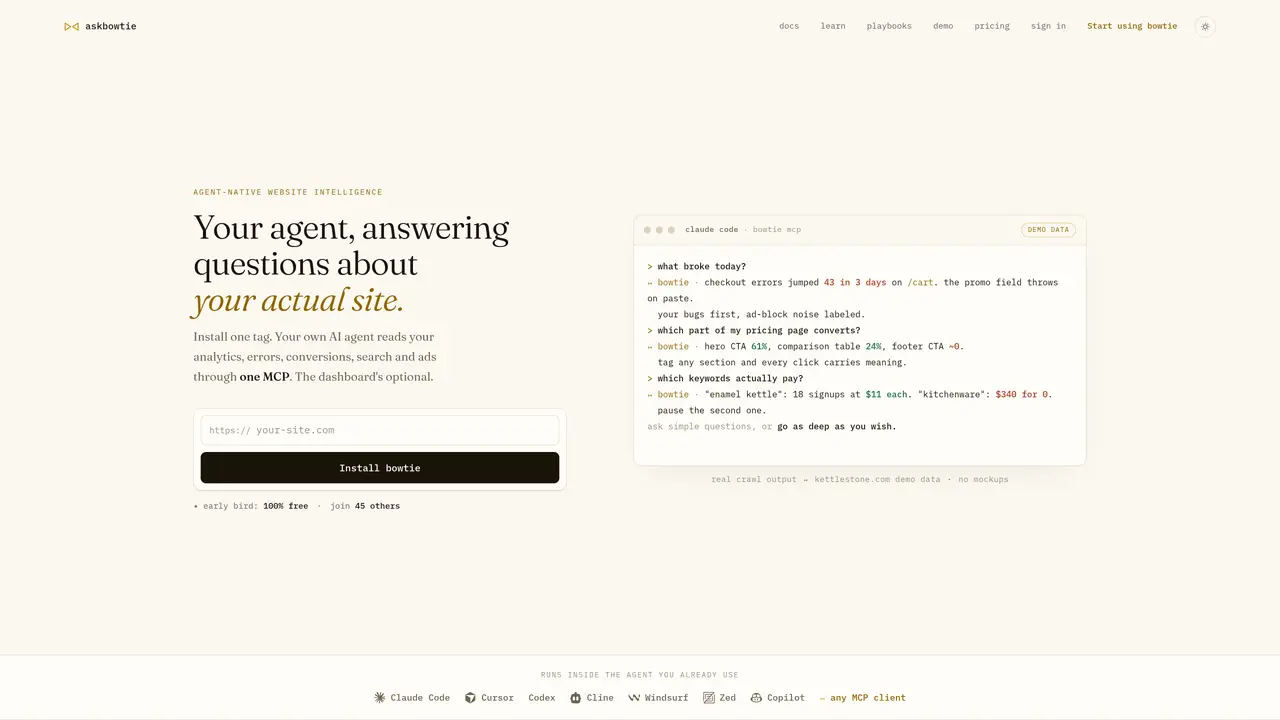
askbowtie is an agent-native site observability tool that transforms raw site data into actionable, conversational insights for AI agents. By installing a single lightweight tracker and connecting Google sources like Search Console and Ads, the tool unifies analytics, errors, conversions, search performance, and uptime into one per-site data layer. This allows users to ask plain-language questions within MCP-compatible AI agents—such as Claude Code, Cursor, or Codex—and receive cited, data-backed answers about site health, performance trends, and conversion drivers. The system eliminates the need to stitch together multiple dashboards, enabling developers and site owners to troubleshoot issues, identify optimization opportunities, and receive automated digests without manual reporting. While the dashboard is optional, the core functionality centers on agent-driven analysis, where questions like ‘What broke today?’ or ‘Which keywords actually pay?’ yield precise, actionable responses backed by real site data. The tool is designed for teams seeking to leverage existing AI workflows for site monitoring and decision-making, prioritizing simplicity and depth in equal measure.
askbowtie consolidates site analytics, errors, conversions, search performance, and uptime into a single data layer that AI agents can query conversationally. It enables users to ask plain-language questions about their site and receive cited, data-backed answers without manually stitching together dashboards.
The tool is designed for site owners, developers, and teams who want to use AI agents for site monitoring and troubleshooting. It suits users comfortable with MCP-compatible tools like Claude Code or Cursor and those seeking to reduce manual reporting overhead.
askbowtie currently offers its full product for free, including the tag, MCP integration, dashboard, and all connections. Future pricing will introduce credits for heavier usage while keeping the core functionality free, with early users retaining founding rates indefinitely.
The tool integrates with Google sources via OAuth, including Search Console for organic performance and Google Ads for cost-per-conversion analysis. It also automatically monitors uptime and captures site errors, conversions, and engagement signals through a single tracker.
No. The tracker is a 9.8 KB async script that loads after content, ensuring it never blocks rendering. It captures sessions, errors, and conversions without impacting site performance.
Start by installing the provided tag on your site, then connect your Google sources (Search Console and Ads) via OAuth. Once set up, you can query your site data directly within any MCP-compatible AI agent or use the optional dashboard for automated digests and monitoring.
We use essential cookies to run aitoolnavio™, and optional cookies to analyze traffic and measure our marketing. You choose what we use — optional cookies stay off unless you turn them on. See our Privacy Policy.
One short email a week: fresh tools worth trying, honest takes and the updates that actually matter. No spam, unsubscribe any time.
Generate captions, optimize content, and enhance with custom images for maximum engagement.
Build conversational forms, capture rich responses, and automate follow-ups with AI-powered surveys and workflows.
Automate code, research, and documents using agents.
AI-powered IDE for autonomous coding tasks and agentic development workflows
Source, match, and manage talent with predictive analytics for effortless recruiting.
Automate workflow, optimize operations, and detect potential issues with this efficient AI-driven solution.
Transforms thoughts into actions, enhancing productivity and efficiency.
AI Recruitment engine to hire top global talent
All-in-one team productivity platform combining chat, docs, video meetings, workflows, and AI tools in one place.
Personal assistant that coordinates tasks across apps and devices via text or call
AI automation and agent-building platform with 3,000+ app integrations
AI job search copilot that matches roles to skills, optimizes resumes for ATS, generates cover letters, and autofills applications with real-time insights.
Matched on what this tool does — grouped by the job you would be replacing.
matches Consolidates analytics, errors, search, ads, and uptime into one data layer · Tracks conversions, errors, ad performance, and uptime · Designed for conversational troubleshooting and reporting
AI-powered platform for full-stack observability, anomaly detection, and automated root cause analysis without coding.
Real-time observability platform for software teams to visualize, analyze, and troubleshoot application performance with intuitive data visualizations.
AI-powered platform that consolidates debugging, monitoring, and support workflows via a conversational agent executing tasks like session replays and bug diagnosis.
matches Enables plain-language queries for AI agents · Provides data-backed, cited answers and digests · Offers emailed digests without requiring an AI agent
Uncover insights, search for answers and create interactive reports with AI-powered analytics from any data source.
An agentic AI data platform that lets business teams analyze and visualize data through natural language chat, with automated dashboards and reports.
AI-powered business intelligence platform that lets non-technical users analyze cross-source data using natural language queries.
Privacy-first analytics platform that tracks traffic, events, and funnels while answering plain-language questions with live data insights.