

Generate captions, optimize content, and enhance with custom images for maximum engagement.
46M visits/mo-10%#3 Image & Design
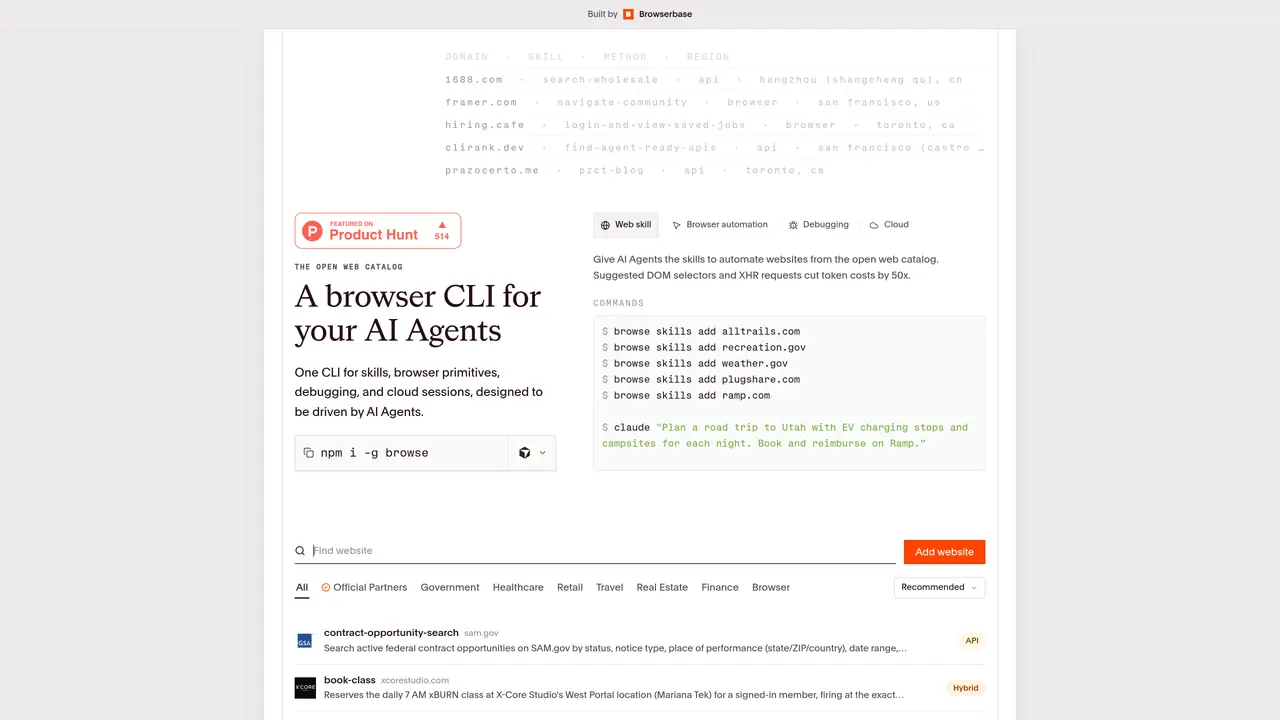
Browse.sh is Browserbase’s open catalog and command line tool for reusable browser automation skills tailored to AI agents. Instead of asking an agent to rediscover how to search flights, check inventory, or book reservations, developers install site specific skills that encode those workflows in SKILL.md recipes. The combination of human readable SKILL.md files, a skill directory indexed by site and category, and an agent friendly CLI gives AI agents something close to ‘muscle memory’ for the web. Browse.sh treats browser automation knowledge as a distributable asset rather than something every team rebuilds from scratch. It slots into existing stacks as infrastructure that any agent client can reuse. The tool offers a focused mix of catalog, CLI, and cloud hooks that feels closer to infrastructure than to a toy demo, with enough visibility and control to build workflows that can actually survive production traffic. Browse.sh is used by AI agent framework developers, ML & automation engineers, data & operations teams, and product & growth teams for automating QA runs, regression checks, end-to-end web workflows, scraping structured data, checking prices or availability, and running recurring operational playbooks. It is also used in research labs to benchmark browser agents on a shared task suite and by indie founders to validate agent product ideas before investing in full custom automation. Browse.sh has a free open catalog and CLI, but larger teams typically combine it with Browserbase enterprise plans for higher volumes, compliance, and dedicated support.
Browse.sh is an open catalog and command-line tool for reusable browser automation skills designed for AI agents. It provides a directory of site-specific automation workflows encoded in human-readable SKILL.md files, enabling agents to automate tasks like searching, booking, or scraping without rebuilding automation logic from scratch.
The tool is aimed at AI agent framework developers, ML and automation engineers, data and operations teams, and product or growth teams. It is also used by research labs for benchmarking browser agents and by indie founders to validate automation ideas before investing in custom solutions.
Browse.sh provides suggested DOM selectors and XHR requests for common websites, which helps AI agents avoid inefficient exploration of web pages. This reduces the number of tokens consumed during automation tasks, often by a significant factor.
Yes, browse.sh supports remote browser sessions through Browserbase's platform. Users can prefix any command with 'cloud' to switch from local Chromium to a remote session, enabling higher scalability and compliance for production workflows.
The catalog includes skills for automating tasks on websites like SAM.gov for contract searches, Ticketmaster for event discovery, FlightAware for flight tracking, Glassdoor for company reviews, and Amazon for product searches. Skills are categorized by site and function.
Install the CLI using npm and start adding skills for specific websites. For example, run 'browse skills add recreation.gov' to enable automation for that site. The tool provides commands for interacting with websites, debugging sessions, and managing cloud-based browser instances.
browse.sh · third-party estimates from Similarweb
Last 4 months · grows by one month every month
Share of visits · estimated visits
Other countries: 51.1%
How people reach this site from other AI tools
9 a month
Automation & Agents · Sep 2026
Traffic figures are third-party estimates, good for scale and trends; they can differ from a company's own numbers. Updated monthly.
We use essential cookies to run aitoolnavio™, and optional cookies to analyze traffic and measure our marketing. You choose what we use — optional cookies stay off unless you turn them on. See our Privacy Policy.
One short email a week: fresh tools worth trying, honest takes and the updates that actually matter. No spam, unsubscribe any time.
Generate captions, optimize content, and enhance with custom images for maximum engagement.
Build conversational forms, capture rich responses, and automate follow-ups with AI-powered surveys and workflows.
Automate code, research, and documents using agents.
AI-powered IDE for autonomous coding tasks and agentic development workflows
Source, match, and manage talent with predictive analytics for effortless recruiting.
Automate workflow, optimize operations, and detect potential issues with this efficient AI-driven solution.
Transforms thoughts into actions, enhancing productivity and efficiency.
AI Recruitment engine to hire top global talent
All-in-one team productivity platform combining chat, docs, video meetings, workflows, and AI tools in one place.
Personal assistant that coordinates tasks across apps and devices via text or call
AI automation and agent-building platform with 3,000+ app integrations
AI job search copilot that matches roles to skills, optimizes resumes for ATS, generates cover letters, and autofills applications with real-time insights.
Matched on what this tool does — grouped by the job you would be replacing.
matches Agent First Browser CLI · Integrated Debugging · Local And Cloud Sessions
BrowserBase automates web workflows with secure, scalable browser instances for tasks like scraping and testing.
AI web agent that automates browser tasks like scraping, form filling, and multi-step workflows using natural language commands.
Nextbrowser is an AI-powered browser agent that automates web tasks like clicking, typing, and data extraction using plain-language instructions.
MCP server that connects Browserbase to Cursor, Claude Desktop, and Windsurf for web automation and scraping.
matches Open Web Skill Catalog
Turns AI agent sessions into version-controlled Git repositories for developers and teams.
Local-first tool that turns AI coding sessions into inspectable, reusable workflows