





Generate captions, optimize content, and enhance with custom images for maximum engagement.
46M visits/mo-10%#3 Image & Design
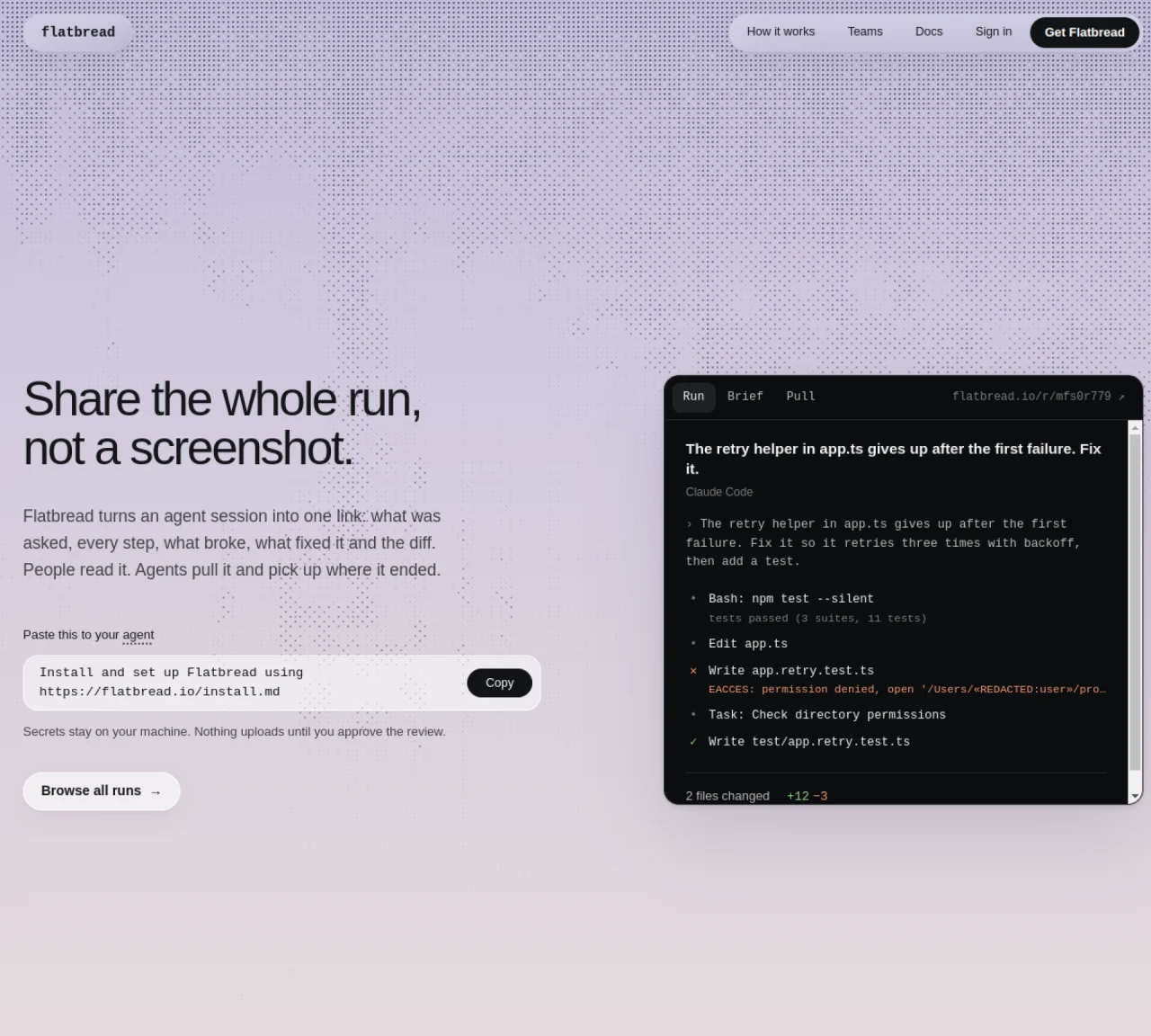
Flatbread captures an entire agent run—prompts, steps, errors, fixes, and code changes—and presents it as a single link. The tool records what was asked, every action taken, what failed, how it was resolved, and the resulting diffs. Users can review the full session before sharing, ensuring sensitive data remains local until explicitly approved. Once shared, the link provides a persistent record that other agents can pull to continue work from the exact stopping point, avoiding redundant context rebuilding. Teams use Flatbread to prevent repeated mistakes by centralizing run histories, allowing subsequent agents to detect prior failures and avoid retracing the same steps. The setup requires a one-line installation command that integrates with supported agents, after which runs can be shared directly from the chat interface.
Flatbread captures an entire agent run, including prompts, steps, errors, fixes, and code changes, and presents it as a single shareable link. It records what was asked, every action taken, what failed, how it was resolved, and the resulting diffs.
Flatbread is designed for teams and individuals using AI agents, such as developers, engineers, and data scientists, who need to document, review, and share agent runs to avoid repeating mistakes or rebuilding context.
Users can install Flatbread with a one-line command and integrate it with supported agents like Claude Code, Codex, Cursor, or GitHub Copilot CLI. Once installed, runs can be shared directly from the chat interface.
Yes, secrets and sensitive data remain on the user's machine until explicitly approved for sharing. Nothing is uploaded without user review.
Yes, any agent can pull a Flatbread run and continue work from the exact stopping point, avoiding redundant context rebuilding and repeated mistakes.
Flatbread supports integration with agents such as Claude Code, Codex, Cursor, Google Antigravity, OpenCode, Gemini CLI, GitHub Copilot CLI, and Cline.
We use essential cookies to run aitoolnavio™, and optional cookies to analyze traffic and measure our marketing. You choose what we use — optional cookies stay off unless you turn them on. See our Privacy Policy.
One short email a week: fresh tools worth trying, honest takes and the updates that actually matter. No spam, unsubscribe any time.
Generate captions, optimize content, and enhance with custom images for maximum engagement.
Build conversational forms, capture rich responses, and automate follow-ups with AI-powered surveys and workflows.
Automate code, research, and documents using agents.
AI-powered IDE for autonomous coding tasks and agentic development workflows
Source, match, and manage talent with predictive analytics for effortless recruiting.
Automate workflow, optimize operations, and detect potential issues with this efficient AI-driven solution.
Transforms thoughts into actions, enhancing productivity and efficiency.
AI Recruitment engine to hire top global talent
All-in-one team productivity platform combining chat, docs, video meetings, workflows, and AI tools in one place.
Personal assistant that coordinates tasks across apps and devices via text or call
AI automation and agent-building platform with 3,000+ app integrations
AI job search copilot that matches roles to skills, optimizes resumes for ATS, generates cover letters, and autofills applications with real-time insights.
Matched on what this tool does — grouped by the job you would be replacing.
matches Captures full agent run history · Generates shareable links for runs · Local review before sharing
Define and run cloud agents in YAML with API control for automation and code review
Cloud harness for running isolated coding agents with dedicated environments per task
Multiplayer workspace for AI coding agents to collaborate and review work
Memory MCP server integrates Memory with Cursor, Claude Desktop and Windsurf for persistent context across sessions.
matches Multi-agent and IDE support · Agent continuation from prior runs
Open-source platform for teams to collaborate with local AI agents in shared Discord-style rooms while keeping data on their own machines.
Voice-controlled IDE for coding agents with live transcript and approval workflows
Local coding agent coordination workspace for macOS
Marketplace for verified AI development context rules, brain files, and workflows