Generate captions, optimize content, and enhance with custom images for maximum engagement.
46M visits/mo-10%#3 Image & Design

Automate Google Sheets workflows and run AI agents to execute multi-step tasks without coding.
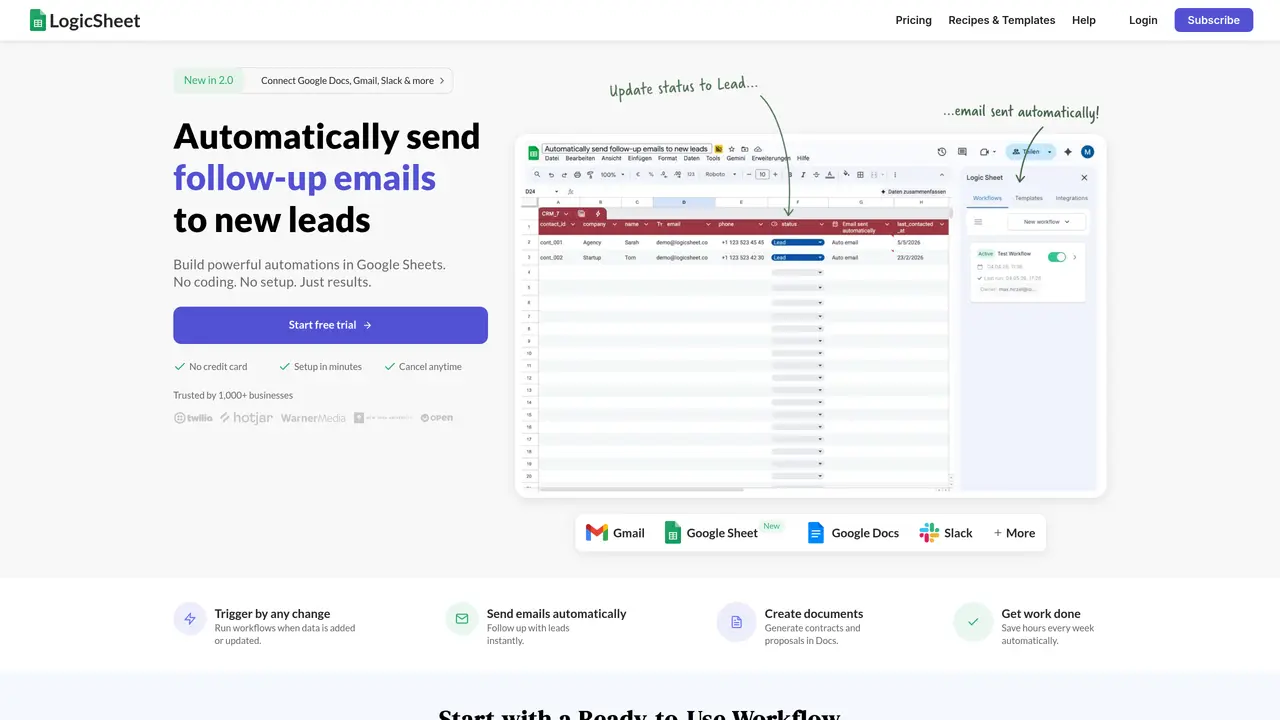
Logic Sheet is a Google Sheets add-on that enables users to automate repetitive workflows without writing code. It connects spreadsheets to external tools such as Airtable, Notion, HubSpot, and Mailchimp, allowing for seamless data synchronization and updates. The tool supports triggers, conditions, and actions to streamline processes like sending emails, Slack messages, or webhooks directly from the spreadsheet environment. Logic Sheet also embeds AI agents powered by OpenAI or Gemini, which execute plain-English instructions to perform tasks such as scraping data, summarizing content, generating outreach messages, enriching datasets, and drafting personalized communications. This makes it particularly useful for non-developers who need to eliminate manual work, reduce errors, and save time by automating workflows that previously required developer intervention or tedious manual effort. By bridging the gap between spreadsheets and external services, Logic Sheet transforms spreadsheets into dynamic, automated hubs for business operations.
Logic Sheet is a Google Sheets add-on that automates repetitive workflows by connecting spreadsheets to external tools and services. It allows users to set up triggers, conditions, and actions to perform tasks like sending emails, updating databases, or integrating with platforms such as Airtable and Notion without writing code.
Logic Sheet is designed for non-developers who need to automate spreadsheet-based workflows. It suits business professionals, analysts, and teams looking to reduce manual effort, minimize errors, and streamline processes that involve data management and external integrations.
Logic Sheet embeds AI agents powered by OpenAI or Gemini, which execute plain-English instructions to perform tasks such as data scraping, content summarization, generating outreach messages, enriching datasets, and drafting personalized communications directly within Google Sheets.
Logic Sheet can automate workflows involving data synchronization between spreadsheets and tools like Airtable or Notion, sending notifications via email or Slack, updating CRM systems like HubSpot, and performing AI-driven tasks such as content generation or data enrichment.
No, Logic Sheet is designed to be used without coding. Users can set up automations using a visual interface to define triggers, conditions, and actions, making it accessible to non-developers.
To get started, install the Logic Sheet add-on from the Google Workspace Marketplace within Google Sheets. Once installed, users can begin setting up automations by configuring triggers, conditions, and actions directly within the spreadsheet interface.
logicsheet.co · third-party estimates from Similarweb
Last 4 months · grows by one month every month
Share of visits by channel
Automation & Agents · Sep 2026
Traffic figures are third-party estimates, good for scale and trends; they can differ from a company's own numbers. Updated monthly.
We use essential cookies to run aitoolnavio™, and optional cookies to analyze traffic and measure our marketing. You choose what we use — optional cookies stay off unless you turn them on. See our Privacy Policy.
One short email a week: fresh tools worth trying, honest takes and the updates that actually matter. No spam, unsubscribe any time.
Generate captions, optimize content, and enhance with custom images for maximum engagement.
Build conversational forms, capture rich responses, and automate follow-ups with AI-powered surveys and workflows.
Automate code, research, and documents using agents.
AI-powered IDE for autonomous coding tasks and agentic development workflows
Source, match, and manage talent with predictive analytics for effortless recruiting.
Automate workflow, optimize operations, and detect potential issues with this efficient AI-driven solution.
Transforms thoughts into actions, enhancing productivity and efficiency.
AI Recruitment engine to hire top global talent
All-in-one team productivity platform combining chat, docs, video meetings, workflows, and AI tools in one place.
Personal assistant that coordinates tasks across apps and devices via text or call
AI automation and agent-building platform with 3,000+ app integrations
AI job search copilot that matches roles to skills, optimizes resumes for ATS, generates cover letters, and autofills applications with real-time insights.
Matched on what this tool does — grouped by the job you would be replacing.
matches Google Sheets add-on integration · Automates workflows with triggers, conditions, and actions · Supports scraping, summarizing, and content generation
A no-code platform that turns plain-language prompts and Google Sheets into custom internal tools, dashboards, and client portals without coding.
AI assistant that brings ChatGPT directly into Google Sheets and Docs to generate, analyze, and transform content.
matches Automates workflows with triggers, conditions, and actions · Connects to Airtable, Notion, HubSpot, Mailchimp, and more · Embeds AI agents for plain-English task execution
matches Embeds AI agents for plain-English task execution · Eliminates manual work without requiring coding
Autonomous AI agents that automate business processes in plain English, connecting to APIs, MCP servers, and computers for 24/7 execution.
Runs autonomous multi-step workflows across 2,800+ apps using AI agents, replacing repetitive tasks with reliable automation.
AI-driven platform that turns plain-English go-to-market tasks into automated workflows across HubSpot, Apollo, Gmail, Airtable, Notion and more.
AI agents automate routine tasks across 1,500+ apps using plain English instructions, no code required.
Enterprise automation platform that builds and deploys no-code intelligent agents to streamline workflows across 100+ business tools like Salesforce and Slack.
Run AI agents across Slack, Teams, Google, Notion, Shopify and more to automate real work like summarizing meetings, generating content, and handling customer support.
No-code AI workflow automation platform that builds, deploys, and manages AI agents to automate repetitive knowledge work across apps like Gmail, Calendar, Slack, and Notion.